
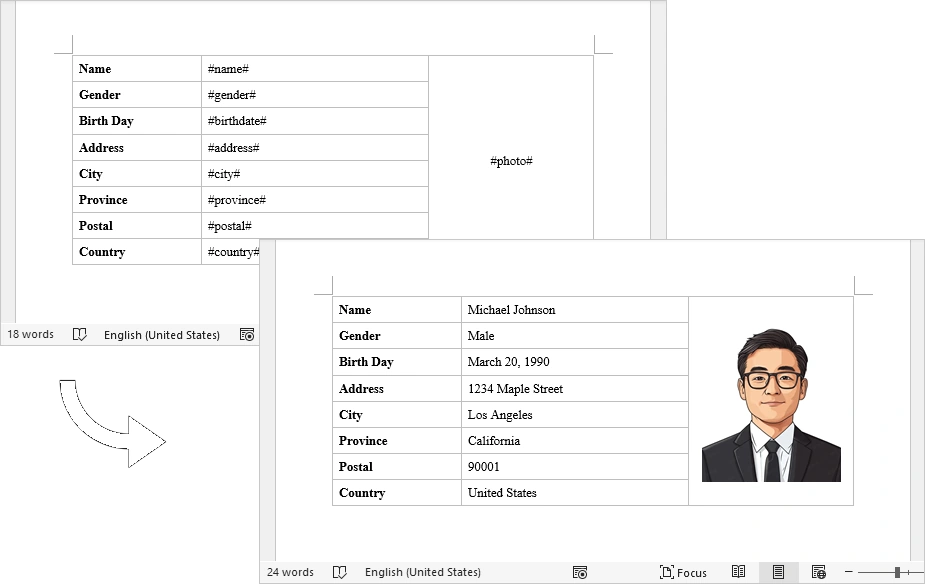
In daily development, we often encounter scenarios where we need to generate Word documents in bulk, such as contracts, notices, and reports. The most elegant approach is to prepare a template file and then use code to replace placeholders, quickly producing the final documents. In this article, we’ll show how to easily achieve this using Free Spire.Doc.
Why Choose Free Spire.Doc?
Free Spire.Doc is a free and easy-to-use Word processing library that allows you to create, read, edit, and save documents without installing Microsoft Office. It supports both .NET Framework and .NET Core, making it ideal for server-side batch processing.
Install via NuGet:
PM> Install-Package FreeSpire.DocImplementation Steps
Design a Word template in advance (e.g.,
template.docx) and mark placeholders for dynamic contentLoad the template in code and replace placeholders with actual data
Support both text replacement and image insertion (e.g., profile photos)
Save the result as a new Word document
Complete Code
using Spire.Doc;
using Spire.Doc.Documents;
using Spire.Doc.Fields;
using System.Drawing;

namespace CreateWordByReplacingPlaceholders
{
    class Program
    {
        static void Main(string[] args)
        {
            // Initialize a new Document object
            Document document = new Document();

            // Load the template Word file
            document.LoadFromFile("C:\\Users\\Administrator\\Desktop\\template.docx");

            // Dictionary to hold placeholders and their replacements
            Dictionary<string, string> replaceDict = new Dictionary<string, string>
            {
		{ "#name#", "Michael Johnson" },
		{ "#gender#", "Male" },
		{ "#birthdate#", "March 20, 1990" },
		{ "#address#", "1234 Maple Street" },
		{ "#city#", "Los Angeles" },
		{ "#province#", "California" },
		{ "#postal#", "90001" },
		{ "#country#", "United States" }
            };

            // Replace placeholders in the document with corresponding values
            foreach (KeyValuePair<string, string> kvp in replaceDict)
            {
                document.Replace(kvp.Key, kvp.Value, true, true);
            }

            // Path to the image file
            String imagePath = "C:\\Users\\Administrator\\Desktop\\portrait.png";

            // Replace the placeholder for the photograph with an image
            ReplaceTextWithImage(document, "#photo#", imagePath);

            // Save the modified document
            document.SaveToFile("ReplacePlaceholders.docx", FileFormat.Docx);

            // Release resources
            document.Dispose();
        }

        // Method to replace a placeholder in the document with an image
        static void ReplaceTextWithImage(Document document, String stringToReplace, String imagePath)
        {
            // Load the image from the specified path
            Image image = Image.FromFile(imagePath);
            DocPicture pic = new DocPicture(document);
            pic.LoadImage(image);
            pic.Width = 130;

            // Find the placeholder in the document
            TextSelection selection = document.FindString(stringToReplace, false, true);

            // Get the range of the found text
            TextRange range = selection.GetAsOneRange();
            int index = range.OwnerParagraph.ChildObjects.IndexOf(range);

            // Insert the image and remove the placeholder text
            range.OwnerParagraph.ChildObjects.Insert(index, pic);
            range.OwnerParagraph.ChildObjects.Remove(range);
        }
    }
}
Join the conversation! Your thoughts help the community grow.