

A I said,in this article we will create a picture viewer in C#.Let's start by creating a new Windows Forms Aplication Project and add a button,an openfile dialog and a picturebox to our form.
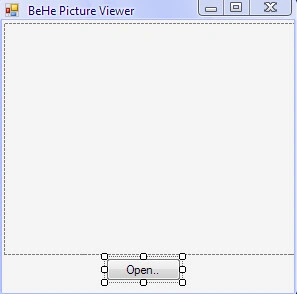
Now,it should look like this,but you can design it however you want.
The first part is finished,so let's start writing the code.
In my case
opnbutton = openbutton
pictureBox1 = the picturebox
openFileDialog1 = the openfile dialog
This is the code
- using System;
- using System.Collections.Generic;
- using System.ComponentModel;
- using System.Data;
- using System.Drawing;
- using System.Linq;
- using System.Text;
- using System.Windows.Forms;
- using System.IO;
- namespace BeHe_Picture_Viewer
- {
- public partial class Form1: Form
- {
- public string path;
- public Form1()
- {
- InitializeComponent();
- }
- private void opnbutton_Click(object sender, EventArgs e)
- {
- openFileDialog1.ShowDialog(); //Shows the dialog
- if (openFileDialog1.ShowDialog() == System.Windows.Forms.DialogResult.OK)
- {
- try
- {
- pictureBox1.Load(openFileDialog1.FileName); //Loads the selected file
- }
- catch
- {
- MessageBox.Show("Error opening file"); //Sets the erorr
- }
- path = Path.GetDirectoryName(openFileDialog1.FileName); //Gets the current path
- this.Text = "BeHe Picture Viewer - " + path;
- }
- }
- }
- }
Thanks you guys.
Enjoy.
Join the conversation! Your thoughts help the community grow.