

In development, DropDownList is very common. On the basis of the requirement, we have to create cascading between DropDownLists. Today, in this article, we will learn how to populate DropDownList and cascade over it.
So, let's start.
Step 1
Open Visual Studio.
Step 2
Go to File>>New>> Project.
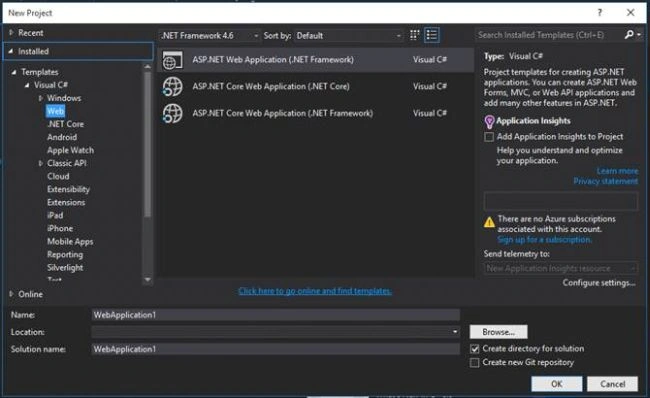
Choose ASP.NET Web application.
Step 3
Select WebAPI.

Click on OK button and check the Solution Explorer.
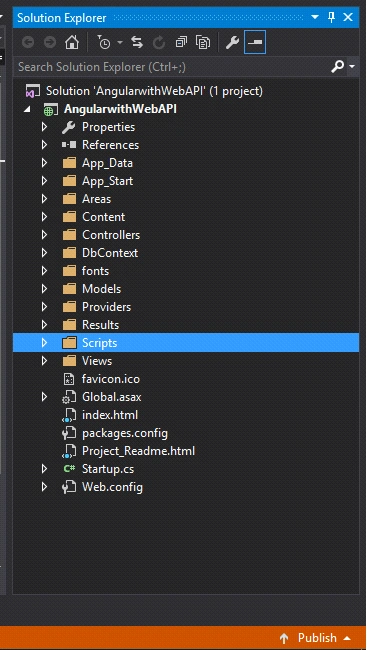
In this article, we have two tables.
Step 1
Open Visual Studio.
Step 2
Go to File>>New>> Project.
Choose ASP.NET Web application.
Step 3
Select WebAPI.
Click on OK button and check the Solution Explorer.
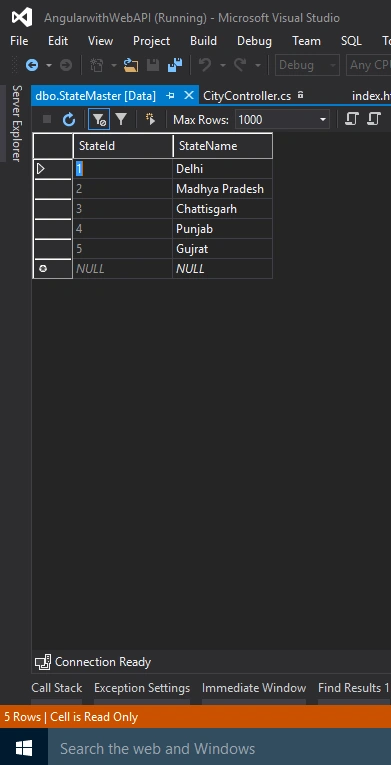
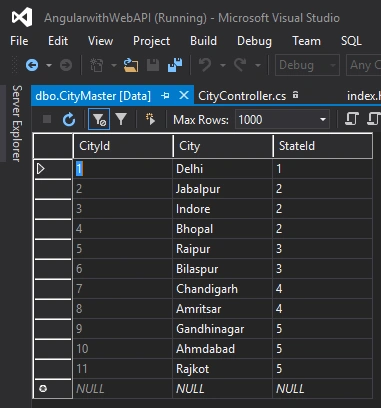
In this article, we have two tables.
- StateMaster Having the list of states.
- CityMaster List of cities, on the basis of their state.
Now, let's create an ADO.NET Entity Data Model file for connecting the tables.
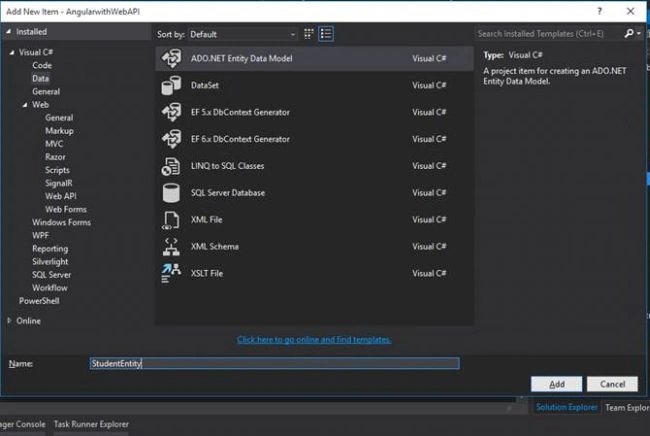
Click on Add button. Now, create an edmx file.
- Once you click on the Finish button, your screen will look like the following.
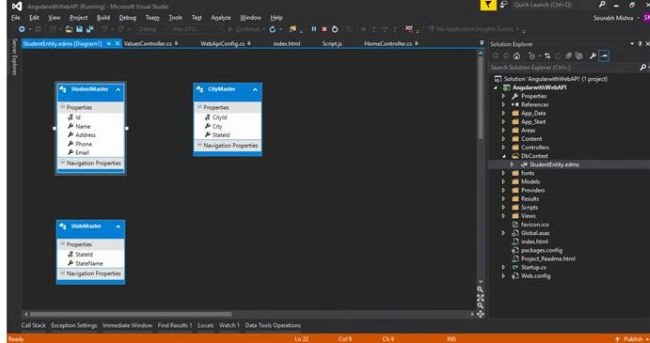
Now, let's create a StateController and paste the below code. This code gives you the list of states.
- usingAngularwithWebAPI.DbContext;
- using System;
- usingSystem.Collections.Generic;
- usingSystem.Linq;
- usingSystem.Web;
- usingSystem.Web.Http; // This namespace is responsible for IHttpActionResult
- usingSystem.Web.Mvc;
- namespaceAngularwithWebAPI.Controllers {
- publicclassStateController: ApiController {
- DbContext.StudentEntitiesstudentEntities = newDbContext.StudentEntities();
- publicIHttpActionResultGetStates() {
- var states = studentEntities.StateMasters.ToList();
- return Ok(states);
- }
- }
- }
- using System;
- usingSystem.Collections.Generic;
- usingSystem.Linq;
- using System.Net;
- usingSystem.Net.Http;
- usingSystem.Web.Http;
- namespaceAngularwithWebAPI.Controllers {
- publicclassCityController: ApiController {
- DbContext.StudentEntitiesstudentEntities = newDbContext.StudentEntities();
- publicIHttpActionResultGetCity(intstateId) {
- var city = studentEntities.CityMasters.Where(x => x.StateId == stateId).ToList();
- return Ok(city);
- }
- }
- }
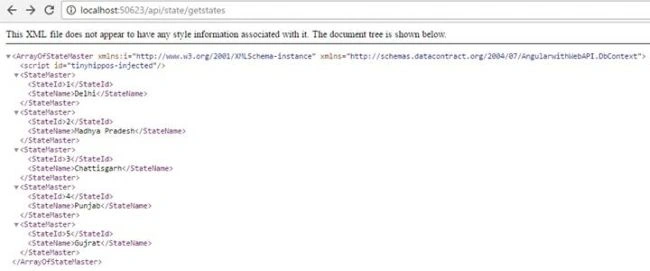
- GetState() Method
- GetCity(intstateId) Method
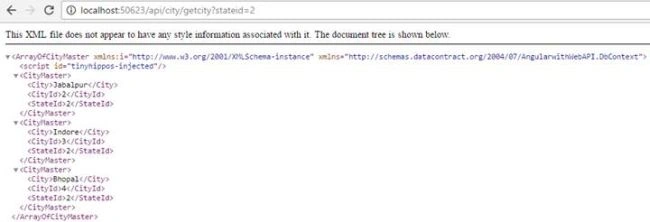
So, as we can see, both of our methods are returning data properly. Now, it is time to code in AngularJS to call these methods into UI.
Script.js
- vartestApp = angular
- .module("testModule", [])
- .controller("testController", function($scope, $http) {
- $http.get('http://localhost:50623/api/state/getstates').then(function(response) {
- $scope.states = response.data;
- $scope.stateChange($scope.states[0].StateId);
- });
- $scope.stateChange = function(stateId) {
- $http.get('http://localhost:50623/api/city/getcity', {
- params: {
- stateId: stateId
- }
- }).then(function(response) {
- $scope.city = response.data;
- });
- }
- });
- $http.get('http://localhost:50623/api/home/getstates').then(function(response)
- {
- $scope.states = response.data;
- $scope.stateChange($scope.states[0].StateId);
- });
- In the first line, you can see that $http.get sends request to URL and in response, we have a model variable state which will get the list of states.
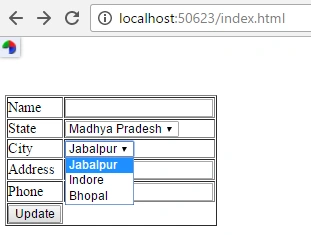
- In the 3rd line, $scope.stateChange($scope.states[0].stateId) is a function, which send stateId of first state which is on the list of dropdownlist, so we can get the cities of selected states automatically.
- $scope.stateChange = function(stateId) {
- $http.get('http://localhost:50623/api/city/getcity', {
- params: {
- stateId: stateId
- }
- }).then(
- function(response) {
- $scope.city = response.data;
- });
Sourabh MishraPosted Feb 27, 2017, 9:44 PM
Watch in Video Format, click on the below link https://www.youtube.com/watch?v=Bw9PrDykDxI
Satish Kumar VadlavalliPosted Oct 24, 2016, 12:13 AM
And only suggestion is you should make city as null in stateChange method
Satish Kumar VadlavalliPosted Oct 24, 2016, 12:11 AM
Nice share