Introduction
This article demonstrates one of interesting and most useful concept in C#.
Question: What is combine delegates?
In simple terms "It is the process of combining multiple methods to assign to
single delegate object".
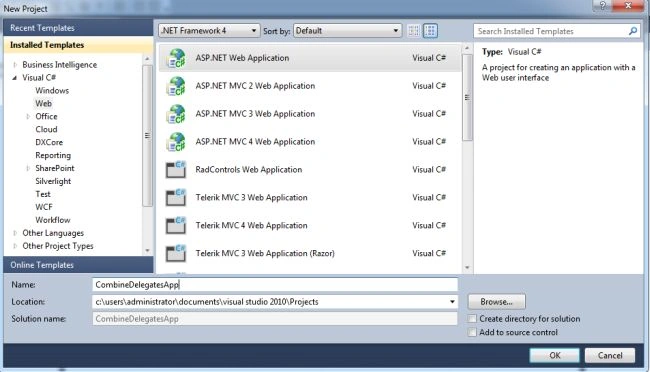
Step 1: Create a new web application
Step 2: The complete code of webform1.aspx looks as below
<%@
Page Language="C#"
AutoEventWireup="true"
CodeBehind="WebForm1.aspx.cs"
Inherits="CombineDelegatesApp.WebForm1"
%>
<!DOCTYPE
html PUBLIC
"-//W3C//DTD XHTML 1.0 Transitional//EN"
"http://www.w3.org/TR/xhtml1/DTD/xhtml1-transitional.dtd">
<html
xmlns="http://www.w3.org/1999/xhtml">
<head
id="Head1"
runat="server">
<title></title>
</head>
<body>
<form id="form1"
runat="server">
<center>
<div>
<table>
<tr>
<td
colspan="2"
align="center">
<asp:Label
ID="Label1"
runat="server"
Text="Combine Delegates"
Font-Bold="true"
Font-Size="Large"
Font-Names="Verdana"
ForeColor="Maroon"></asp:Label>
</td>
</tr>
<tr>
<td>
<asp:Label
ID="Label6"
runat="server"
Text="Please Enter
FirstNumber" Font-Size="Large"
Font-Names="Verdana"
Font-Italic="true"></asp:Label>
</td>
<td>
<asp:TextBox
ID="TextBox4"
runat="server"></asp:TextBox>
</td>
</tr>
<tr>
<td>
<asp:Label
ID="Label2"
runat="server"
Text="Please Enter
SecondNumber" Font-Size="Large"
Font-Names="Verdana"
Font-Italic="true"></asp:Label>
</td>
<td>
<asp:TextBox
ID="TextBox1"
runat="server"></asp:TextBox>
</td>
</tr>
<tr>
<td
colspan="2"
align="center">
<asp:Button
ID="Button1"
runat="server"
Text="Addition"
Font-Names="Verdana"
Width="213px"
BackColor="Orange"
Font-Bold="True"
OnClick="Button1_Click"
/>
</td>
</tr>
<tr>
<td
colspan="2"
align="center">
<asp:Button
ID="Button2"
runat="server"
Text="Substraction"
Font-Names="Verdana"
Width="213px"
BackColor="Orange"
Font-Bold="True"
OnClick="Button2_Click"
/>
</td>
</tr>
<tr>
<td
colspan="2"
align="center">
<asp:Button
ID="Button3"
runat="server"
Text="Multiplication"
Font-Names="Verdana"
Width="213px"
BackColor="Orange"
Font-Bold="True"
OnClick="Button3_Click"
/>
</td>
</tr>
<tr>
<td
colspan="2"
align="center">
<asp:Button
ID="Button4"
runat="server"
Text="Division"
Font-Names="Verdana"
Width="213px"
BackColor="Orange"
Font-Bold="True"
OnClick="Button4_Click"
/>
</td>
</tr>
<tr>
<td
colspan="2"
align="center">
<asp:Label
ID="Label5"
runat="server"
Font-Bold="true"
Font-Names="Verdana"></asp:Label>
</td>
</tr>
</table>
</div>
</center>
</form>
</body>
</html>
Step 3: The complete code of
webform1.aspx.cs looks as below
using
System;
using
System.Collections.Generic;
using
System.Linq;
using
System.Web;
using
System.Web.UI;
using
System.Web.UI.WebControls;
namespace
CombineDelegatesApp
{
public partial
class WebForm1 : System.Web.UI.Page
{
protected void
Page_Load(object sender, EventArgs e)
{
}
public delegate
double Arthmetic(double
a, double b);
protected void
Button1_Click(object sender, EventArgs e)
{
if (string.IsNullOrEmpty(TextBox4.Text)
|| string.IsNullOrEmpty(TextBox1.Text))
{
Label5.Text =
"Please Enter Some Values"; Label5.ForeColor
= System.Drawing.Color.Red;
}
else
{
Arthmetic
result = GetAddResult();
Label5.Text =
String.Format("Addition Result is: {0}",
result(double.Parse(TextBox4.Text),
double.Parse(TextBox1.Text)));
Label5.ForeColor = System.Drawing.Color.Green; TextBox4.Text =
string.Empty;
TextBox1.Text
= string.Empty;
}
}
protected void
Button2_Click(object sender, EventArgs e)
{
if (string.IsNullOrEmpty(TextBox4.Text)
|| string.IsNullOrEmpty(TextBox1.Text))
{
Label5.Text =
"Please Enter Some Values"; Label5.ForeColor
= System.Drawing.Color.Red;
}
else
{
Arthmetic
result = GetSubResult();
Label5.Text =
String.Format("Substraction Result is: {0}",
result(double.Parse(TextBox4.Text),
double.Parse(TextBox1.Text)));
Label5.ForeColor = System.Drawing.Color.Green;
TextBox4.Text
= string.Empty;
TextBox1.Text
= string.Empty;
}
}
protected void
Button3_Click(object sender, EventArgs e)
{
if (string.IsNullOrEmpty(TextBox4.Text)
|| string.IsNullOrEmpty(TextBox1.Text))
{
Label5.Text =
"Please Enter Some Values";
Label5.ForeColor = System.Drawing.Color.Red;
}
else
{
Arthmetic
result = GetMulResult();
Label5.Text =
String.Format("Multiplication Result is: {0}",
result(double.Parse(TextBox4.Text),
double.Parse(TextBox1.Text)));
Label5.ForeColor = System.Drawing.Color.Green; TextBox4.Text =
string.Empty; TextBox1.Text =
string.Empty;
}
}
protected void
Button4_Click(object sender, EventArgs e)
{
if (string.IsNullOrEmpty(TextBox4.Text)
|| string.IsNullOrEmpty(TextBox1.Text))
{
Label5.Text =
"Please Enter Some Values";
Label5.ForeColor = System.Drawing.Color.Red;
}
else
{
Arthmetic
result = GetDivResult();
Label5.Text =
string.Format("Division
Result is: {0}", result(double.Parse(TextBox4.Text),
double.Parse(TextBox1.Text)));
Label5.ForeColor = System.Drawing.Color.Green;
TextBox4.Text
= string.Empty; TextBox1.Text =
string.Empty;
}
}
private Arthmetic GetAddResult()
{
Arthmetic result
= GetAdd; return result;
}
private Arthmetic GetSubResult()
{
Arthmetic result
= GetSub; return result;
}
private Arthmetic GetMulResult()
{
Arthmetic result
= GetMul; return result;
}
private Arthmetic GetDivResult()
{
Arthmetic result
= GetDiv; return result;
}
public double
GetAdd(double a, double
b)
{
return a + b;
}
public double
GetSub(double a, double
b)
{
return a - b;
}
public double
GetMul(double a, double
b)
{
return a * b;
}
public double
GetDiv(double a, double
b)
{
return a / b;
}
}
}
Step 4: The output for the application is shown below:



Join the conversation! Your thoughts help the community grow.