

Procedure to change the ASP.Net Core version in project.json file
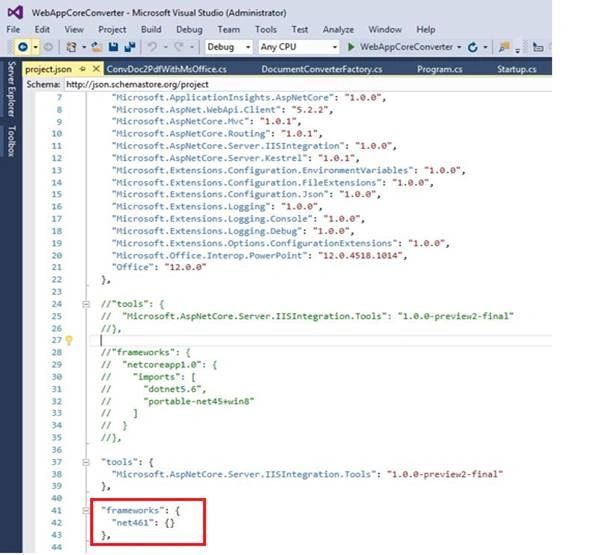
If you observe the highlighted block of code which I give below and have commented, the commented block of codes are default framework configurations. To configure our required framework versions, we have to modify the default configuration setting, as highlighted below.
- {
- "dependencies": {
- //"Microsoft.NETCore.App": {
- // "version": "1.0.1",
- // "type": "platform"
- //},
- ---------------
- ---------------
- ---------------
- //"frameworks": {
- // "netcoreapp1.0": {
- // "imports": [
- // "dotnet5.6",
- // "portable-net45+win8"
- // ]
- // }
- //},
- "frameworks": {
- "net461": {}
- },
- ------------
- ------------
- ------------
- }
Screenshot for the reference is given below.
Procedure to change the default port number
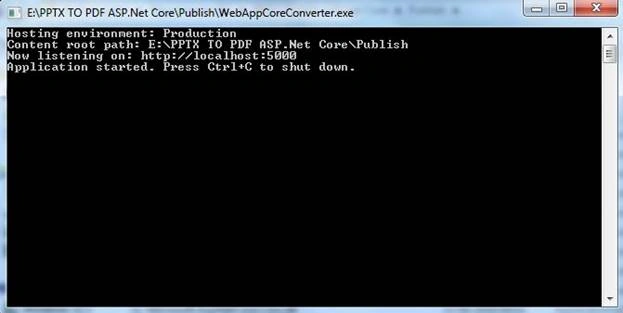
We know that ASP.NET Core Application runs under Kestrel Server with default port number http://localhost:5000.
Screenshot for the reference is given below.
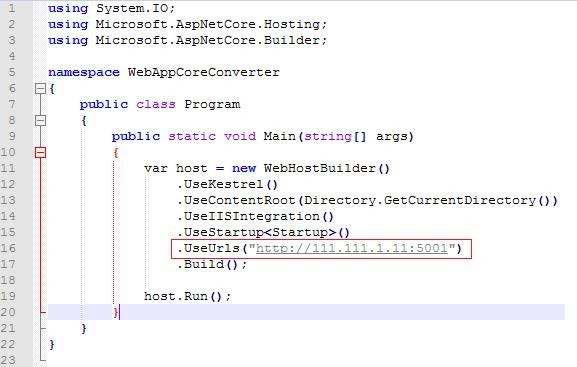
To change the default port number with our own host address or IP address, we have to register the configuration in Program.cs file, as shown below.
Prakash TripathiPosted Mar 29, 2017, 7:59 AM
This change is applicable since core preview 3 release and there are tools provided to migrate to csproj. You may follow: https://docs.microsoft.com/en-us/dotnet/articles/core/tools/dotnet-migrate
Prakash TripathiPosted Mar 29, 2017, 7:52 AM
They Santosh, project.json file has been scrapped months back from project templates and instead csproj has been bought in. You may want to update the blog.