

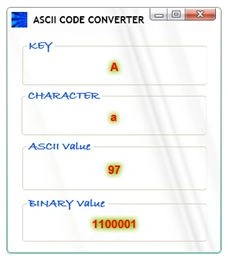
We will see how to build a WPF application that converts the key pressed to ASCII and binary code.
- First create a simple WPF form.
- Take Four Labels and name then as
- lblKey to show key pressed
- lblChar to show actual character of the key
- lblAscii to show its ASCII value
- lblBinary to show binary value
- and a textbox that will be hidden
Now in the form code as below.
private void GlassWindow_Loaded(object sender, RoutedEventArgs e)
{
textBox1.Focus();
}
private void GlassWindow_KeyDown(object sender, KeyEventArgs e)
{
textBox1.Text = "";
lblKey.Content = e.Key.ToString();
lblAscii.Content = "";
lblBinary.Content = "";
lblChar.Content = "";
}
private void textBox1_TextChanged(object sender, TextChangedEventArgs e)
{
try
{
lblChar.Content = textBox1.Text.ToString();
lblAscii.Content = Convert.ToUInt16(Convert.ToChar(textBox1.Text));
lblChar.Content = Convert.ToChar(lblAscii.Content);
lblBinary.Content = Convert.ToString(Convert.ToByte(lblAscii.Content), 2);
}
catch { }
}
Output will be:
Join the conversation! Your thoughts help the community grow.