

What is StringBuilder in C#.NET?
String builder is mutable. It means once we create a string builder object we can perform any operation like insert, replace, or append without creatinga new instance every time.
For Example:
Output:
Hello World! What a beautiful day.
Advantages of String Builder
- using System;
- using System.Text;
- StringBuilder MyStringBuilder = new StringBuilder("Hello World!");
- MyStringBuilder.Append(" What a beautiful day.");
- Console.WriteLine(MyStringBuilder);
Hello World! What a beautiful day.
Advantages of String Builder
- It’s mutable.
- Performance wise string builder is high because it will use same instance of object to perform any action.
- In String Builder we can use append keyword.
- Stringbuilder belongs to System.Text namespace.
Open -> MS SQL SERVER 2012 ->Create an Table in database.
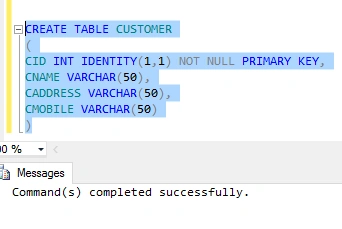
Press F5 for execution
Press F5 for execution
Insert data into your table
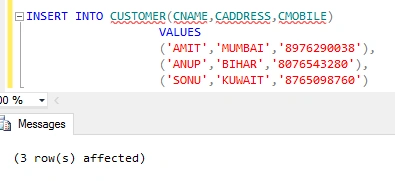
Now Create Store Procedure in your database.
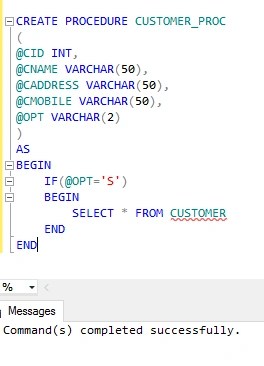
Press F5 For Execution
Test the stored procedure.
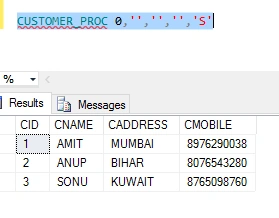
Create Connection from database------->Open web.config--------->Add below Code in Configuration.
- <connectionStrings>
- <add name="dbConnect" connectionString="Data Source=xxxxxxx;Initial Catalog=xxxxx;Integrated Security=True" providerName="System.data.SqlClient" />
- </connectionStrings>
Open Visual Studio 2013------>File------>New------->Website------>Websit_Name.
Right Click on Solution------>WebForm------->Default.aspx.
Add App_Code folder in Solution------>Add on class(Research).
Right Click on Solution------>WebForm------->Default.aspx.
Add App_Code folder in Solution------>Add on class(Research).

Add one method in Research.cs
- using System;
- using System.Collections.Generic;
- using System.Linq;
- using System.Web;
- using System.Data;
- using System.Data.SqlClient;
- using System.Configuration;
- public static class Research
- {
- public static string GetConnectionString()
- {
- string conString = ConfigurationManager.ConnectionStrings["dbConnect"].ConnectionString;
- return conString;
- }
- public static DataSet GetData(int CID, string CNAME, string CADDRESS, string CMOBILE, string OPT)
- {
- DataSet ds = new DataSet();
- try
- {
- string CS = Research.GetConnectionString();
- SqlConnection con = new SqlConnection(CS);
- SqlCommand cmd = new SqlCommand("CUSTOMER_PROC", con);
- cmd.CommandType = CommandType.StoredProcedure;
- SqlDataAdapter da = new SqlDataAdapter(cmd);
- con.Open();
- cmd.Parameters.AddWithValue("@CID", CID);
- cmd.Parameters.AddWithValue("@CNAME", Convert.ToString(CNAME));
- cmd.Parameters.AddWithValue("@CADDRESS", Convert.ToString(CADDRESS));
- cmd.Parameters.AddWithValue("@CMOBILE", Convert.ToString(CMOBILE));
- cmd.Parameters.AddWithValue("@OPT", Convert.ToString(OPT));
- da.Fill(ds);
- con.Close();
- }
- catch (Exception err)
- {
- throw err;
- }
- return ds;
- }
- }
Add one table in Default.aspx page and give id to TD and runat="Server" in body section.
- <table>
- <tr>
- <td id="Grd1" runat="server">
- </td>
- </tr>
- </table>
Write code in Default.aspx.cs
- using System;
- using System.Collections.Generic;
- using System.Linq;
- using System.Web;
- using System.Web.UI;
- using System.Web.UI.WebControls;
- using System.Text;
- using System.Data;
- public partial class _Default: System.Web.UI.Page
- {
- DataSet ds = null;
- StringBuilder sb = new StringBuilder();
- protected void Page_Load(object sender, EventArgs e)
- {
- try
- {
- BindTable();
- }
- catch (Exception err)
- {
- Response.Write(err.Message);
- }
- }
- public void BindTable()
- {
- try
- {
- ds = Research.GetData(0, "", "", "", "S");
- if (ds != null && ds.Tables.Count > 0 && ds.Tables[0].Rows.Count > 0)
- {
- sb.Append("<table border='1' cellpadding='0' cellspacing='0'>");
- sb.Append("<tr>");
- sb.Append("<td>CID</td>");
- sb.Append("<td>CNAME</td>");
- sb.Append("<td>CADDRESS</td>");
- sb.Append("<td>CMOBILE</td>");
- sb.Append("</tr>");
- sb.Append("</table>");
- sb.Append("<table border='1' cellpadding='0' cellspacing='0' width='100%'>");
- for (int i = 0; i < ds.Tables[0].Rows.Count; i++)
- {
- sb.Append("<tr>");
- sb.Append("<td>" + Convert.ToString(ds.Tables[0].Rows[i]["CID"] + "</td>"));
- sb.Append("<td>" + Convert.ToString(ds.Tables[0].Rows[i]["CNAME"] + "</td>"));
- sb.Append("<td>" + Convert.ToString(ds.Tables[0].Rows[i]["CADDRESS"] + "</td>"));
- sb.Append("<td>" + Convert.ToString(ds.Tables[0].Rows[i]["CMOBILE"] + "</td>"));
- sb.Append("</tr>");
- }
- sb.Append("</table>");
- Grd1.InnerHtml = Convert.ToString(sb);
- }
- else
- {
- Response.Write("NO DATA FOUND");
- }
- }
- catch (Exception err)
- {
- Response.Write(err.Message);
- }
- finally
- {
- if (ds != null)
- {
- ds.Dispose();
- }
- }
- }
- }
Run your Application
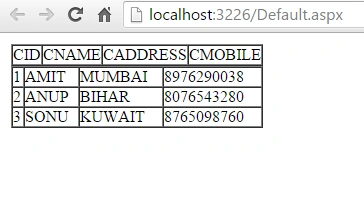
I hope you liked this blog. Please share with me your valuable suggestions and feedback.
Titus SamPosted Sep 27, 2018, 12:58 PM
Good One how to create a table with Multiple layer of header using stringbuilder.
Muhammad Aqib ShehzadPosted Jan 19, 2018, 7:29 AM
Really helpful stuff, thanks for sharing
suresh thippaniPosted Nov 27, 2017, 6:05 AM
Hi Amit ..good to see you here..Keep it up..
kalu singh raoPosted Jul 19, 2016, 8:22 AM
Nice...
Amit Kumar SinghPosted Apr 25, 2016, 4:16 PM
Thank you Rajeev
Rajeev PunhaniPosted Mar 2, 2016, 12:49 AM
Nice share.
Ritesh SinghPosted Feb 22, 2016, 2:01 AM
good job Amit .... keep it up :p