

In this blog I am sharing my thoughts on to
create very basic MVC application and terminology being used.
Here we go:
Open your visual studio, click on New Project and select ASP.NET MVC3 Web
Application:
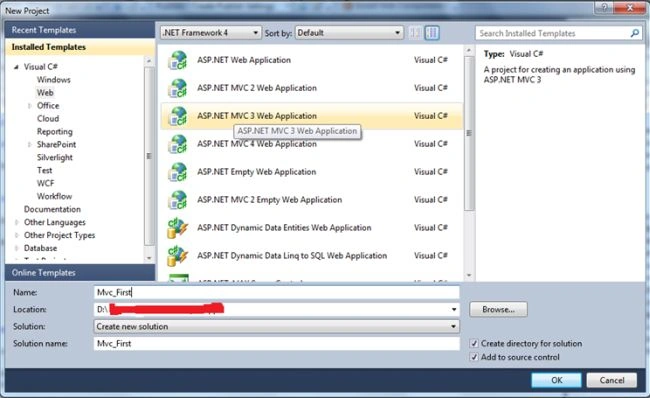
Specify the name of your first application like your desire and click ok.
New window will appear ,from that window I picked up internet application whilst
many options are there. Another intersting fact that there is a dropdown named
as View Engine I seleccted Razor which is more specific to MVC 3 and MVC 4 and
keep a checkbox “create a new unit test” unchecked.

Click on ok button.
The given below depict screen is default one comes after clicking on OK Button.
Hvaing multiple folder's.
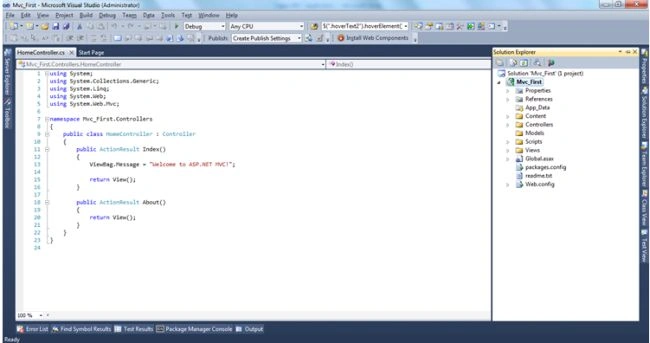
Let's go into more detail for this. I tried to associate MVC new terms with traditional webforms application.


This is what I tried to shared with you, Will come up with more articles on MVC
soon.
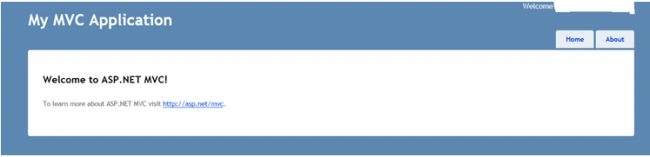
Press F5 and you will see the very basic output of application.
Its very simple, you need to create a simple asp.net appllication.
Devanand LaroiyaPosted Apr 16, 2013, 4:13 AM
What is the major difference between MVC3 and MVC4. I checked the MVC3 and found it simple to use. Kindly share your thoughts on this. Best Regards