

createLinearGradient() method in HTML5
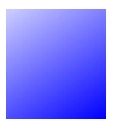
In this Blog, I will take an example of a Canvas method. Basically it shows how we show a Linear gradient In Canvas, In my example it changes the color to Blue to White according to the values:
- <html>
- <body>
- <canvas id="MyFirstCanvas" width="150" height="150">
- There is an errr that your browser does not support the HTML5 Canvas tag.</canvas>
- <script type="text/javascript">
- var x=document.getElementById("MyFirstCanvas");
- var mycont=x.getContext("2d");
- var mygred=mycont.createLinearGradient(100,150,0,0);
- mygred.addColorStop(0,"Blue");
- mygred.addColorStop(1,"White");
- mycont.fillStyle=mygred;
- mycont.fillRect(0,40,100,150);
- </script>
- </body>
- </html>
The Output Will Be:
Join the conversation! Your thoughts help the community grow.