

Introduction
Glassmorphism is a popular design trend that adds a sleek and modern look to user interfaces.
This blog post will explore how to create a glassmorphism effect in Power Apps, Microsoft's low-code application development platform.
Steps to Create a Glassmorphism Effect in Power Apps,
Setting up the Background
Create a new canvas app in Power Apps.
Add an Image control to the screen to serve as the background.
Add an Html Control and add the below code
"<div style =' width:"& Self.Width-100&"px; height: "&Self.Height-100&"px; background:rgba(100,100,100,0.5);backdrop-filter: blur(5px); border-radius: 65px 65px 65px 65px '> </div>"
Customizing Controls
- Add your app's desired controls, such as labels, buttons, or input fields.
- Set the Fill property of these controls to a semi-transparent color, such as RGBA(255, 255, 255, 0.5), to achieve the glassy appearance.
- Adjust the Opacity property of the controls to control the level of transparency.
- Enhance the glassmorphism effect by adding subtle drop shadows or lighting effects to the controls.
Output Example
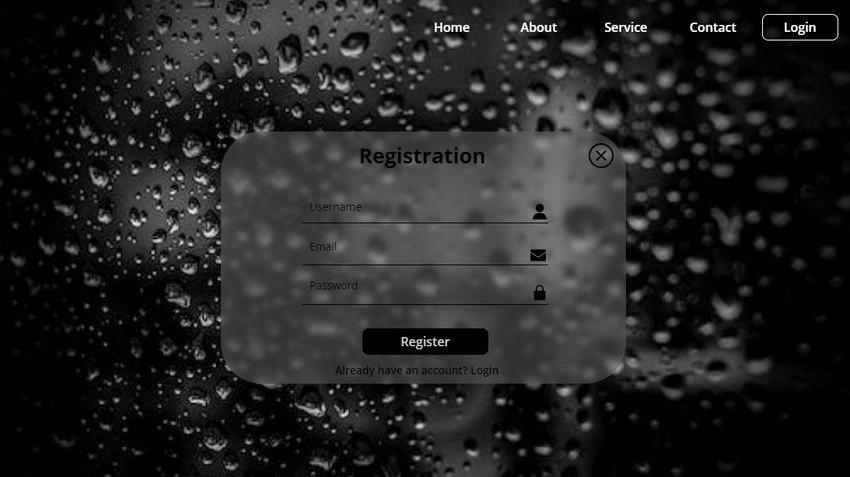
Conclusion
This blog post explored how to create a glassmorphism effect in Power Apps. By customizing the background, controls, and shadows, you can achieve a sleek and modern design that follows the glassmorphism trend.
Konga MounikaPosted May 18, 2023, 11:14 AM
Nice blog Brother
Dinesh KumarPosted May 18, 2023, 10:54 AM
Blog Project Blazor