

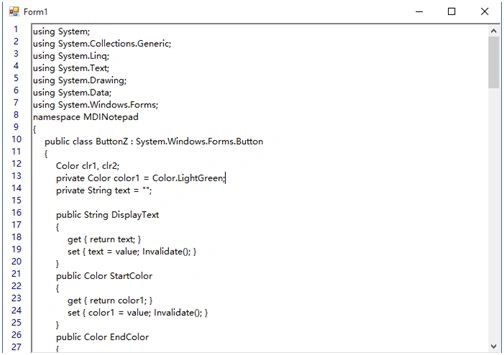
I am using AddLineNumbers() function to call anywhere in the program.
I am also using the getWidth() function that returns the specific width according to number of lines for auto resizing the line numbers width.
Here's code of AddLineNumbers() function:
- public void AddLineNumbers()
- {
- // create & set Point pt to (0,0)
- Point pt = new Point(0, 0);
- // get First Index & First Line from richTextBox1
- int First_Index = richTextBox1.GetCharIndexFromPosition(pt);
- int First_Line = richTextBox1.GetLineFromCharIndex(First_Index);
- // set X & Y coordinates of Point pt to ClientRectangle Width & Height respectively
- pt.X = ClientRectangle.Width;
- pt.Y = ClientRectangle.Height;
- // get Last Index & Last Line from richTextBox1
- int Last_Index = richTextBox1.GetCharIndexFromPosition(pt);
- int Last_Line = richTextBox1.GetLineFromCharIndex(Last_Index);
- // set Center alignment to LineNumberTextBox
- LineNumberTextBox.SelectionAlignment = HorizontalAlignment.Center;
- // set LineNumberTextBox text to null & width to getWidth() function value
- LineNumberTextBox.Text = "";
- LineNumberTextBox.Width = getWidth();
- // now add each line number to LineNumberTextBox upto last line
- for (int i = First_Line; i <= Last_Line + 2; i++)
- {
- LineNumberTextBox.Text += i + 1 + "\n";
- }
- }
Step 1: Start Visual Studio & create new Windows Forms Application in C#.
Step 2: Drag & Drop RichTextBox onto Form1 & Set following properties to it.
| Name | LineNumberTextBox |
| BackColor | White |
| BorderStyle | None |
| Cursor | PanNE |
| Dock | Left |
| ForeColor | Black |
| ReadOnly | true |
| ScrollBars | None |
You can set BackColor & ForeColor to LineNumberTextBox as you wish.
Here you can also set Enabled property to false, but you can not see ForeColor & BackColor.
For ForeColor & BackColor we are set as above properties to LineNumberTextBox.
Step 3: Drag & Drop RichTextBox onto Form1 & Set Dock property to Fill. T he default name could be richTextBox1.
Step 4: Add above AddLineNumbers() function to your Form1 code or see Complete Code next.
Step 5: Add following events & code to Form1.
- Load:
- private void Form1_Load(object sender, EventArgs e)
- {
- LineNumberTextBox.Font = richTextBox1.Font;
- richTextBox1.Select();
- AddLineNumbers();
- }
- Resize
- private void Form1_Resize(object sender, EventArgs e)
- {
- AddLineNumbers();
- }
Step 6: Add following events & code to richTextBox1.
- SelectionChanged
- private void richTextBox1_SelectionChanged(object sender, EventArgs e)
- {
- Point pt = richTextBox1.GetPositionFromCharIndex(richTextBox1.SelectionStart);
- if (pt.X == 1)
- {
- AddLineNumbers();
- }
- }
- VScroll
- private void richTextBox1_VScroll(object sender, EventArgs e)
- {
- LineNumberTextBox.Text = "";
- AddLineNumbers();
- LineNumberTextBox.Invalidate();
- }
- TextChanged
- private void richTextBox1_TextChanged(object sender, EventArgs e)
- {
- if (richTextBox1.Text == "")
- {
- AddLineNumbers();
- }
- }
- FontChanged
- private void richTextBox1_FontChanged(object sender, EventArgs e)
- {
- LineNumberTextBox.Font = richTextBox1.Font;
- richTextBox1.Select();
- AddLineNumbers();
- }
Step 7: Add following events & code to LineNumberTextBox.
- MouseDown
- private void LineNumberTextBox_MouseDown(object sender, MouseEventArgs e)
- {
- richTextBox1.Select();
- LineNumberTextBox.DeselectAll();
- }
Step 8: Debug your Form & check it out.
Complete Code
- using System;
- using System.Drawing;
- using System.Windows.Forms;
- namespace LineNumbers_CSharp
- {
- public partial class Form1 : Form
- {
- public Form1()
- {
- InitializeComponent();
- }
- public int getWidth()
- {
- int w = 25;
- // get total lines of richTextBox1
- int line = richTextBox1.Lines.Length;
- if (line <= 99)
- {
- w = 20 + (int)richTextBox1.Font.Size;
- }
- else if (line <= 999)
- {
- w = 30 + (int)richTextBox1.Font.Size;
- }
- else
- {
- w = 50 + (int)richTextBox1.Font.Size;
- }
- return w;
- }
- public void AddLineNumbers()
- {
- // create & set Point pt to (0,0)
- Point pt = new Point(0, 0);
- // get First Index & First Line from richTextBox1
- int First_Index = richTextBox1.GetCharIndexFromPosition(pt);
- int First_Line = richTextBox1.GetLineFromCharIndex(First_Index);
- // set X & Y coordinates of Point pt to ClientRectangle Width & Height respectively
- pt.X = ClientRectangle.Width;
- pt.Y = ClientRectangle.Height;
- // get Last Index & Last Line from richTextBox1
- int Last_Index = richTextBox1.GetCharIndexFromPosition(pt);
- int Last_Line = richTextBox1.GetLineFromCharIndex(Last_Index);
- // set Center alignment to LineNumberTextBox
- LineNumberTextBox.SelectionAlignment = HorizontalAlignment.Center;
- // set LineNumberTextBox text to null & width to getWidth() function value
- LineNumberTextBox.Text = "";
- LineNumberTextBox.Width = getWidth();
- // now add each line number to LineNumberTextBox upto last line
- for (int i = First_Line; i <= Last_Line + 2; i++)
- {
- LineNumberTextBox.Text += i + 1 + "\n";
- }
- }
- private void Form1_Load(object sender, EventArgs e)
- {
- LineNumberTextBox.Font = richTextBox1.Font;
- richTextBox1.Select();
- AddLineNumbers();
- }
- private void richTextBox1_SelectionChanged(object sender, EventArgs e)
- {
- Point pt = richTextBox1.GetPositionFromCharIndex(richTextBox1.SelectionStart);
- if (pt.X == 1)
- {
- AddLineNumbers();
- }
- }
- private void richTextBox1_VScroll(object sender, EventArgs e)
- {
- LineNumberTextBox.Text = "";
- AddLineNumbers();
- LineNumberTextBox.Invalidate();
- }
- private void richTextBox1_TextChanged(object sender, EventArgs e)
- {
- if (richTextBox1.Text == "")
- {
- AddLineNumbers();
- }
- }
- private void richTextBox1_FontChanged(object sender, EventArgs e)
- {
- LineNumberTextBox.Font = richTextBox1.Font;
- richTextBox1.Select();
- AddLineNumbers();
- }
- private void LineNumberTextBox_MouseDown(object sender, MouseEventArgs e)
- {
- richTextBox1.Select();
- LineNumberTextBox.DeselectAll();
- }
- private void Form1_Resize(object sender, EventArgs e)
- {
- AddLineNumbers();
- }
- }
- }
ridtichai borseenPosted Aug 25, 2022, 5:07 AM
Thank you for the code. it worked for me
Cedric OuelletPosted Jan 5, 2022, 9:18 AM
*FIX* Initially it won't work, and will keep adding everytime. This is because you need to do LineNumberTextBox.Clear(); at the beginning of AddLineNumbers(). Then, it will re-render line numbers and work as intended.
Chand BhandariPosted Aug 26, 2021, 8:23 AM
It is not working
Noman AliPosted Apr 21, 2021, 6:17 PM
Not working tried almost 10 times
Yogi GrantzPosted Nov 4, 2020, 6:17 PM
This is awesome Pritam, I love it! it works great for me. John Fisher , to optimize the += just use Stringbuilder like this: StringBuilder sb = new StringBuilder(); for (int i = First_Line; i <= Last_Line + 2; i++) { sb.AppendLine($"{i + 1}."); } rtbLineNumber.Text += sb.ToString(); The whole thing works for me
Sushma MPosted Oct 25, 2019, 7:52 AM
Thank you for the code. I understand well and it also worked perfectly :)
Carl HaneyPosted Oct 15, 2019, 9:45 AM
This s crap the Linenumberbox don't add number as you goto next line...try doing a video tutorial on how to do this and we'll see if it works visually !
John FisherPosted Aug 26, 2019, 2:03 PM
I mean, thanks though for posting but I can't spend any more time trying to get this to work,... sigh ...
John FisherPosted Aug 26, 2019, 2:02 PM
For (int i = First_Line; i <= Last_Line + 2; i++) { LineNumberTextBox.Text += i + 1 + "\n"; }
John FisherPosted Aug 26, 2019, 2:02 PM
Having hard time getting this to work ... you have bug ... this loop creates a super long string just tacking on the line number ...
Jayesh BetalaPosted Aug 11, 2019, 2:09 PM
Need help regarding the code. only numbers from 1-3 is being displayed. Even after i press i enter the code isn't working. i tried atleast 3-4 times and made sure i made no error in following the steps above
Lord ChariotPosted Sep 7, 2018, 2:52 PM
I'm sorry, but I cannot find any reference to the object LineNumberTextBox above. Where/what is it?
Johnny BravoPosted Jun 29, 2018, 7:40 PM
Hey how about LineNumberTextBox?
Tim SeverancePosted Mar 13, 2018, 10:55 AM
Hi, Thanks for the great information, this is exactly what I have been searching for! Question: you don't mention setting up and adding the LineNumberTextbox. How do I set that up and add it to the form since the richtextbox1 is already filling the form? Thanks!Tim
Jill BustilloPosted Jun 26, 2016, 9:48 AM
hello, i have a problem. the output when i tried the code is that it does not display the line numbers. how can i solve this?
Pritam ZopePosted Feb 14, 2016, 1:33 AM
Thanks...
Santhakumar MunuswamyPosted Feb 12, 2016, 11:34 PM
Thanks for nice share