

Read into Binary Formate

int len = FileUpload1.PostedFile.ContentLength;
byte[] pic = new byte[len];
FileUpload1.PostedFile.InputStream.Read(pic, 0, len);
1. Add one Dataset
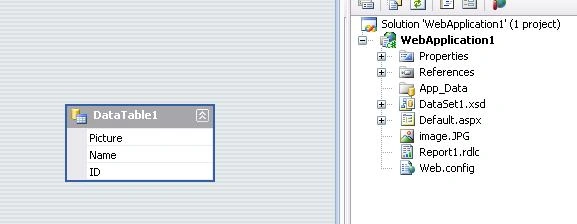
2. Add Report.rdlc file in project
go to Report and change the property
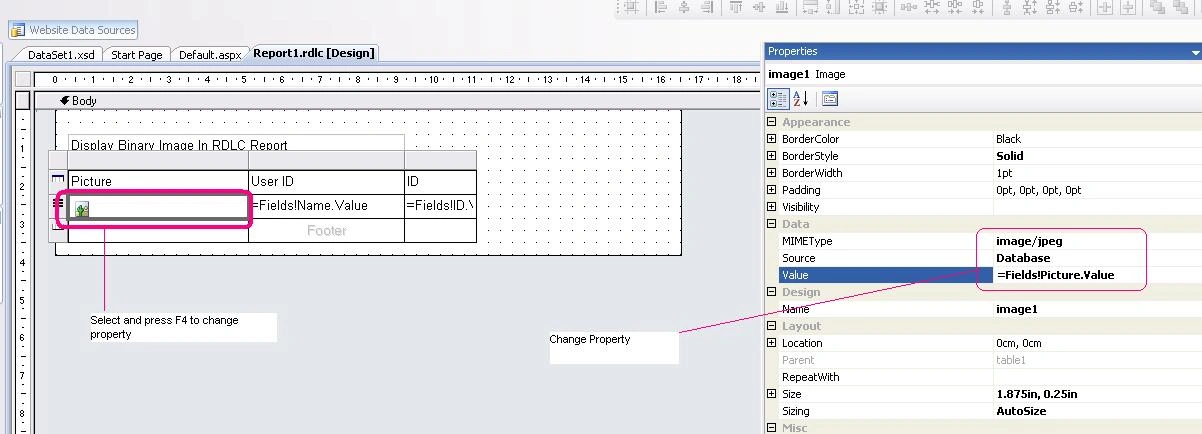
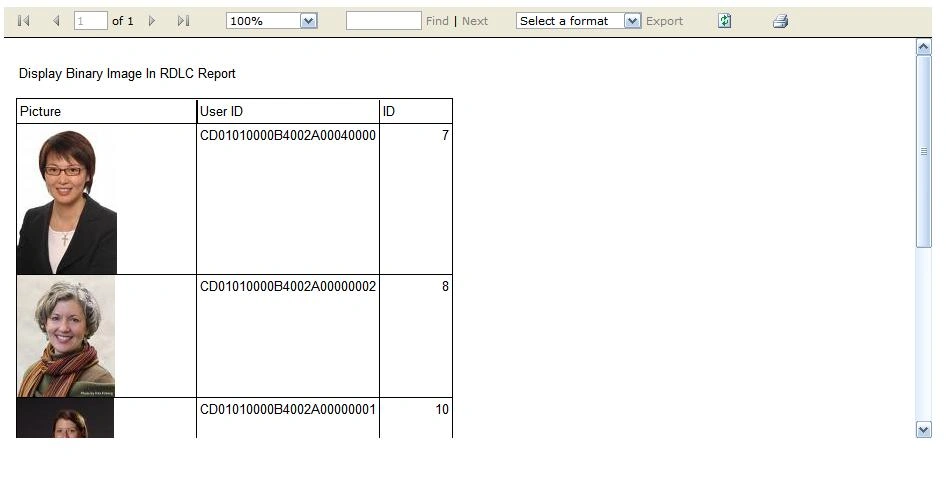
Now Display Save Image into RDLC report (Microsoft Report Viewer)
using (SqlConnection cn = new SqlConnection(System.Configuration.ConfigurationManager.AppSettings["Connection"].ToString()))
{
cn.Open();
using (SqlCommand cmd = new SqlCommand("select Picture,Name,ID from tblImage", cn))
{
using (SqlDataAdapter da = new SqlDataAdapter(cmd))
{
DataSet ds = new DataSet();
da.Fill(ds, "DataSet1_DataTable1");
ReportDataSource rds = new ReportDataSource("DataSet1_DataTable1", ds.Tables[0]);
ReportViewer1.LocalReport.DataSources.Clear();
ReportViewer1.LocalReport.DataSources.Add(rds);
ReportViewer1.LocalReport.Refresh();
}
}
Raja SaqibPosted Jan 2, 2019, 6:31 AM
Hello Can u help me to show image in rdlc using database field stored folder address
Raja SaqibPosted Jan 2, 2019, 6:28 AM
How to display image from db using folder address in rdlc plz
Vu Tien AnhPosted Oct 23, 2017, 9:03 PM
How to display picture use its local path. I cannot display image to view. Thanks!
mdrafi skPosted Dec 14, 2016, 11:31 AM
How to display multiple images in one row of rdlc report
BELS MIIROPosted Jun 6, 2015, 2:55 AM
okay now i have finally got the formula. yosua dwipermana, sutotpal shrivastava bahaa samir new Nguyen jamil shah i have got the right answer to your question. First create a report connected to its dataset. now place a table control on the report. so when i comes to selectiong which fields to place in the first row or any row. instead of selecting , choose insert image, when the popup comes, select image source as database, then MIMType as any like image/jpg and OK. then on the other rows choose what you want displayed. and run, thats all you need no science
BELS MIIROPosted Jun 6, 2015, 2:32 AM
Neeraj Pandey how do you make the image display different images without repeating the same image
BELS MIIROPosted Jun 6, 2015, 2:28 AM
I get what Neeraj Pandey is saying, on your report add a table control, then add an image control on the report select database as source on the image and MMIType, after than choose an empty row in the table and drag the image control there, it will fit well .
yosua dwipermanaPosted Apr 21, 2015, 1:28 AM
whats the property you've changed? what the img datatype?
Neeraj PandeyPosted Sep 12, 2013, 11:05 AM
Its Working Follow The Step Declare Image Field Datatype as Image in DataBase SqlServer
sutotpal shrivastavaPosted Sep 12, 2013, 7:33 AM
Image Download karne ko diya hai...........
bahaa samirPosted Sep 11, 2013, 8:03 AM
please Create project And upload it
new NguyenPosted Jul 4, 2013, 5:10 AM
Hello sir, I want to know which the data type of picture is and the a specific value of this field, thank you.
jamil shahPosted Jul 11, 2012, 2:20 AM
Hello Sir can Describe how can change property of image column urgent
jamil shahPosted Jul 11, 2012, 2:20 AM
Hello Sir can Describe how can change property of image column urgent
jamil shahPosted Jul 11, 2012, 2:20 AM
Hello Sir can Describe how can change property of image column urgent
jamil shahPosted Jul 11, 2012, 2:20 AM
Hello Sir can Describe how can change property of image column urgent
jamil shahPosted Jul 11, 2012, 2:20 AM
Hello Sir can Describe how can change property of image column urgent
jamil shahPosted Jul 11, 2012, 2:20 AM
Hello Sir can Describe how can change property of image column urgent
jamil shahPosted Jul 11, 2012, 2:20 AM
Hello Sir can Describe how can change property of image column urgent
Neeraj PandeyPosted Apr 9, 2012, 5:39 AM
use OdbcCommand for access
marcePosted Apr 6, 2012, 11:35 AM
My database is in Access so this code is not working. can i get some help please!
Jin GinusukePosted Oct 10, 2011, 2:54 AM
Thanks...this and that blog post was on the same day. My mistake is i used an image on the body and not a text box and also not knowing I can use "Convert.ToBase64String()" due to its marked red when I typed it on the expression builder (and the only available is Convert.ToString()). Now it works. Thanks.
Neeraj PandeyPosted Oct 7, 2011, 11:19 AM
follow the link to display image in header and footer section http://www.c-sharpcorner.com/Blogs/6200/display-image-in-page-header-footer-section-in-rdlc-repo.aspx
Jin GinusukePosted Oct 7, 2011, 2:18 AM
This only works if it is on the body of the report. I created a report that views a person matches the query. I used the header with an image and textbox for displaying the first result and the body with a table (just like shown above) as the all results. I tried the same expression used on the image to view the first image on the table on the header but the expression "=Fields!" is prohibited on the header and footer. I tried using "=First(ReportItems!image1.Value)" to fetch the first value of the image on the table and set MIMEType = "image/jpeg" and Source = Database but it doesn't work. Any ideas?