

In the modern UI, SharePoint “Site Contents” page contains two tabs. Each tab shows the apps present in the SharePoint site.
- Contents
- Shows Lists, Libraries, Apps from the current site.
- REST API - https://ktskumar.sharepoint.com/_api/web/AppTiles
- Subsites
- Shows subsites from the current site.
- REST API - https:// ktskumar.sharepoint.com/_api/Web/GetSubwebsFilteredForCurrentUser(nWebTemplateFilter=-1)?$filter=WebTemplate ne ‘APP’
Each tab sends a separate REST API request to get the respective data from the SharePoint.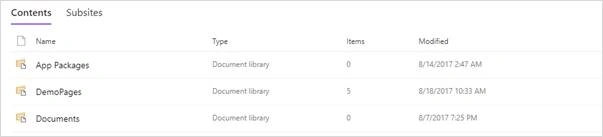
Contents / App Tiles
Below is the sample JavaScript code to get the lists of available Lists, Librarie, and Apps from the site.
- <script src="/SiteAssets/js/jquery.min.js"></script>
- <div id="outputInfo"></div>
- <script type="text/javascript">
- $(document).ready(function() {
- jQuery.ajax({
- url: _spPageContextInfo.webAbsoluteUrl + "/_api/web/AppTiles",
- method: "GET",
- headers: {
- "Accept": "application/json; odata=verbose"
- },
- success: function(data) {
- var appTiles = data.d.results;
- console.log(appTiles);
- var tempValue = "<h2>Site Contents</h2><br/>";
- appTiles.forEach(function(app) {
- tempValue += app.Title + " ( " + app.AppId + " )<br/>";
- });
- $("#outputInfo").html(tempValue);
- },
- error: function(data) {
- console.log(data);
- }
- });
- })
- </script>
Output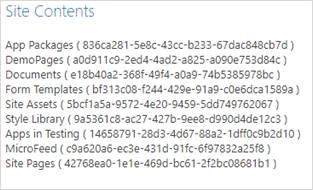
Subsites
Below is sample JavaScript code to get the subsites for the current user using SharePoint REST API.
- <script src="/SiteAssets/js/jquery.min.js"></script>
- <div id="outputInfo"></div>
- <script type="text/javascript">
- $(document).ready(function() {
- jQuery.ajax({
- url: _spPageContextInfo.webAbsoluteUrl + "/_api/Web/GetSubwebsFilteredForCurrentUser(nWebTemplateFilter=-1)?$filter=WebTemplate ne 'APP'",
- method: "GET",
- headers: {
- "Accept": "application/json; odata=verbose"
- },
- success: function(data) {
- var subSites = data.d.results;
- console.log(subSites);
- var tempValue = "<h2>Sub sites</h2><br/>";
- subSites.forEach(function(site) {
- tempValue += site.Title + "( " + site.Id + " )<br/>";
- });
- $("#outputInfo").html(tempValue);
- },
- error: function(data) {
- console.log(data);
- }
- });
- })
- </script>
Output
Join the conversation! Your thoughts help the community grow.