
Introduction
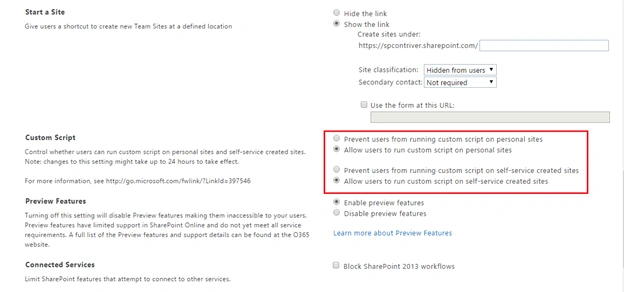
Enabling the Custom Scripts is allowing the users to run the custom scripts on personal sites and self-service created sites. Without enabling the custom scripts, we can’t embed the script in personal sites using SharePoint designer.
Steps - Follow the below steps to “Enable” the custom script feature.
Step 1 - Open your Office 365 Admin Portal.

Step 2 - Then, select SharePoint from left navigation, as shown below.

Step 3 - On SharePoint admin page, select 'Settings'. It will navigate to Settings page.

Step 4 - Check 'Allow users to run custom scripts on personal sites and self-service created sites', as shown below.
Step 5 - Then, click “OK”. It takes about 24 hours for the changes to take effect.
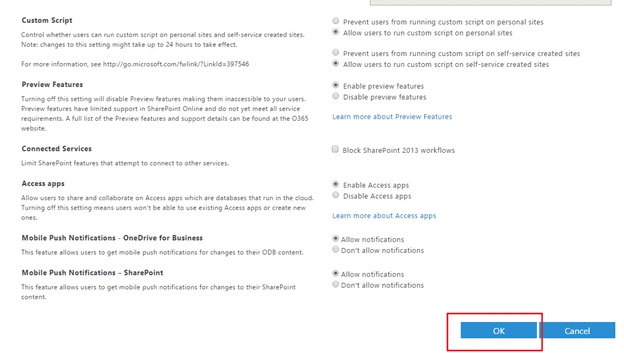
Finally, you can embed the code for personal sites using SharePoint Designer.
Summary - So, we have explored how to enable the custom script for SharePoint Online Portal.

Enable Custom Script In SharePoint Online
Join the conversation! Your thoughts help the community grow.
Sign in to leave a comment
It is the same account you read, post and publish with — and you will come straight back to this page.
Sravan AmbalaPosted Mar 5, 2020, 11:01 PM
HI Kaviya, I want to run a script to hide sharepoint controls like headerbar. Can you please suggest a way for it.
Deepak KumarPosted Feb 24, 2020, 7:36 AM
Thanks Kaviya for this great post. I have a query, I have have executed these two commands connect-sposervice -url https://myspsite-admin.sharepoint.com set-SPOsite -Identity https://myspsite.sharepoint.com -DenyAddAndCustomizePages 0 but next day I need to run thses commands again. Is there any job run by SPO to revert thses changes ?
Kaviya BalasubramanianPosted Sep 21, 2016, 1:01 AM
Thanks :)
Tarun DPosted Sep 21, 2016, 1:00 AM
Nice one.