

Applicable to – SharePoint 2013, SharePoint 2016, SharePoint Online.
Design Manager was introduced in SharePoint 2013 as an alternative to SharePoint Designer for the purpose of creating customized master pages. It has gained much popularity ever since, and has been a part of the subsequent releases - SharePoint 2016 as well as SharePoint Online.
This article explains how to activate the Design Manager in SharePoint line. The steps are the same for SharePoint 2013 and SharePoint 2016.
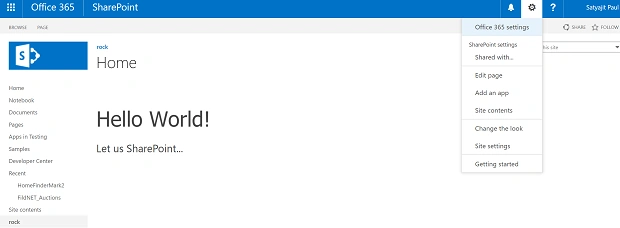
Follow the steps mentioned below to get it up and running, as shown below.
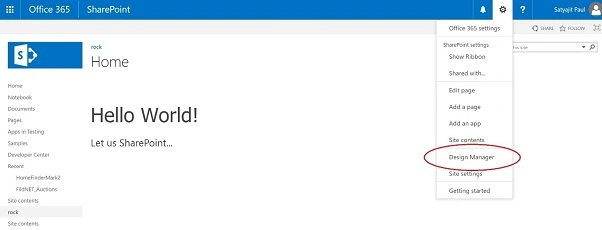
Step 1
Activate the feature “SharePoint Server Publishing Infrastructure” present at the site collection level. This can be navigated as Settings-Site settings-Site collection features (under Site Collection Administration) - SharePoint Server Publishing Infrastructure - click on "Activate".
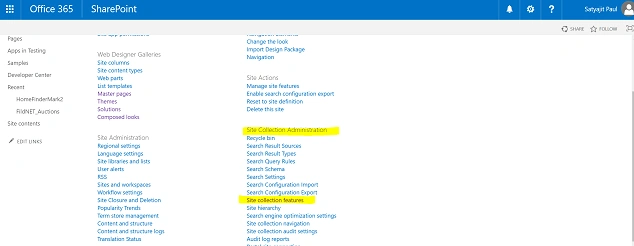
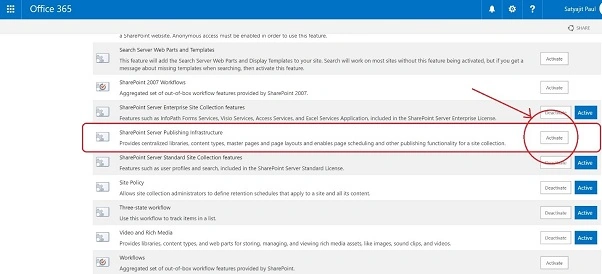
Step 2
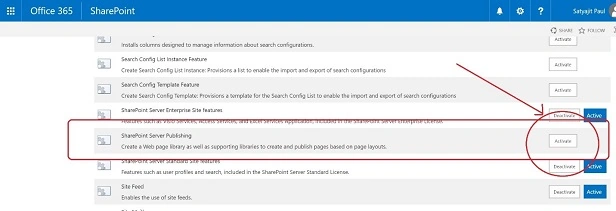
Once the site collection feature has been activated in the above step, then navigate to the subsite, and activate the Site Feature – “SharePoint Server Publishing”. This can be navigated as,
Settings-Site settings-Manage site features (under Site Actions) - SharePoint Server Publishing - Click on Activate
Step 3
After steps 1 and 2 have been completed, navigate back to the site, under Settings, “Design Manager” will be available now.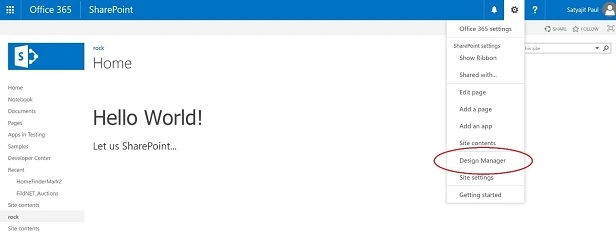
N.B.
Many times, it happens that the Design Manager isn’t available in the Settings menu, even after the two required features are activated. In that case, just deactivate both the features (site feature first, followed by site collection feature) and then follow the steps again. This will bring in the “Design Manager” to the Settings menu.
Feroz RanaPosted Mar 25, 2019, 1:06 AM
Hi Satyajit, In my testing environment i am not able to find the “SharePoint Server Publishing Infrastructure” in my both root and new web application site collection. so, can you please tell me how i can add my HTML template in my web page in sharepoint 2013 ?
uday vijayaPosted Apr 12, 2018, 11:28 PM
Hi Satyajit Ji, I have followed the above steps to activate the design manager publishing feature in SharePoint online but it didn't show up and even I have deactivated them and repeated the same but the same result again, any solution for this?