

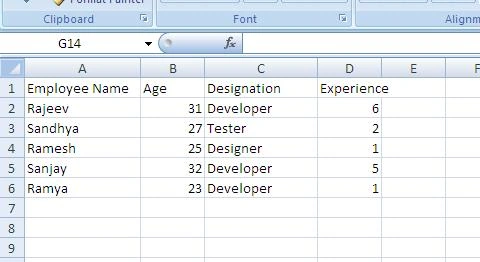
In this blog, we will see how to export an HTML table to a CSV file, using the simple tabletoCSV jQuery plugin.
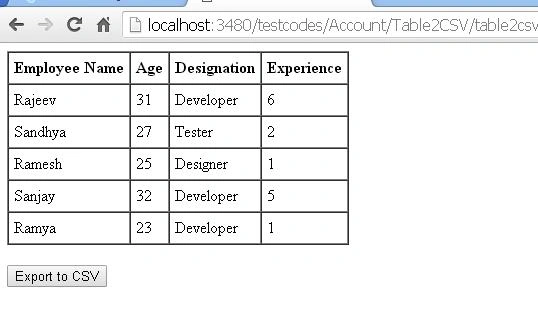
First, we will create an HTML table, which shows the employee details and an Export to CSV button, as shown below.
- <div>
- <table id="mytable" cellpadding="5" border="1" cellspacing="0">
- <thead>
- <tr>
- <th>
- Employee Name
- </th>
- <th>
- Age
- </th>
- <th>
- Designation
- </th>
- <th>
- Experience
- </th>
- </tr>
- </thead>
- <tbody>
- <tr>
- <td>
- Rajeev
- </td>
- <td>
- 31
- </td>
- <td>
- Developer
- </td>
- <td>
- 6
- </td>
- </tr>
- <tr>
- <td>
- Sandhya
- </td>
- <td>
- 27
- </td>
- <td>
- Tester
- </td>
- <td>
- 2
- </td>
- </tr>
- <tr>
- <td>
- Ramesh
- </td>
- <td>
- 25
- </td>
- <td>
- Designer
- </td>
- <td>
- 1
- </td>
- </tr>
- <tr>
- <td>
- Sanjay
- </td>
- <td>
- 32
- </td>
- <td>
- Developer
- </td>
- <td>
- 5
- </td>
- </tr>
- <tr>
- <td>
- Ramya
- </td>
- <td>
- 23
- </td>
- <td>
- Developer
- </td>
- <td>
- 1
- </td>
- </tr>
- </tbody>
- </table>
- <br />
- <button onclick="exporttocsv()">
- Export to CSV</button>
- </div>
chsss shsssPosted Jul 24, 2017, 3:34 AM
Small, issue doesn't work with Page Index
Vaibhav DeshmukhPosted Jun 13, 2017, 1:51 AM
Thanks...But I added reference still it showing me TypeError: $(...).table2csv is not a function$("#mytable").table2csv({