

I have created a SharePoint 2013 team site; in the
document library I was not able to see the Followoption in the ribbon
interface as well as in the top right corner of the site.

(Click here to view larger image)
This is because Following Content feature was not activated in the site level. Go to Site Settings, click on Manage Site Features under Site Actions section. Activate the Following content feature now you can be able to see the Follow option in the team site.
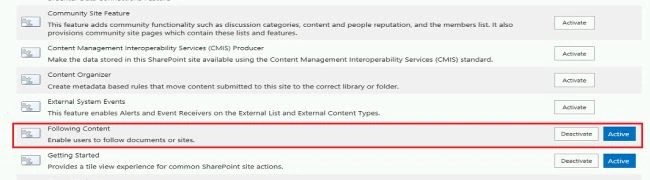
(Click here to view larger image)
Jishin KPosted Oct 22, 2018, 2:06 AM
Have same issue with the SharePoint online ,Following content is enabled but even though it's not displaying
Manish RanglaniPosted Mar 22, 2017, 11:56 PM
Follow is not available in modern document library even though this feature is enabled. Any idea?