

We often use .xsd files in our ASP.net projects to create xsd (XSD: XML Schema Definition, used to validate XML) schema.
However, sometimes when we attempt to update the dataset the Visual Basic/ C-Sharp code behind the scene does not get updated i.e., dataset.designer.vb or dataset.designer.cs does not get updated.
You can force Visual Studio 2008 to use a .xsd file and to have it create/update its designer code.
There, is a simple workaround for this,
- Click the .xsd file from Visual Studio 2008 Solution Explorer
- Go into the .xsd file’s Properties
- Set the "Build Action" to "Content"
- Update the "Custom Tool" property to "MSDataSetGenerator". You need to write it in the Text Box Provided.
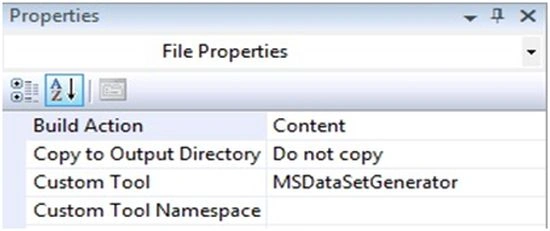
And that’s it. This will automatically regenerate the dataset.designer.vb or dataset.designer.cs file. The next time you save the XSD file you should be able to see the dataset file, dataset.designer.cs (or .vb) file, for your XSD.
Chlara AnecdotePosted Aug 4, 2018, 12:51 AM
Thank you for a little enlightenment, sir.I want to know coding to save, edit and delete records that can update my dataset using vb.net 2010.Please let me know. thanks