

Please refer to my previous article regarding "Set Custom App Properties in SharePoint App Model."
Step 1: Create SharePoint hosted App using Visual Studio 2013. Go to solution explorer.
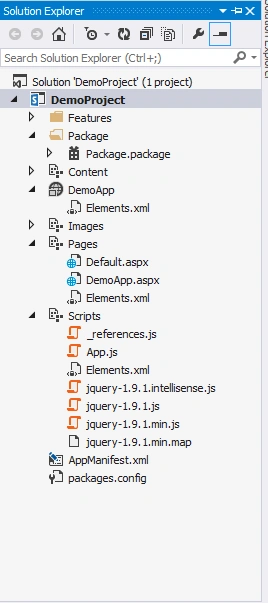
Step 2: Open App.js file.
Step 3: Open App.js file. Copy and paste the following function in App.js file.
- function getQueryStringParameter(param)
- {
- var params = document.URL.split("?")[1].split("&");
- for (var i = 0; i < params.length; i = i + 1)
- {
- var singleParam = params[i].split("=");
- if (singleParam[0] == param)
- {
- return singleParam[1];
- }
- }
- }
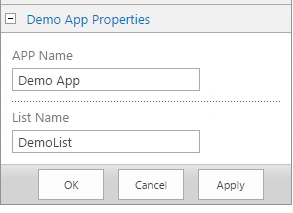
- var hostWebUrl = decodeURIComponent(getQueryStringParameter('SPHostUrl'));
- var appWebUrl = decodeURIComponent(getQueryStringParameter('SPAppWebUrl'));
- var listName = decodeURIComponent(getQueryStringParameter('ListName'));
- var AppName = decodeURIComponent(getQueryStringParameter('AppName'));
- console.log("List Name: " + listName);
- console.log("App Name: " + AppName);

Summary
In this article we have explored how to get custom App properties value from the SharePoint App using JavaScript.
Join the conversation! Your thoughts help the community grow.