

Requirement
This is another blog from my training experience on SharePoint 2013 and SharePoint Online. In this blog, I will show two different scenario, where we need users from SharePoint online site using PowerShell.
- Get all users in a specified Group.
- Get a specific user by his/her login name.
Syntax for 1st Scenario:
- Connect to SharePoint Online by using the following PowerShell command. It takes the URL of our tenant admin and a username. Then it will ask for password.
- Connect-SPOService -Url https://moharanakirti-admin.sharepoint.com [email protected]
- Get all user of a specified group.
Get-SPOUser -Site https://moharanakirti.sharepoint.com/sites/kirti -Group "Kirti RND Members"
Output:
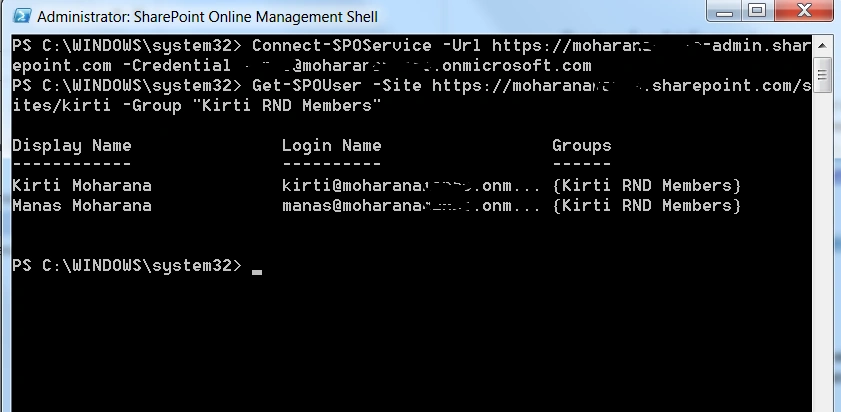
After running the above cmdlets, we will see get all available users of a specified SharePoint Security Groups in SharePoint Online site as shown in following figures.
Syntax for 2nd Scenario:
- Connect to SharePoint Online by using the following PowerShell command. It takes the URL of our tenant admin and a username. Then it will ask for password.
- Connect-SPOService -Url https://moharanakirti-admin.sharepoint.com [email protected]
- Get a specific user of a site by login name.
- Get-SPOUser -Site https://moharanakirti.sharepoint.com/sites/kirti [email protected]
Output:
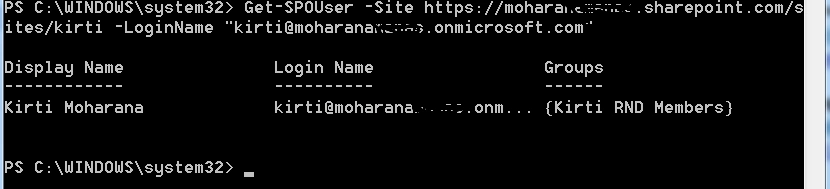
After running the above cmdlets, we will see get the specified user by its log in name in SharePoint Online site as shown in following figures.
Hope this blog will help in some cases. Thank You.
Santhakumar MunuswamyPosted Dec 31, 2015, 1:45 AM
Thanks for nice share