Introduction
This blog gives an illustration how to use Win32_Processor class to get
details about your processor. this Win32_processor class belongs System.Management namespace. before starting example i would like to give a
explanation about Win32_processor class. so that you will have little knowledge
about Win32_processor class.
Win32_processor
The Win32_Processor WMI
class represents a device that can interpret a sequence of instructions on a
computer running on a Windows operating system. On a multiprocessor computer,
one instance of the Win32_Processor class exists for each processor.
lets start work with Win32_processor class, you can get properties of
Win32_processor using ManagementObjectSearcher class which comes under
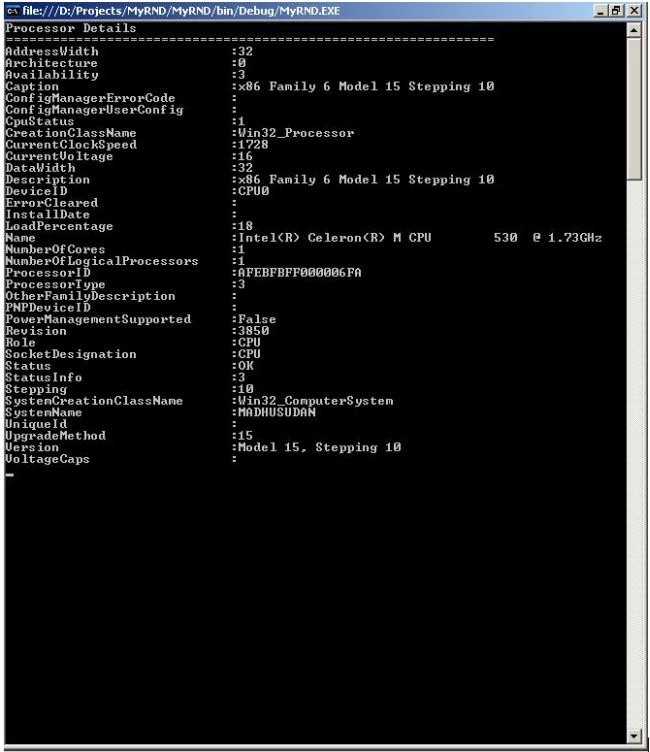
System.Management namespace. this following illustration lists all the
properties which contains related information about your local processor.
Code Example
ManagementObjectSearcher MOS = new
ManagementObjectSearcher("SELECT * FROM
Win32_Processor");
foreach (ManagementObject MO
in MOS.Get())
{
Console.WriteLine("Processor Details");
Console.WriteLine("===============================================================");
Console.WriteLine("AddressWidth :"+MO["AddressWidth"]);
Console.WriteLine("Architecture :"+MO["Architecture"]);
Console.WriteLine("Availability :"+MO["Availability"]);
Console.WriteLine("Caption :"+MO["Caption"]);
Console.WriteLine("ConfigManagerErrorCode :"+MO["ConfigManagerErrorCode"]);
Console.WriteLine("ConfigManagerUserConfig :"+MO["ConfigManagerUserConfig"]);
Console.WriteLine("CpuStatus :"+MO["CpuStatus"]);
Console.WriteLine("CreationClassName :"+MO["CreationClassName"]);
Console.WriteLine("CurrentClockSpeed :"+MO["CurrentClockSpeed"]);
Console.WriteLine("CurrentVoltage :"+MO["CurrentVoltage"]);
Console.WriteLine("DataWidth :"+MO["DataWidth"]);
Console.WriteLine("Description :"+MO["Description"]);
Console.WriteLine("DeviceID :"+MO["DeviceID"]);
Console.WriteLine("ErrorCleared :"+MO["ErrorCleared"]);
Console.WriteLine("InstallDate :"+MO["InstallDate"]);
Console.WriteLine("LoadPercentage :"+MO["LoadPercentage"]);
Console.WriteLine("Name :"+MO["Name"]);
Console.WriteLine("NumberOfCores :"+MO["NumberOfCores"]);
Console.WriteLine("NumberOfLogicalProcessors :"+MO["NumberOfLogicalProcessors"]);
Console.WriteLine("ProcessorID :"+MO["ProcessorID"]);
Console.WriteLine("ProcessorType :"+MO["ProcessorType"]);
Console.WriteLine("OtherFamilyDescription :"+MO["OtherFamilyDescription"]);
Console.WriteLine("PNPDeviceID :"+MO["PNPDeviceID"]);
Console.WriteLine("PowerManagementSupported :"+MO["PowerManagementSupported"]);
Console.WriteLine("Revision :"+MO["Revision"]);
Console.WriteLine("Role :"+MO["Role"]);
Console.WriteLine("SocketDesignation :"+MO["SocketDesignation"]);
Console.WriteLine("Status :"+MO["Status"]);
Console.WriteLine("StatusInfo :"+MO["StatusInfo"]);
Console.WriteLine("Stepping :"+MO["Stepping"]);
Console.WriteLine("SystemCreationClassName :"+MO["SystemCreationClassName"]);
Console.WriteLine("SystemName :"+MO["SystemName"]);
Console.WriteLine("UniqueId :"+MO["UniqueId"]);
Console.WriteLine("UpgradeMethod :"+MO["UpgradeMethod"]);
Console.WriteLine("Version :"+MO["Version"]);
Console.WriteLine("VoltageCaps :"+MO["VoltageCaps"]);
Output

Join the conversation! Your thoughts help the community grow.