

The DirectionsService in Google Maps helps us to calculate distance between source and destination and the duration it will take for travelling.
The Autocomplete widget is used to provide a type-ahead search box. It is operated by using Google API Key.
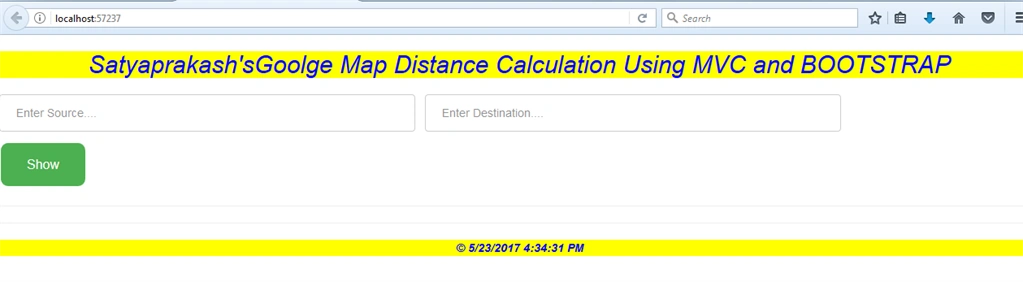
The source and destination textbox show us places.
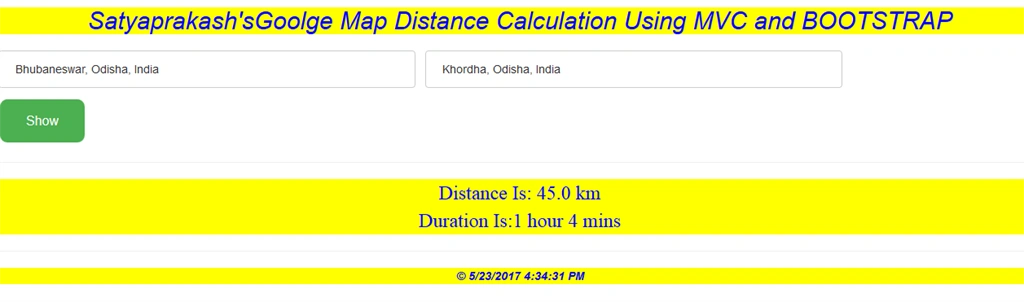
After we put the source and the destination, then click on go button and you will get the realtime duration and distance details.
For more details , visit my blogs and articles based on Google Maps.
http://www.c-sharpcorner.com/members/satyaprakash-samantaray
Steps to be followed
Step1
As I described earlier, create a Controller action method named "DistanceCalculation" in "HomeController.cs".
- using System;
- using System.Collections.Generic;
- using System.Linq;
- using System.Web;
- using System.Web.Mvc;
- namespace SatyaGoogleMapBootstrapMVC.Controllers
- {
- public class HomeController : Controller
- {
- //
- // GET: /Home/
- public ActionResult Index()
- {
- return View();
- }
- public ActionResult Details()
- {
- return View();
- }
- public ActionResult Animate()
- {
- return View();
- }
- public ActionResult Icon()
- {
- return View();
- }
- public ActionResult Steet()
- {
- return View();
- }
- public ActionResult ModeTravel()
- {
- return View();
- }
- public ActionResult Traffic()
- {
- return View();
- }
- public ActionResult RouteColor()
- {
- return View();
- }
- public ActionResult DistanceCalculation()
- {
- return View();
- }
- }
- }
- @{
- ViewBag.Title = "Satyaprakash Goolge Map Distance Calculation";
- }
- <title>@ViewBag.Title</title>
- <h2 style="background-color: Yellow;color: Blue; text-align: center; font-style: oblique">Satyaprakash'sGoolge Map Distance Calculation Using MVC and BOOTSTRAP</h2>
- <meta charset="utf-8">
- <meta name="viewport" content="width=device-width, initial-scale=1">
- <link rel="stylesheet" href="https://maxcdn.bootstrapcdn.com/bootstrap/3.3.7/css/bootstrap.min.css">
- <script src="https://ajax.googleapis.com/ajax/libs/jquery/3.2.1/jquery.min.js"></script>
- <script src="https://maxcdn.bootstrapcdn.com/bootstrap/3.3.7/js/bootstrap.min.js"></script>
- <title>Places Searchbox</title>
- <style>
- #dvMap {
- height: 50%;
- }
- .button {
- background-color: #4CAF50;
- border: none;
- color: white;
- padding: 15px 32px;
- text-align: center;
- text-decoration: none;
- display: inline-block;
- font-size: 16px;
- margin: 4px 2px;
- cursor: pointer;
- }
- .button4 {
- border-radius: 9px;
- }
- input[type=text], select {
- width: 40%;
- padding: 12px 20px;
- margin: 10px 0;
- display: inline-block;
- border: 1px solid #ccc;
- border-radius: 4px;
- box-sizing: border-box;
- }
- </style>
- <script src="https://maps.googleapis.com/maps/api/js?key=AIzaSyCkVZYQFe4YYva_g5ulymGDt9EBoVjjZJ8&libraries=places">
- </script>
- <script type="text/javascript">
- var source, destination;
- var directionsDisplay;
- var directionsService = new google.maps.DirectionsService();
- google.maps.event.addDomListener(window, 'load', function () {
- new google.maps.places.SearchBox(document.getElementById('txtSource'));
- new google.maps.places.SearchBox(document.getElementById('txtDestination'));
- directionsDisplay = new google.maps.DirectionsRenderer({ 'draggable': true });
- });
- function GetRoute() {
- var mumbai = new google.maps.LatLng(18.9750, 72.8258);
- var mapOptions = {
- zoom: 7,
- center: mumbai
- };
- source = document.getElementById("txtSource").value;
- destination = document.getElementById("txtDestination").value;
- var request = {
- origin: source,
- destination: destination,
- travelMode: google.maps.TravelMode.DRIVING
- };
- directionsService.route(request, function (response, status) {
- if (status == google.maps.DirectionsStatus.OK) {
- directionsDisplay.setDirections(response);
- }
- });
- var service = new google.maps.DistanceMatrixService();
- service.getDistanceMatrix({
- origins: [source],
- destinations: [destination],
- travelMode: google.maps.TravelMode.DRIVING,
- unitSystem: google.maps.UnitSystem.METRIC,
- avoidHighways: false,
- avoidTolls: false
- }, function (response, status) {
- if (status == google.maps.DistanceMatrixStatus.OK && response.rows[0].elements[0].status != "ZERO_RESULTS") {
- var distance = response.rows[0].elements[0].distance.text;
- var duration = response.rows[0].elements[0].duration.text;
- var dvDistance = document.getElementById("dvDistance");
- dvDistance.innerHTML = "";
- dvDistance.innerHTML += "Distance Is: " + distance + "<br />";
- dvDistance.innerHTML += "Duration Is:" + duration;
- //alert(dvDistance.innerHTML);
- } else {
- alert("Your Request For Distance Not Available");
- }
- });
- }
- </script>
- <input type="text" id="txtSource" placeholder="Enter Source...." />
- <input type="text" id="txtDestination" placeholder="Enter Destination...." />
- <br />
- <input type="button" value="Show" onclick="GetRoute()" class="button button4" />
- <hr />
- <div id="dvDistance" style="font-size:x-large; font-family: Arial Black; background-color: Yellow; color: Blue; text-align: center">
- </div>
- <hr />
- <footer>
- <p style="background-color: Yellow; font-weight: bold; color:blue; text-align: center; font-style: oblique">© @DateTime.Now.ToLocalTime()</p> @*Add Date Time*@
- </footer>
For getting direction and route.
- source = document.getElementById("txtSource").value;
- destination = document.getElementById("txtDestination").value;
- var request = {
- origin: source,
- destination: destination,
- travelMode: google.maps.TravelMode.DRIVING
- };
- directionsService.route(request, function (response, status) {
- if (status == google.maps.DirectionsStatus.OK) {
- directionsDisplay.setDirections(response);
- }
- });
- var service = new google.maps.DistanceMatrixService();
- service.getDistanceMatrix({
- origins: [source],
- destinations: [destination],
- travelMode: google.maps.TravelMode.DRIVING,
- unitSystem: google.maps.UnitSystem.METRIC,
- avoidHighways: false,
- avoidTolls: false
- }, function (response, status) {
- if (status == google.maps.DistanceMatrixStatus.OK && response.rows[0].elements[0].status != "ZERO_RESULTS") {
- var distance = response.rows[0].elements[0].distance.text;
- var duration = response.rows[0].elements[0].duration.text;
- var dvDistance = document.getElementById("dvDistance");
- dvDistance.innerHTML = "";
- dvDistance.innerHTML += "Distance Is: " + distance + "<br />";
- dvDistance.innerHTML += "Duration Is:" + duration;
- //alert(dvDistance.innerHTML);
- } else {
- alert("Your Request For Distance Not Available");
- }
- });
- var mumbai = new google.maps.LatLng(18.9750, 72.8258);
- var mapOptions = {
- zoom: 7,
- center: mumbai
- function GetRoute() {
- }
- <input type="text" id="txtSource" placeholder="Enter Source...." />
- <input type="text" id="txtDestination" placeholder="Enter Destination...." />
- <input type="button" value="Show" onclick="GetRoute()" class="button button4" />
- <hr />
- <div id="dvDistance" style="font-size:x-large; font-family: Arial Black; background-color: Yellow; color: Blue; text-align: center">
- </div>
- function (response, status) {
- if (status == google.maps.DistanceMatrixStatus.OK && response.rows[0].elements[0].status != "ZERO_RESULTS") {
- var distance = response.rows[0].elements[0].distance.text;
- var duration = response.rows[0].elements[0].duration.text;
- var dvDistance = document.getElementById("dvDistance");
- dvDistance.innerHTML = "";
- dvDistance.innerHTML += "Distance Is: " + distance + "<br />";
- dvDistance.innerHTML += "Duration Is:" + duration;
- //alert(dvDistance.innerHTML);
- } else {
- alert("Your Request For Distance Not Available");
- }
- });
- else {
- alert("Your Request For Distance Not Available");
- }

Desktop View
For valid data
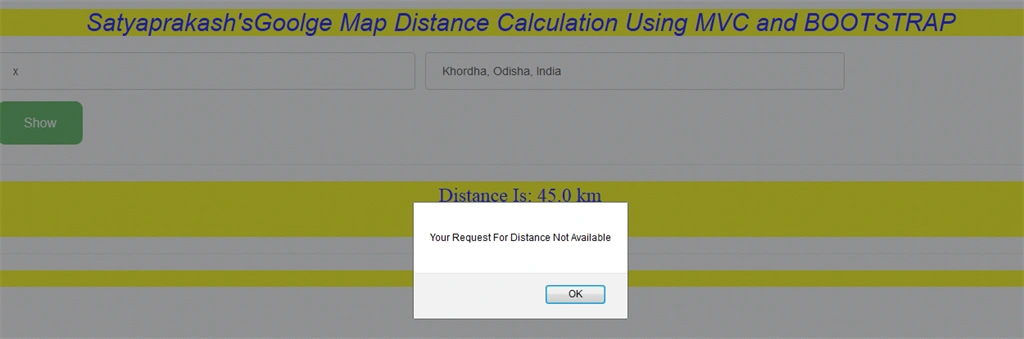

Invalid data because I put 'X' in the source textbox part.
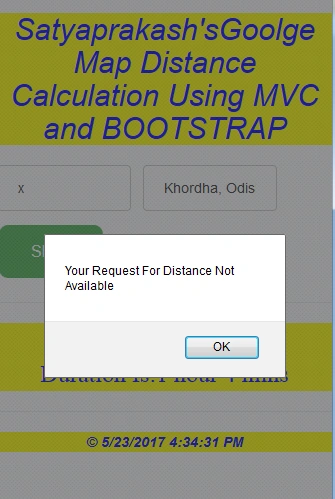
Mobile View
For invalid data
For invalid data
GIF image for better undertstanding.
SUMMARY
- Calculate distance and duration calculation between places using Google API Key.
- How to implement it in MVC and Bootstrap.
- Autocomplete widget link with textboxes.
Viknaraj ManogararajahPosted Aug 6, 2018, 11:36 AM
nice article
Farhan AhmedPosted Jul 24, 2018, 3:48 AM
Nice..........
Pradeep YadavPosted May 24, 2017, 10:07 AM
Nice!!! Thanks for sharing.
Former memberPosted May 24, 2017, 7:51 AM
Yes but if you upload your project code in zip file then people can run your project so quickly in their pc.
Former memberPosted May 24, 2017, 7:35 AM
Nice one but it would be great if you provide sample code in zip file to download.