
Creating a DeSerializator is like reinventing the wheel but at the same time, it is a great task. Obviously, if the DeSerializator is not being made only for a specific class, then we have to use reflection, and during the implementation, we can meet many difficulties and interesting problems.
The basic idea is to use a simple XML with this structure.
<tag>value</tag>
OR NOT USED TAG
<tag/>
CONCEPTION
An XML is a tree where there is a root element, and the tree can have many branches. The leaf element is actually the value element and each element in the path is a branch.
The class object that we want to instantiate by XML contains everything that is in the XML but there is no surity if the XML contains everything that is in the class.
It means that we have to traverse on the XML tree and instantiate the objects in the class accordingly.
I choose Pre-order traversal which works in the way shown below.
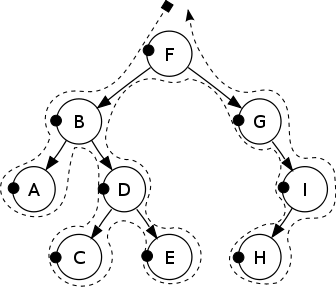
Although it is a binary tree we can use this approach on our non-binary XML tree as well.
IMPLEMENTATION
For the sake of simplicity, first create a tree object from the XML and use this object from now on.
The node object of the tree contains the tag name which is the type of the object in the class, the possible value and possible child nodes,
- private class Node
- {
- public int level { get; set; }
- public int index { get; set; }
- public string tag { get; set; }
- public string value { get; set; }
- public List<Node> nodes { get; set; }
- public Node()
- {
- nodes = new List<Node>();
- }
- }
Get the text from the XML file and create a concatenated string from it by removing the possible namespaces and commented out parts,
- private string GetTextFromXml(XDocument doc)
- {
- //Remove Namespaces from the tags
- doc.Descendants().Attributes().Where(x => x.IsNamespaceDeclaration).Remove();
- foreach (var elem in doc.Descendants())
- elem.Name = elem.Name.LocalName;
- var xmlDocument = new XmlDocument();
- xmlDocument.Load(doc.CreateReader());
- string text = xmlDocument.OuterXml;
- //Remove breaks
- text = text.Replace("\n", "");
- //Remove whitespaces
- text = Regex.Replace(text, @"\s+", "");
- //Remove commented out tags
- text = Regex.Replace(text, @"(<!--)(.*?)(-->)", "");
- return text;
- }
When the concatenated string already exists, we can build the tree by recursion using regular expression in order to get the elements along with values.
- private void GetTag(string tag, Node n)
- {
- //If tag doesn't contain close tag '</' then the end of the branch is reached
- if (!tag.Contains("</")) { return; };
- //Get the complete XML node along with value
- foreach (Match match in Regex.Matches(tag, @"<([^>]+)>(.*?)</\1>"))
- {
- Node node = new Node();
- //Next level of the tree
- node.level = n.level + 1;
- //Name of the tag
- node.tag = match.Groups[1].ToString();
- //Value of the tag (maybe null)
- if (!match.Groups[2].Value.Contains("/")) node.value = match.Groups[2].Value;
- n.nodes.Add(node);
- //Next index on the current level
- node.index = n.nodes.Count;
- //Recursion
- GetTag(match.Groups[2].Value, node);
- }
- }
When we have a Node object which is a tree containing the values, we can traverse on the tree and create the class.
The procedure of the instantiation is simple but not so straight forward in many cases, like arrays or interfaces.
DIFFICULTIES
The class may contains arrays.
Instantiation of an array is easy if we know its length.
- Array.CreateInstance( typeof(Int32), 5 );
The class may contain interface. Obviously, we can't instantiate an interface so we have to find the behind class that implements it.
How to check if the property is a list or array
We can do it differently like this one but we have to be careful because it will be true for String type as well.
- typeof(IEnumerable).IsAssignableFrom(propInfo.PropertyType)
How to get the generic type of a list items
Obviously, the type of the PropertyInfo is List and not the type of its item. We can't instantiate a string object with the activator because it doesn't have parameterless constructor
- Activator.CreateInstance(propInfo.PropertyType) //string à Error!
SOLUTION
The traversal method completed with explanations in the code,
- private void Traverse(Node n, object o, Helper helperObj)
- {
- //All properties of the curent object
- PropertyInfo[] propInfos = o.GetType().GetProperties();
- PropertyInfo propInfo = null;
- //If there is no more children then the end of the branch is reached
- if (n.nodes.Count == 0)
- {
- return;
- }
- //Looping on the child nodes of the current object
- foreach (Node node in n.nodes)
- {
- object instance = null;
- object obj = null;
- //Get the actual property of the current node
- //Maybe it's name defined in an XmlArrayItemAttribute or an XmlElementAttribute
- propInfo = Array.Exists(propInfos, x => x.Name == node.tag) ?
- propInfos.Where(x => x.Name == node.tag).First() :
- Array.Exists(propInfos, y =>
- {
- var attribs = y.GetCustomAttributes(false);
- return Array.Exists(attribs, z =>
- {
- Type attribType = z.GetType();
- if (attribType == typeof(XmlArrayItemAttribute))
- {
- return ((XmlArrayItemAttribute)z).ElementName == node.tag;
- }
- else if (attribType == typeof(XmlElementAttribute))
- {
- return ((XmlElementAttribute)z).ElementName == node.tag;
- }
- return false;
- });
- }) ?
- propInfos.First(v => v.GetCustomAttributes(false).First(m =>
- (m.GetType() == typeof(XmlArrayItemAttribute) &&
- ((XmlArrayItemAttribute)m).ElementName == node.tag) ||
- (m.GetType() == typeof(XmlElementAttribute) &&
- ((XmlElementAttribute)m).ElementName == node.tag)) != null) :
- null;
- if (propInfo != null)
- {
- //If the property is an IEnumerable and not a String
- //then create a generic list with the type of the property
- if (typeof(IEnumerable).IsAssignableFrom(propInfo.PropertyType) &&
- (propInfo.PropertyType.Name != "String"))
- {
- var listType = typeof(List<>);
- //Get the proper generic type
- var genericType = propInfo.PropertyType.IsArray ?
- listType.MakeGenericType(Type.GetType(propInfo.PropertyType.FullName.Replace("[]", ""))) :
- listType.MakeGenericType(Type.GetType(propInfo.PropertyType.FullName).GetGenericArguments()[0]);
- //Create the generic instance
- instance = Activator.CreateInstance(genericType);
- //Create the concrete item instance
- var itemInstance = (propInfo.PropertyType.Name == "String[]" ||
- instance.GetType().GetGenericArguments().Single() == typeof(string)) ?
- new String(new Char[] { ' ' }) //If string
- : instance.GetType().GetGenericArguments().Single().IsInterface ? //If interface
- Activator.CreateInstance(Assembly.GetExecutingAssembly().GetTypes().First
- (x => x.GetInterfaces().Contains(instance.GetType().GetGenericArguments().Single()) && x.GetConstructor(Type.EmptyTypes) != null)) :
- Activator.CreateInstance(instance.GetType().GetGenericArguments().Single()); //If other
- //If the object already exists then don't need new instance
- object temp = propInfo.GetValue(o, null);
- //If the collection already exists
- if (temp != null)
- {
- //and it's an array then fill the created temporary list
- //with it's exisiting items
- if (propInfo.PropertyType.IsArray)
- {
- foreach (object item in ((Array)temp))
- {
- instance.GetType().GetMethod("Add").Invoke(instance, new[] { item });
- }
- }
- //or set the created instance to the existing one
- else
- instance = temp;
- }
- //Add the created item instance to the generic list
- instance.GetType().GetMethod("Add").Invoke(instance, new[] { itemInstance });
- helperObj.HelperObject = instance;
- //If the property is an array then loop through
- //the list and fill a new array with the items
- if (propInfo.PropertyType.IsArray)
- {
- //Initialze the length of the array in advance
- //by the number of the current child nodes.
- //The first one will be set and the others are null for the time being
- var CountofItem = node.nodes.Count;
- var array = Array.CreateInstance(itemInstance.GetType(), CountofItem);
- for (int j = 0; j < ((IList)instance).Count; j++)
- {
- array.SetValue(((IList)instance)[j], j);
- }
- //Finally set the array to the instance
- instance = array;
- helperObj.ItemIndex = 0;
- helperObj.HelperObject = instance;
- }
- obj = itemInstance;
- }
- else //If property is NOT Enumerable
- {
- //If the property is value type
- if (propInfo.PropertyType.IsValueType)
- {
- TypeConverter tc = TypeDescriptor.GetConverter(propInfo.PropertyType);
- instance = tc.ConvertFromString(node.value);
- } //or it's a String
- else if (propInfo.PropertyType.Name == "String")
- {
- instance = new String(node.value.ToCharArray());
- } //or it's a class
- else if (propInfo.PropertyType.IsClass)
- {
- instance = Activator.CreateInstance(propInfo.PropertyType);
- } //or it's an interface
- else if (propInfo.PropertyType.IsInterface)
- {
- //Find the implementation of the interface
- //Get all executing assemblies
- Type[] types = Assembly.GetExecutingAssembly().GetTypes();
- //Get the implemented type
- Type implementedType = types.First(x =>
- x.GetInterfaces().Contains(propInfo.PropertyType) &&
- x.GetConstructor(Type.EmptyTypes) != null);
- instance = Activator.CreateInstance(implementedType);
- }
- obj = instance;
- }
- //Finally set the property with the created object
- propInfo.SetValue(o, instance, null);
- }
- else
- {
- //If the current node index is 1 then it is the first item of the collection
- //therefore we use the existing first item and don't create a newer one
- if (node.index==1)
- {
- obj = o;
- } //Otherwise create a new object
- else if (o.GetType().Name != "String")
- obj = Activator.CreateInstance(o.GetType());
- else //Except if it is a String object
- obj = new String(new char[] { });
- //If the Node has value then set the value of the object
- if (node.value != null)
- {
- if (obj.GetType().IsValueType)
- {
- TypeConverter tc = TypeDescriptor.GetConverter(obj.GetType());
- obj = tc.ConvertFromString(node.value);
- } //or it's a String
- else if (obj.GetType().Name == "String")
- {
- obj = new String(node.value.ToCharArray());
- }
- }
- //If the HelperObject is a List or Array
- if (helperObj.HelperObject != null)
- {
- //If the collection is an array
- if (helperObj.HelperObject.GetType().IsArray)
- {
- //Set the created new object to the next item by using
- //the itemIndex of the Helper
- if (((Array)helperObj.HelperObject).GetValue(0).GetType() == obj.GetType())
- {
- ((Array)helperObj.HelperObject).SetValue(obj, helperObj.ItemIndex);
- helperObj.ItemIndex++;
- }
- else
- throw new Exception("Not possible to set this <" +node.tag+ "> into the class object!");
- }
- //If the collection is a generic list
- else if (typeof(IEnumerable).IsAssignableFrom(helperObj.HelperObject.GetType()) &&
- (helperObj.HelperObject.GetType().Name != "String"))
- {
- //If the current node index is 1 then it is the first item of the collection
- //therefore we set this item with the object
- if (node.index == 1)
- {
- ((IList)helperObj.HelperObject)[0] = obj;
- } //Otherwise add as a new item
- else
- ((IList)helperObj.HelperObject).Add(obj);
- }
- }
- //If the HelperObject is null then there isn't object
- //for the current node
- else
- throw new Exception("Not possible to set this <" +node.tag+ "> into the class object!");
- }
- //Recursion
- Traverse(node, obj, helperObj);
- }
- }
- class Helper
- {
- public int ItemIndex { get; set; }
- public object HelperObject { get; set; }
- }
The object parameter will be the class object that we want to instantiate.
- public Deserializator(string path, object obj)
- {
- if (File.Exists(path))
- {
- string[] lines = File.ReadAllLines(path);
- XDocument doc = XDocument.Parse(String.Join("", lines));
- string text = GetTextFromXml(doc);
- Node n = new Node() { tag = "root", index = 0 };
- GetTag(text, n);
- Helper helperObj = new Helper();
- Traverse(n.nodes[0], obj, helperObj);
- }
- }
CONCLUSION
Although, this is an unnecessary solution as DeSerializator already exists for XML, but it was an interesting challenge to implement. It revealed some special cases of reflection and traversal. It can be interesting to implement other possible property types as well. Please let me know if you have any constructive ideas.
Join the conversation! Your thoughts help the community grow.