
Steps for activating on public site from here:
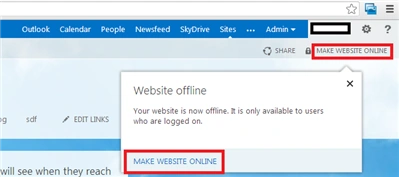
- Navigate to the Office 365 admin center.
- Click Sites on the top link bar.
- Click Public site.
- Click MAKE WEBSITE ONLINE at the top right corner of the page.
Thanks for learning my blogs!!

Join the conversation! Your thoughts help the community grow.
Sign in to leave a comment
It is the same account you read, post and publish with — and you will come straight back to this page.
Steps for activating on public site from here:
Vijay SPosted Jun 17, 2015, 9:06 AM
Good one