

I have created a custom list which will have the following columns.
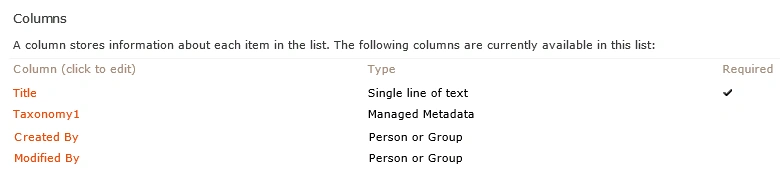
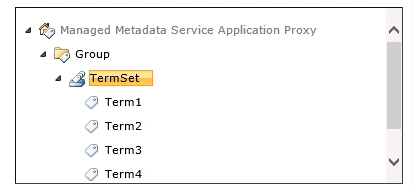
I have created a farm solution in which I have added a custom application page. In this application page I have added the taxonomy field.
In the application page (ApplicationPage.aspx) please add the following highlighted code.
- protected void Page_Load(object sender, EventArgs e)
- {
- GetTaxonomyFieldTermset("Taxonomy", "Taxonomy1", this.taxCtrl1);
- }
- private void GetTaxonomyFieldTermset(string listName, string fieldName, TaxonomyWebTaggingControl taxCtrl)
- {
- SPList list = SPContext.Current.Web.Lists.TryGetList(listName);
- if (list != null)
- {
- TaxonomyField taxonomyField = list.Fields[fieldName] as TaxonomyField;
- if (taxonomyField != null)
- {
- taxCtrl.SspId.Add(taxonomyField.SspId);
- taxCtrl.TermSetId.Add(taxonomyField.TermSetId);
- }
- }
- }
- protected void btnGet_Click(object sender, EventArgs e)
- { TaxonomyFieldValueCollection taxFieldValColl=TaxonomyFieldControl.GetTaxonomyCollection(this.taxCtrl1.Text);
- foreach (TaxonomyFieldValue taxFieldVal in taxFieldValColl)
- {
- lbl.Text += taxFieldVal.Label;
- }
- }
Deploy the solution and navigate to the custom page. You could be able to see the taxonomy field control in the custom application page. Select the term for the taxonomy field and then click on the button. Selected term is displayed as shown below.
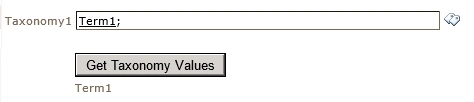
Thus in this blog you have seen how to add a taxonomy field control in a custom SharePoint page.
Gowtham RajamanickamPosted Mar 19, 2015, 10:14 PM
simple and superb...