

Introduction
To add combobox in ag-grid first of all we have to have knowledge of cell render. Through cell render we can edit our ag-grid column with drop down or textbox.
To add combobox in ag-grid first of all we have to have knowledge of cell render. Through cell render we can edit our ag-grid column with drop down or textbox.
We can bind our dropdown in two ways: statically and dynamically
In this I will show statically how to bind dropdown.
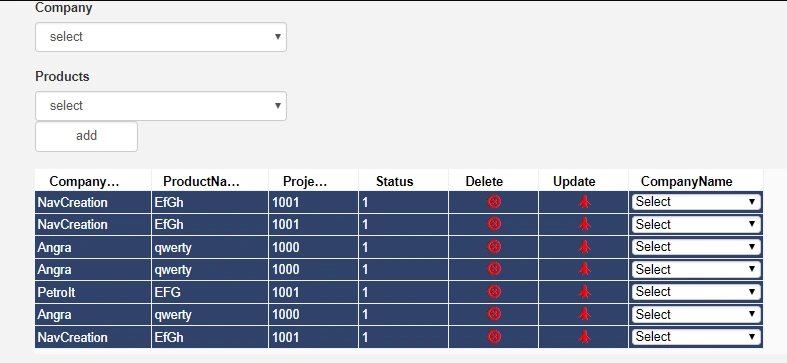
Now In This Image I inserted DropDown.
Firstly let's see the code part of this.
In this I will show statically how to bind dropdown.
Now In This Image I inserted DropDown.
Firstly let's see the code part of this.
- $scope.gridOptions = {
- columnDefs: [{
- headerName: "CompanyName",
- field: "CompanyName",
- editable: true,
- width: 130
- }, {
- headerName: 'ProductName',
- field: "ProductName",
- editable: true,
- width: 130
- }, {
- headerName: "ProjectID",
- field: "ProjectID",
- editable: true,
- width: 100
- }, {
- headerName: "Status",
- field: "Status",
- editable: true,
- width: 100
- }, {
- headerName: "Delete",
- field: "Delete",
- editable: true,
- editable: false,
- width: 100,
- cellRenderer: customEditorImageWQ
- }, {
- headerName: "Update",
- field: "Update",
- editable: true,
- editable: false,
- width: 100,
- cellRenderer: customEditor
- }, {
- headerName: "CompanyName",
- field: "CompanyName",
- width: 150,
- cellRenderer: CustomCombobox
- }, ],
- rowData: null,
- enableColResize: true,
- enableSorting: true,
- rowSelection: 'multiple',
- angularCompileRows: true,
- rowDeselection: true,
- onRowClicked: RowClick,
- enableFilter: true,
- editable: true,
- suppressRowClickSelection: true,
- };
- function CustomCombobox(params) {
- //Find RowIndex
- var rowIndex = params.rowIndex;
- //FindColoumn Name
- var Column = params.eGridCell.attributes.colId;
- //FindGridData
- var WeldGridData = $scope.gridOptions.rowData;
- //create select element using javascript
- var eSelect = document.createElement("select");
- //Set attributes
- eSelect.setAttribute('class', 'custom-select form-control');
- eSelect.setAttribute('style', 'padding:0px');
- eSelect.setAttribute('name', params.colDef.field);
- eSelect.setAttribute('id', params.colDef.field + "_" + rowIndex);
- //get the value of the select option
- var value = params.data.CompanyID;
- //create the default option of the select element
- var eOption = document.createElement("option");
- eOption.text = "Select";
- eOption.value = "";
- eSelect.appendChild(eOption);
- if (params.colDef.field == "CompanyName") {
- CompanyName = $scope.CompanyList;
- var companyid = params.data.CompanyID;
- var eOptionVal = document.createElement("option");
- //Statical set data in grid ComboBox
- eOptionVal.text = "Angra";
- eOptionVal.value = 1;
- eSelect.appendChild(eOptionVal);
- var eOption = document.createElement("option");
- eOption.text = "Navcreation";
- eOption.value = "2";
- eSelect.appendChild(eOption);
- }
- return eSelect;
- }
This Is coding part in js file through this I bind my dropdown
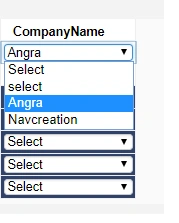
If you want to know how to add dropdown dynamically then visit my blog.
If you want to know how to add dropdown dynamically then visit my blog.
Thanks for visiting; please do comment
Join the conversation! Your thoughts help the community grow.