

In this Blog I'm going tell you How to bind a date range in a Dropdownlist excluding Sunday at both starting date and end date.
Suppose I have to bind 4 to 7 days starting from today's date.
Like today's date is 20th May 2015, then the displayed date will be 25th to 28th May 2015. Here I'm excluding today's date. stimeperiod = 3; etimeperiod = 7;
So in code behind
- int stimeperiod = 3;
- int etimeperiod = 7;
- //For Starting Date
- DateTime TODAYDATE = DateTime.Now;
- DateTime StartDate = DateTime.Now; ;
- int DayInterval = 1;
- int count = 0;
- while (TODAYDATE.AddDays(DayInterval) <= DateTime.Now.AddDays(stimeperiod))
- {
- if (TODAYDATE.AddDays(DayInterval).DayOfWeek != DayOfWeek.Sunday)
- {
- StartDate = TODAYDATE.AddDays(DayInterval);
- TODAYDATE = TODAYDATE.AddDays(DayInterval);
- }
- else
- {
- TODAYDATE = TODAYDATE.AddDays(DayInterval);
- stimeperiod = stimeperiod + 1;
- count++;
- }
- }
- //For Ending Date
- DateTime EndDate = DateTime.Now.AddDays(etimeperiod);
- if (count > 0) { EndDate = EndDate.AddDays(1); }
- List<DateTime> datelist = new List<DateTime>();
- while (StartDate.AddDays(DayInterval) <= EndDate)
- {
- if (StartDate.AddDays(DayInterval).DayOfWeek != DayOfWeek.Sunday)
- {
- StartDate = StartDate.AddDays(DayInterval);
- datelist.Add(StartDate);
- }
- else
- {
- EndDate = EndDate.AddDays(1);
- StartDate = StartDate.AddDays(DayInterval);
- }
- }
- DDL_Date.DataSource = datelist;
- DDL_Date.DataBind();
- DDL_Date.Items.Insert(0, new ListItem("--Select Date--", "0"));
And in aspx page
Output :-
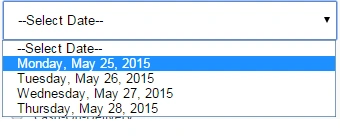
- <asp:DropDownList runat="server" ID="DDL_Date" DataTextFormatString="{0:D}" />
Hope you liked it... :)
All Comments are welcomed..
Santhakumar MunuswamyPosted May 21, 2015, 3:09 PM
Nice