

Introduction
In this blog I will tell you about how to bind Items in to the Gridview in Windows Store Apps using XAML code.
Step 1
Add Gridview Control from Toolbox panel
- Assigne the name of Gridview using x:Name="" attribute like here I mention the name as gridView1
- Adding the items to the grid view by populating the
itemscollection or by binding the
ItemSource property to a data source.
OR
We can set directly using x:String attributes in XAML
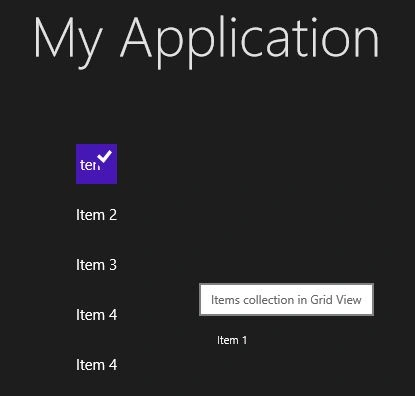
<GridView x:Name="gridView1" SelectionChanged="GridView_SelectionChanged" Margin="159,44,555,444" Grid.Row="1" ToolTipService.ToolTip="Items collection in Grid View" BorderThickness="0">
<x:String>Item 1</x:String>
<x:String>Item 2</x:String>
<x:String>Item 3</x:String>
<x:String>Item 4</x:String>
<x:String>Item 4</x:String>
</GridView>

Step 2
An Event handler when the grid view selection changes, add a handler for the SelectionChabnged event.
private
void
GridView_SelectionChanged(object
sender,
SelectionChangedEventArgs
e)
{
gridView1.SelectionChanged +=
GridView_SelectionChanged;
Lable.Text = gridView1.SelectedItem.ToString();
}
Output:
Join the conversation! Your thoughts help the community grow.