

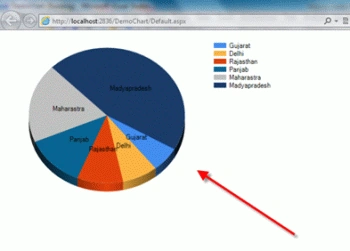
Lets see how to create Chart in ASP.NET.
Step 1
: Your .aspx
page like
<%@ Page Language="C#" AutoEventWireup="true" CodeFile="Default.aspx.cs" Inherits="_Default" %>
<%@ Register Assembly="System.Web.DataVisualization, Version=4.0.0.0, Culture=neutral, PublicKeyToken=31bf3856ad364e35"
Namespace="System.Web.UI.DataVisualization.Charting" TagPrefix="asp" %>
<!DOCTYPE html PUBLIC "-//W3C//DTD XHTML 1.0 Transitional//EN" "http://www.w3.org/TR/xhtml1/DTD/xhtml1-transitional.dtd">
<html xmlns="http://www.w3.org/1999/xhtml">
<head runat="server">
<title></title>
</head>
<body>
<form id="form1" runat="server">
<div>
<asp:Chart ID="Chart1" runat="server" Width="500px">
<Series>
<asp:Series Name="Education" XValueMember="State" YValueMembers="Education"
IsVisibleInLegend="true" ChartType="Pie">
</asp:Series>
</Series>
<ChartAreas>
<asp:ChartArea Name="ChartArea1" Area3DStyle-Enable3D="true">
<AxisX LineColor="DarkGray">
<MajorGrid LineColor="LightGray" />
</AxisX>
<AxisY LineColor="DarkGray">
<MajorGrid LineColor="LightGray" />
</AxisY>
<Area3DStyle Enable3D="True"></Area3DStyle>
</asp:ChartArea>
</ChartAreas>
<Legends>
<asp:Legend>
</asp:Legend>
</Legends>
</asp:Chart>
</div>
</form>
</body>
</html>
Step 2 : Your .cs
page like.
Mohsin MustufaPosted Jun 28, 2013, 1:32 AM
Thanks Buddy Keep it up good work
Vineet KumarPosted Mar 4, 2013, 12:25 AM
its working Nice,sir Please explain the :<%@ Register Assembly="System.Web.DataVisualization, Version=4.0.0.0, Culture=neutral, PublicKeyToken=31bf3856ad364e35"Namespace="System.Web.UI.DataVisualization.Charting" TagPrefix="asp" %> where this assembly store
Kumar SambhavPosted Sep 13, 2012, 8:32 AM
Very very nice codding, Thank you sir ....... But explain about :<%@ Register Assembly="System.Web.DataVisualization, Version=4.0.0.0, Culture=neutral, PublicKeyToken=31bf3856ad364e35"Namespace="System.Web.UI.DataVisualization.Charting" TagPrefix="asp" %> where this assembly store?
Gohil JayendrasinhPosted Jul 9, 2012, 2:33 PM
Class Educationinfo { /* Set property ............. */ } List< Educationinfo> _ EducationinfoList = new List< Educationinfo>(); _ EducationinfoList = ...... //Fill List If(_ EducationinfoList != null) { Chart1.DataSource = _ EducationinfoList; Chart1.DataBind(); }
MiraclePosted Jul 8, 2012, 5:51 AM
nice, but how if my data all in list? how to loop?
Gohil JayendrasinhPosted Jul 4, 2012, 4:49 AM
simple DataTable dt = new DataTable(); --- Fill Data table from database Chart1.DataSource = dt; Chart1.DataBind();
Gohil JayendrasinhPosted Jul 4, 2012, 4:49 AM
simple DataTable dt = new DataTable(); --- Fill Data table from database Chart1.DataSource = dt; Chart1.DataBind();
mohan kumarPosted Apr 24, 2012, 6:24 AM
Hi LION.. Looks quite cool..But how will i use the chart if i need to bind the data from database :)