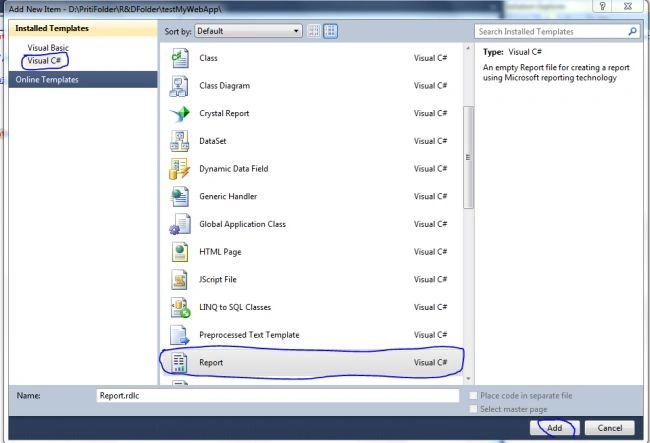
1. Add .rdls template in your web application. Go
to=>Solution=>Right click on Solution=>Add new item.
2. Choose rdlc report from the list of template.
3. Write some code for data filling purpose
and for creating .xsd file
Here, I have to create dataset.xsd file at
specified location .After creating Mydataset.xsd file
you have add mydataset.xsd file in your web
application.
using
System;
using
System.Collections.Generic;
using
System.Linq;
using
System.Web;
using
System.Web.UI;
using
System.Web.UI.WebControls;
using
System.Data;
public
partial class
_Default : System.Web.UI.Page
{
///
<summary>
///
In page load i have to write the code:this code generate
///
dataset.xsd file at specified location.
///
after that i have to run this application after runung this
///
application .xsd file created at specified location.
///
</summary>
///
<param name="sender"></param>
///
<param name="e"></param>
protected void
Page_Load(object sender,
EventArgs e)
{
DataTable dt = Getdata();
dt.TableName =
"mytable";
dt.WriteXmlSchema(@"D:\mydataset.xsd");
}
///
<summary>
///
Here i have to create method that return datatable with value
///
</summary>
///
<returns></returns>
private
DataTable Getdata()
{
DataTable _dt =
new DataTable();
_dt.Columns.Add("id");
_dt.Columns.Add("Name");
_dt.Columns.Add("Age");
_dt.Columns.Add("Salary");
_dt.Rows.Add("1",
"Priti", "22",
"544566");
_dt.Rows.Add("2",
"anu", "21",
"7475");
_dt.Rows.Add("3",
"neha", "24",
"4364");
_dt.Rows.Add("4",
"aman", "21",
"4353453");
_dt.Rows.Add("5",
"rakhi", "34",
"34544");
_dt.Rows.Add("6",
"priyanka",
"24", "435435");
return _dt;
}
}
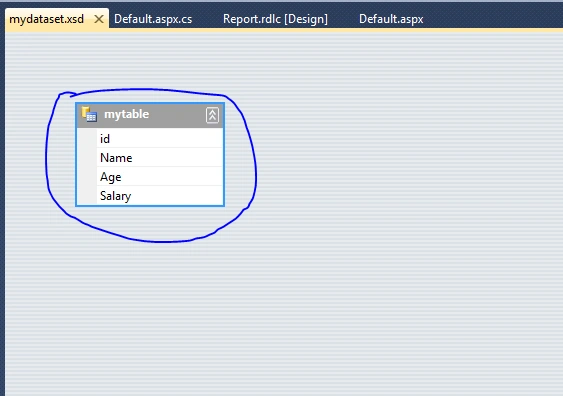
4. After adding Mydataset.xsd file in your web application you can see that the
mydataset.xsd file gets filled with datatable column which has been created in the above
code.
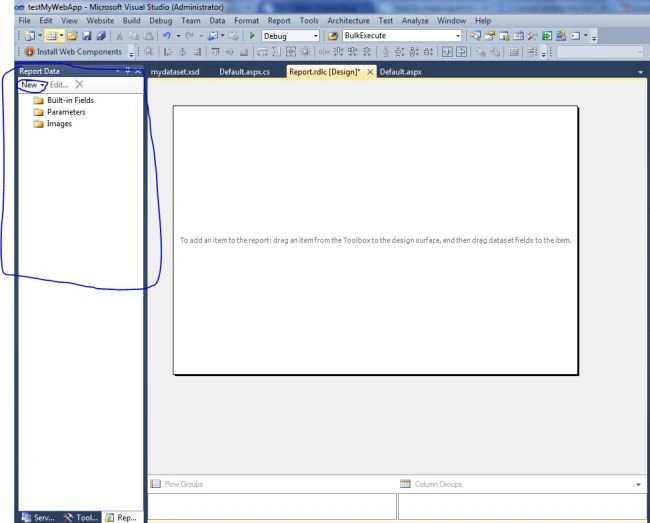
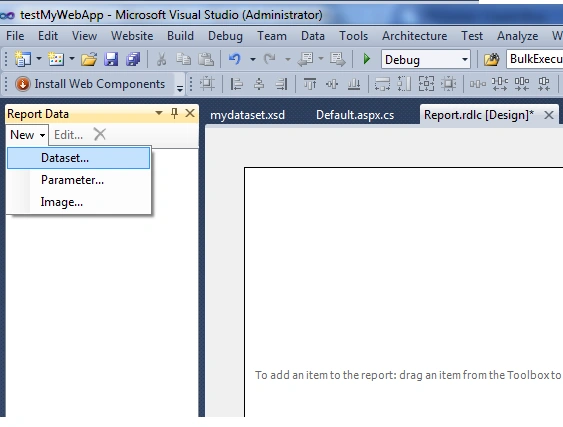
5. After that you have go to rdlc file=>Go to Report data=>click on New.
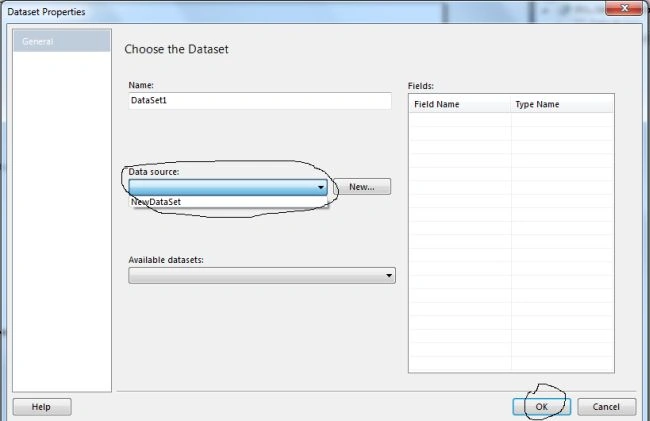
6. After clicking on New =>add dataset(Mydataset.xsd) that has been created
above.
7. Select dataset from Dropdown and click OK.
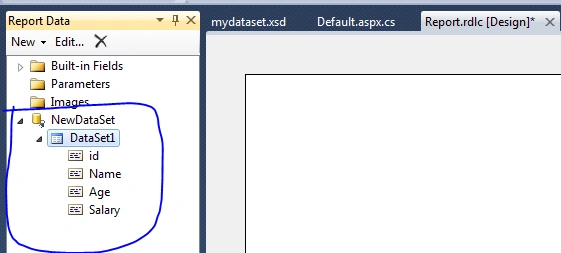
8. After clicking on OK. You can see the dataset added
to the rdls file.
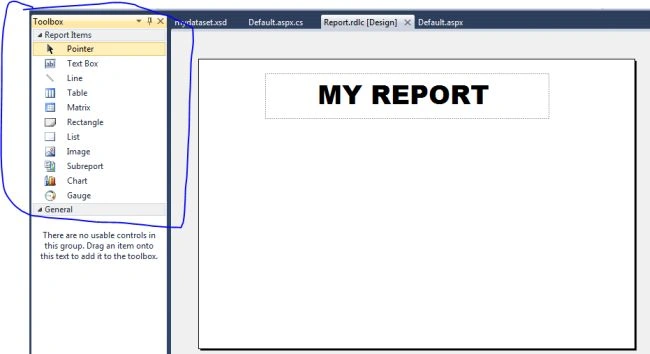
9. After adding the dataset, design the report using the
toolbox control.
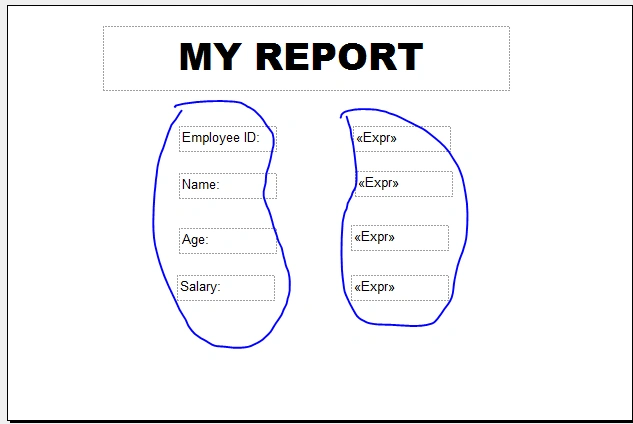
10. Drag and drop the column from the Report data tab
to rdls report file and arrange this according to your own requirement.
11. After creating the Report, it will look like
:
12. After creating all the above task: Now I am showing you how to use This Report in
your web application?
=>Add reportviewer control on your web page
=>Add script manager control from tool box to
your web form.
=>add Microsoft.ReportViewer.WebForms
assembly =>Right click on your web solution=>add reference
13. After that add this code=>
Write this code on page load of web form:
protected
void Page_Load(object
sender, EventArgs e)
{
//Comment
this code:
//DataTable
dt = Getdata();
//dt.TableName
= "mytable";
//
dt.WriteXmlSchema(@"D:\mydataset.xsd");
if
(!IsPostBack)
{
//This
code write only for getting data from datatable on the basis of id.
//and
pass it to th Generatereport method.
//Here
my data source is my datatable but you can also use other datasource.
DataTable
ddt = new
DataTable();
ddt =
Getdata().AsEnumerable().Where(p => p["id"].ToString()
== "1").CopyToDataTable();
Generatereport(ddt);
}
}
Add this method to your web form=>
///
<summary>
///
Dynamically add report nad datasource to the reportviewer.
///
This method created for generating report.
///
in this method call rdlc report file and add data source to reportviewer.
///
</summary>
///
<param name="dt"></param>
private
void Generatereport(DataTable dt)
{
ReportViewer1.SizeToReportContent = true;
ReportViewer1.LocalReport.ReportPath = Server.MapPath("~/Report.rdlc");
ReportViewer1.LocalReport.DataSources.Clear();
ReportDataSource _rsource
= new ReportDataSource("DataSet1",
dt);
ReportViewer1.LocalReport.DataSources.Add(_rsource);
ReportViewer1.LocalReport.Refresh();
}
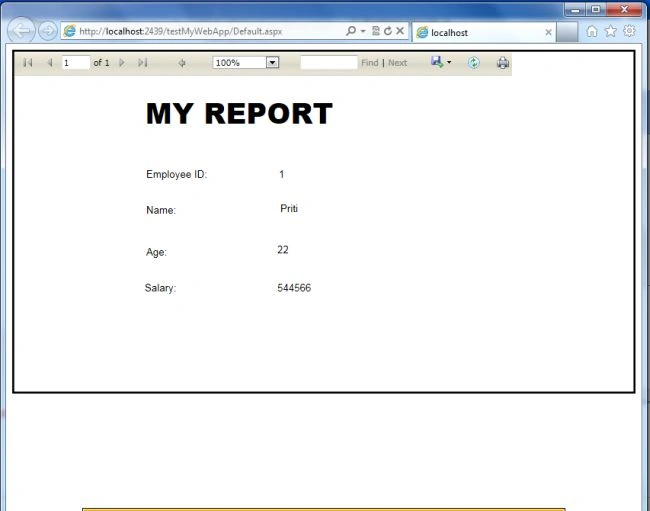
14. Run your application and see the output



jagadeesan vengudusamyPosted Jul 19, 2017, 3:18 AM
Awesome Priti thanks for your Example...Thanks a lot..
Jitendra SutarPosted Feb 21, 2017, 11:00 AM
Is it possible to create a Unique Report Viewer Page in ASP.Net? Just like in windows applications.
Jitendra SutarPosted Feb 21, 2017, 10:58 AM
Thanks Priti for such a simple and best report sample.
Raghupati khotPosted Mar 15, 2016, 4:15 AM
Which report control supported for asp.net project hosting on server
Luis RestrepoPosted Sep 24, 2015, 10:24 AM
Reportviewer good example , I served much to start a new project , thanks , greetings from Bogota - Colombia (http://devcate.blogspot.com/)
Ankit PatelPosted Sep 3, 2015, 9:45 PM
hi priti my contact no is this 07878766113 call or misscall me i have some error with reportviewer.please help me ...
Nikunj TrivediPosted Aug 3, 2015, 2:48 AM
Very Gud Article Priti, Its helpful to us. But can you provide me the guidance, about like this Report Design, i would like to do some fields in Group and other would be in details. Like Example as INVOICE Report ( BILL report format). Please Guide me How to use Groups in Microsoft Report RDLC.
Ponmadasamy RamarajPosted Apr 22, 2015, 7:34 AM
This article very usefull to me
Mukesh KashyapPosted Apr 9, 2015, 7:20 PM
Nice Article
Priti KumariPosted Feb 10, 2015, 4:05 AM
have u got any error? Make sure you have put name of datasource is correct in this line of code: ReportDataSource _rsource = new ReportDataSource("DataSet1", dt);
yong rafidahPosted Feb 10, 2015, 4:00 AM
Hi, I've been trying to follow exactly the tutorial above but my report doesn't display anything. What I suppose to do? I try to debug. seems the DataTable return a value but it does not display at the report
Hitesh KumarPosted Feb 1, 2015, 4:56 AM
Asp.Net Reports with Report viewerhttp://www.codesolution.org/?p=39
HabibPosted Jan 28, 2015, 2:44 AM
am looking for personal class for Dot net in Nerul
angelo reyesPosted Aug 18, 2014, 10:15 PM
Hi priti, can this work in getting data from database and how can I get the next value? Thank you for your answer
arun shankarPosted Aug 14, 2014, 6:57 AM
Hi Priti, That article was great help. Now I am able to generate the report template from button click. But I am facing another challenge now. My variables are declared and generated in the MainWindow. How can I pass the variable value to another window? i declared it as public string, public int etc, but seems like by just doing this is not enough to read the variable value from another window. Any advice on this?
arun shankarPosted Aug 12, 2014, 10:14 PM
Hi Priti, much thanks for the links. I will try them out and let you know. Regarding the plot, the graph is already plotted on the mainwindow and i have a way to copy it to clipboard or save it to a bitmap image. I will need to move it to the report template to complete the report for individual users.
arun shankarPosted Aug 11, 2014, 4:58 AM
Hi Priti, thanks for the article. Could you tell me how to do it in wpf application please? I have a program that analyses a dataset and saves the results such as frequency, peak value and the graph plot in variables. I want to generate a report based on this analysed data. What I have done is to crete a report.rdlc file and made a template. I also created a dataset.xsd and created the data variables that I will need for report generation. I am stuck there and not sure how to pass the analysed data to the report template and generate the report upon a button click. Could you help?
Priti KumariPosted Aug 8, 2014, 12:00 PM
@sudi Mashruuc ,like instanciating class. DataSet ds=new DataSet().If you are new in a ADO.NET then first learn ADO.Net Concept.then u can easily understand the Dataset.
sudi MashruucPosted Aug 4, 2014, 5:10 AM
how i can create data set
Mukesh Kumar TiwariPosted May 5, 2014, 8:02 AM
nice explanations....
mohammed IrshadPosted Mar 25, 2014, 9:03 AM
yes I got it. But percent format is different 66.6666666666667 how can I change the format to 66.66 %
Priti KumariPosted Mar 25, 2014, 8:53 AM
You have to add one column in datatable.and place calculated field data in this column.
mohammed IrshadPosted Mar 25, 2014, 8:40 AM
@priti, can you let me know how can i create a calculated field in report viewer. this is formula for that (gradeval * 100) / 12) gardeval is the column name Thanks
mohammed IrshadPosted Mar 25, 2014, 8:10 AM
@priti, I found the solution Thanks
mohammed IrshadPosted Mar 25, 2014, 7:32 AM
@priti, how can I call this GetData() class in the below code..................ReportViewer1.ProcessingMode = ProcessingMode.Local; ReportViewer1.LocalReport.ReportPath = Server.MapPath("~/Report.rdlc"); Customers dsCustomers = GetData("select top 20 * from customers"); ReportDataSource datasource = new ReportDataSource("Customers", dsCustomers.Tables[0]); ReportViewer1.LocalReport.DataSources.Clear(); ReportViewer1.LocalReport.DataSources.Add(datasource);
Priti KumariPosted Mar 25, 2014, 5:56 AM
write this code: private DataTable GetData() { DataTable dscommted = new DataTable(); SqlConnection con = new SqlConnection(ConString); string strComment = "select top 20 * from customers"; SqlCommand cmdcomment = new SqlCommand(strComment, con); SqlDataAdapter sda = new SqlDataAdapter(cmdcomment); sda.Fill(dscommted); return dscommted; }
mohammed IrshadPosted Mar 25, 2014, 3:09 AM
Hi Priti can you explain how can I bind this method to report viewer Data Source. private void GetData() { DataTable dscommted = new DataTable(); SqlConnection con = new SqlConnection(ConString); string strComment = "select top 20 * from customers"; SqlCommand cmdcomment = new SqlCommand(strComment, con); SqlDataAdapter sda = new SqlDataAdapter(cmdcomment); sda.Fill(dscommted); }