
Unlike Windows Forms controls, the WPF controls do not have
Dock properties. To dock to fill a Tab Control on a Grid, you just need to remove
Width, Height, and Alignment properties of a control.

Unlike Windows Forms controls, the WPF controls do not have
Dock properties. To dock to fill a Tab Control on a Grid, you just need to remove
Width, Height, and Alignment properties of a control.
Here is a window where a Tab control is filled on a Grid panel.
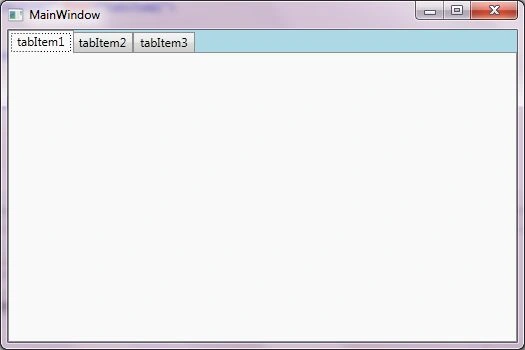
Here is the code snippet. You drag and drop a TabControl on the window and remove its Width, Height and alignment properties.
<Grid Background="LightBlue">
<TabControl Name="tabControl1" >
<TabItem Header="tabItem1" Name="tabItem1">
<Grid />
</TabItem>
<TabItem Header="tabItem2" Name="tabItem2">
<Grid />
</TabItem>
<TabItem Header="tabItem3" Name="tabItem3">
<Grid />
</TabItem>
</TabControl>
</Grid>
Here are some more related articles.
WPF Controls,Layout panel and Graphics primitives
Cheers!
Join the conversation! Your thoughts help the community grow.