

See how to enable Power Pivot in Microsoft Excel 2013 add - in. By default it's not enabled. Power Pivot is used to make data analysis in Microsoft Excel.
Follow these steps -
1. Start Microsoft Excel 2013
2. Go to File > Options > Add-Ins.
3. In the Manage box, click COM Add-ins> Go.
4. Check the Microsoft Office Power Pivot in Microsoft Excel 2013 box, and then click OK.
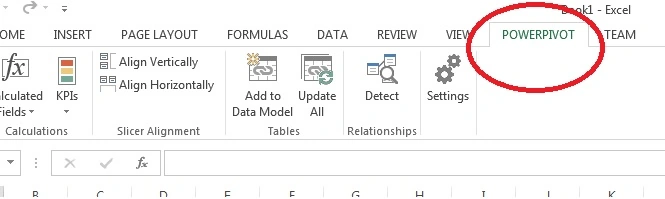
Figure 1
Join the conversation! Your thoughts help the community grow.
Sign in to leave a comment
It is the same account you read, post and publish with — and you will come straight back to this page.
Hashim ShafiqPosted Aug 30, 2015, 9:39 PM
nice
Yashwanth MuthineniPosted Aug 29, 2015, 5:46 AM
Nice Share
Santhakumar MunuswamyPosted Aug 29, 2015, 5:24 AM
Nice. Thanks for sharing
Gowtham KPosted Aug 28, 2015, 1:32 PM
Thanks for sharing
Mohammed IbrahimPosted Aug 28, 2015, 8:30 AM
nice information
Karthikeyan KPosted Aug 28, 2015, 8:29 AM
Informative sir..Thanks for share