

Introduction:
In this blog you will see how to get all the lists using KnockoutJS and CSOM in SharePoint 2013. Please refer my article to implement KnockoutJS in a SharePoint page.
Script:
- <script src="https://c986.sharepoint.com/SiteAssets/jquery-1.8.3.min.js"></script>
- <script src="https://c986.sharepoint.com/SiteAssets/knockout-3.1.0.js"></script>
- <script src="https://c986.sharepoint.com/SiteAssets/ko.sp-1.0.min.js"></script>
- <script>
- ExecuteOrDelayUntilScriptLoaded(MainFunction, "sp.js");
- var completeList = null;
- var listCollection=null;
- // Class used for saving the property values.
- function List(id, name) {
- var self = this;
- self.ID = id;
- self.Name = name;
- }
- // View Model - JavaScript that defines the data and behavior of your UI
- function ListViewModel() {
- var self = this;
- // observableArray equivalent of a regular array,
- self.Lists = ko.observableArray([]);
- self.AddLists = function (id,name) {
- self.Lists.push(new List(id,name));
- }
- }
- function MainFunction() {
- completeList = new ListViewModel();
- // Retrieve the SharePoint Site Content Types
- retrieveLists();
- // Activates knockout.js
- ko.applyBindings(completeList);
- }
- function retrieveLists() {
- var clientContext = new SP.ClientContext.get_current();
- var web = clientContext.get_web();
- this.listCollection = web.get_lists();
- clientContext.load(listCollection);
- clientContext.executeQueryAsync(Function.createDelegate(this, this.onQuerySucceeded), Function.createDelegate(this, this.onQueryFailed));
- }
- function onQuerySucceeded(sender, args) {
- var listsEnumerator = listCollection.getEnumerator();
- while (listsEnumerator.moveNext()) {
- var list = listsEnumerator.get_current();
- completeList.AddLists(list.get_id(), list.get_title());
- }
- }
- function onQueryFailed(sender, args) {
- alert('Request failed. ' + args.get_message() + '\n' + args.get_stackTrace());
- }
- </script>
- <!-- view - HTML markup that defines the appearance of your UI -->
- <div id="divList">
- <h2>
- SharePoint Lists</h2>
- <br />
- <table id="tblList" border="1">
- <thead>
- <tr>
- <th align="center">
- ID
- </th>
- <th align="center">
- Name
- </th>
- </tr>
- </thead>
- <!-- Iterating through every list item using foreach of KO -->
- <tbody data-bind="foreach: Lists">
- <tr>
- <td data-bind="text: ID">
- </td>
- <td data-bind="text: Name">
- </td>
- </tr>
- </tbody>
- </table>
- </div>
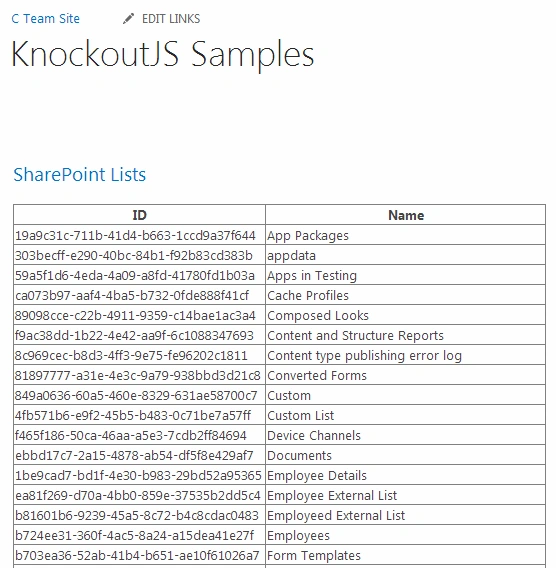
Summary:
Thus in this blog you saw how to get all the lists using KnockoutJS and CSOM in SharePoint 2013.
Join the conversation! Your thoughts help the community grow.