

In this blog, we are going to see how to get the lists/libraries with content type enabled or disabled using PnP PowerShell.
All Lists & Libraries with ContentType property
The below PowerShell command is used to retrieve and print the AllowContentTypes property for all the lists and libraries from the SharePoint site.
All Lists & Libraries with ContentType property
The below PowerShell command is used to retrieve and print the AllowContentTypes property for all the lists and libraries from the SharePoint site.
- PS:> $cred = Get-Credential
- PS:> Connect-PnPOnline -Url https://<tenant>.sharepoint.com/sites/dev -Credential $cred
- PS:> Get-PnPList | Select-Object Title, AllowContentTypes
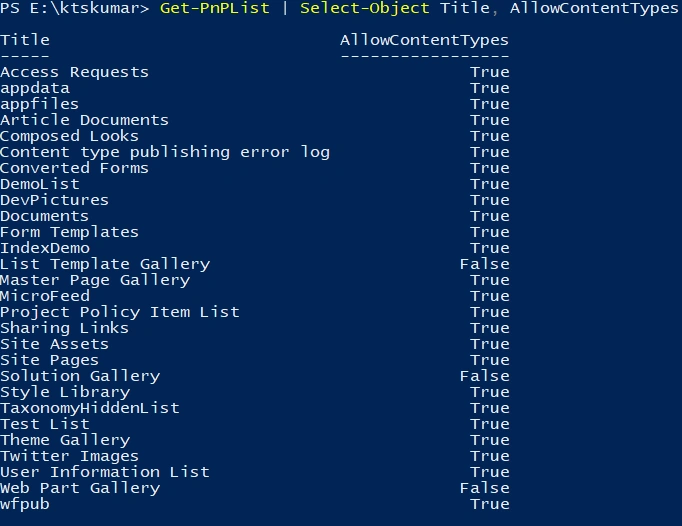
Lists with ContentTypes Disabled
The below PowerShell command is used to retrieve the Lists with ContentTypes disabled for the SharePoint site.
The below PowerShell command is used to retrieve the Lists with ContentTypes disabled for the SharePoint site.
- PS:> $cred = Get-Credential
- PS:> Connect-PnPOnline -Url https://<tenant>.sharepoint.com/sites/dev -Credential $cred
- PS:> Get-PnPList | Select-Object Title, AllowContentTypes | Where-Object { $_.AllowContentTypes -Eq $false }

Lists with ContentTypes Enabled
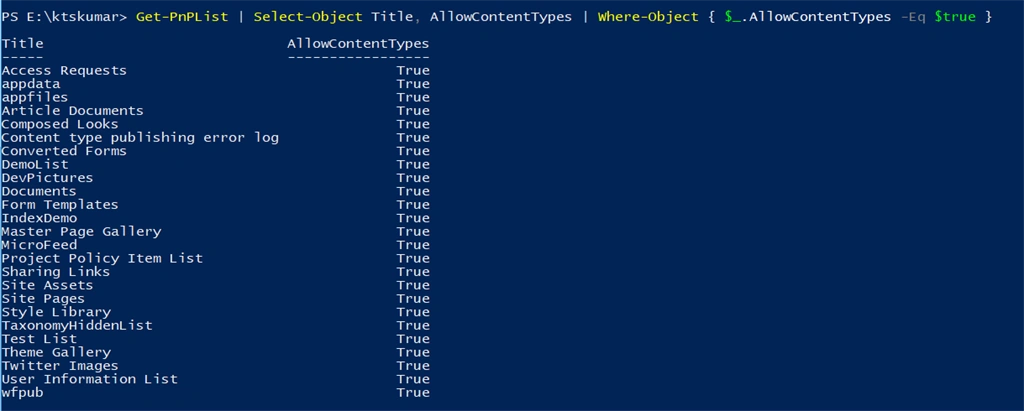
The below PowerShell command is used to retrieve the lists and libraries with ContentTypes enabled for the SharePoint site.
- PS:> $cred = Get-Credential
- PS:> Connect-PnPOnline -Url https://<tenant>.sharepoint.com/sites/dev -Credential $cred
- PS:> Get-PnPList | Select-Object Title, AllowContentTypes | Where-Object { $_.AllowContentTypes -Eq $true }
Join the conversation! Your thoughts help the community grow.