

This blog will help you to learn how to retrieve the different associated properties to the modern SharePoint page using PnP PowerShell.
Get-PnPClientSidePage PowerShell command helps you to retrieve the properties of the modern page. At present, we can retrieve the below properties.
- PageTitle
- Sections
- Controls
- LayoutType
- KeepDefaultWebParts
- Context
- PagesLibrary
- PageListItem
- DefaultSection
- CommentsDisabled
In future, there are chances for more properties to be included in the list.
The below PowerShell command is used to retrieve all associated available properties of the particular modern page.
- PS:> $cred = Get-Credential
- PS:> Connect-PnPOnline -Url https://<tenant>.sharepoint.com/sites/dev -Credential $cred
- PS:> Get-PnPClientSidePage -Identity “Home Page”
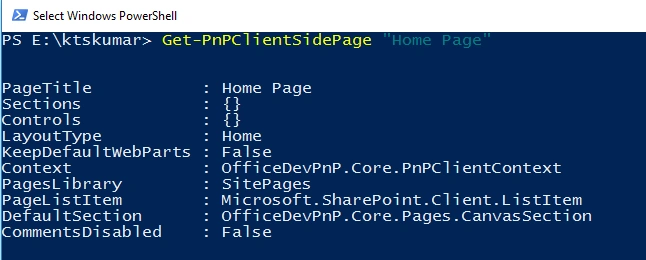
We can also pass the Get-PnPClientSidePage command in the following ways,
- PS:> Get-PnPClientSidePage -Identity “Home Page.aspx”
- PS:> Get-PnPClientSidePage “Home Page”
- PS:> Get-PnPClientSidePage “Home Page.aspx”
- PS:> $cred = Get-Credential
- PS:> Connect-PnPOnline -Url https://<tenant>.sharepoint.com/sites/dev -Credential $cred
- PS:> Get-PnPClientSidePage “Home Page” | Select-Object PageTitle,CommentsDisabled

Abenet BeyenePosted Dec 28, 2019, 7:54 PM
Get-PnPClientSidePage is it still supported?