

AutoComplete is a powerful UI enhancement that helps users complete text entries based on existing data. In this tutorial, we’ll build a simple AutoComplete feature using AjaxControlToolkit in ASP.NET Web Forms, along with a C# backend connected to a SQL database.
Prerequisites
- Visual Studio 2015/2022
- AjaxControlToolkit DLL (added to bin folder and referenced)
- SQL Server database with a table ClientData having a name column
- ASP.NET Web Forms project setup
Step 1. Reference the AjaxControlToolkit.
Add the following register directive at the top of your .aspx page.
<%@ Register Assembly="AjaxControlToolkit" Namespace="AjaxControlToolkit" TagPrefix="cc1" %>
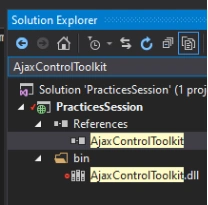
Make sure AjaxControlToolkit.dll is in the bin folder and added to project references.
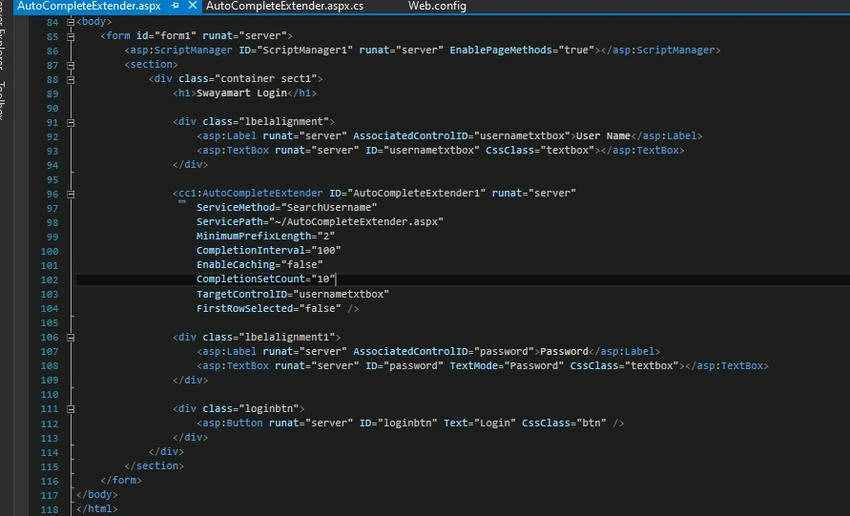
Step 2. Frontend Markup with AutoCompleteExtender.
<asp:ScriptManager
    ID="ScriptManager1"
    runat="server"
    EnablePageMethods="true"
/>

<div class="lbelalignment">
    <asp:Label
        runat="server"
        AssociatedControlID="usernametxtbox">
        User Name
    </asp:Label>

    <asp:TextBox
        runat="server"
        ID="usernametxtbox"
        CssClass="textbox">
    </asp:TextBox>
</div>

<cc1:AutoCompleteExtender
    ID="AutoCompleteExtender1"
    runat="server"
    ServiceMethod="SearchUsername"
    ServicePath="~/AutoCompleteExtender.aspx"
    MinimumPrefixLength="2"
    CompletionInterval="100"
    EnableCaching="false"
    CompletionSetCount="10"
    TargetControlID="usernametxtbox"
    FirstRowSelected="false"
/>
The ServiceMethod refers to a static method in the code-behind that returns a list of suggestions based on the input prefix.
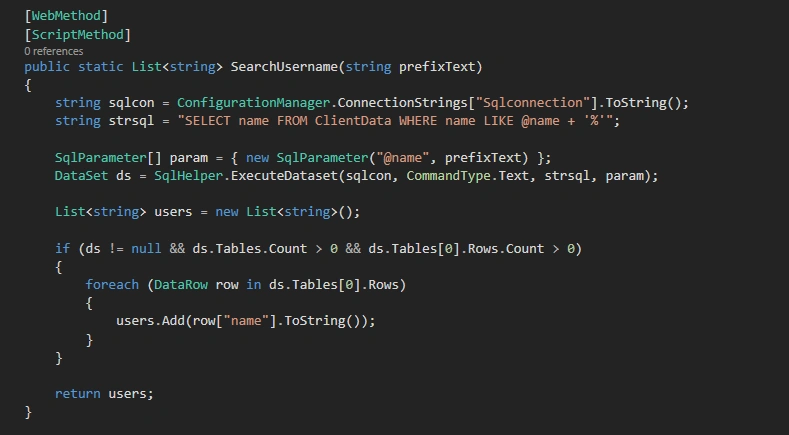
Step 3. Code-Behind - C# Method to Fetch Suggestions.
[WebMethod]
[ScriptMethod]
public static List<string> SearchUsername(string prefixText)
{
    string sqlcon = ConfigurationManager.ConnectionStrings["Sqlconnection"].ToString();
    string strsql = "SELECT name FROM ClientData WHERE name LIKE @name + '%'";

    SqlParameter[] param = { new SqlParameter("@name", prefixText) };
    DataSet ds = SqlHelper.ExecuteDataset(sqlcon, CommandType.Text, strsql, param);

    List<string> users = new List<string>();

    if (ds != null && ds.Tables.Count > 0 && ds.Tables[0].Rows.Count > 0)
    {
        foreach (DataRow row in ds.Tables[0].Rows)
        {
            users.Add(row["name"].ToString());
        }
    }

    return users;
}
This method queries your ClientData table for names starting with the typed prefix and returns matching results as a List<string>.
Some Important properties of AutoCompleteExtender.
- TargetControlID: The TextBox control ID where the user types text to be automatically completed.
- EnableCaching: Whether client-side caching is enabled.
- CompletionSetCount: Number of suggestions to be retrieved from the web service.
- MinimumPrefixLength: Minimum number of characters that must be entered before getting suggestions from a web service.
- CompletionInerval: Time in milliseconds when the timer will kick in to get a suggestion using the web service.
- ServiceMethod: The web service method to be called.
Project Structure
As seen in your Solution Explorer.
- You have the AjaxControlToolkit DLL added in References
- It’s placed in the bin folder as well
This is essential for the successful rendering and usage of the extender.
Screenshots from the Project
Here are some useful visuals from the implementation.
AjaxControlToolkit DLL Reference

AutoComplete TextBox UI
Backend Method (C#)
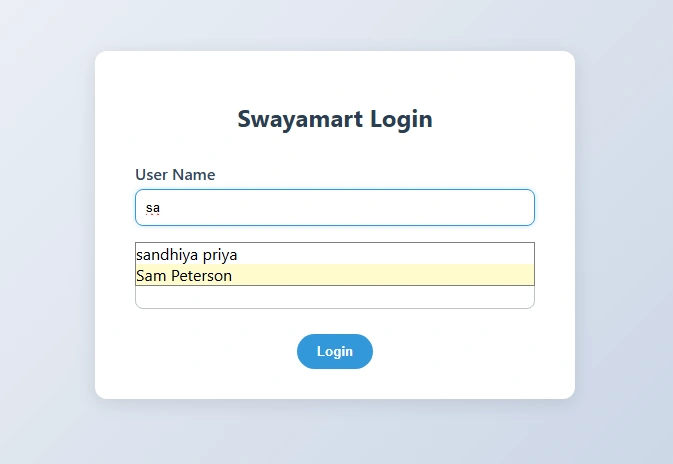
Result
When the user starts typing in the username textbox, suggestions are fetched from the ClientData table and displayed automatically. This improves user experience and speeds up form filling.
Join the conversation! Your thoughts help the community grow.