

Introduction
The jQuery.getJSON( url, [data], [callback] ) method loads JSON data from the server using a GET HTTP request.
The method returns XMLHttpRequest object.
Syntax
Here is the simple syntax to use this method:
$.getJSON( url, [data], [callback] )
Here is the description of all the parameters used by this method:
- url: A string containing the URL to which the request is sent
- data: This optional parameter represents key/value pairs that will be sent to the server.
- callback: This optional parameter represents a function to be executed whenever the data is loaded successfully.
Example
Assuming we have following JSON content in names.txt file with json format content:

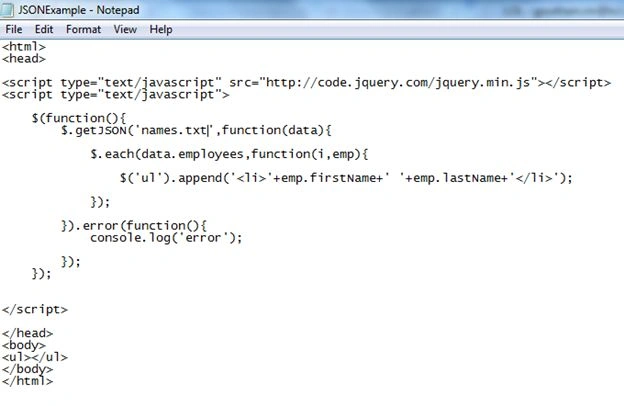
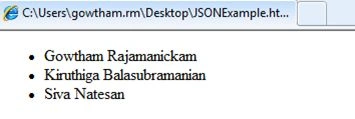
Click on the button to load result.html file:
- {
- "employees":
- [
- {
- "firstName": "Gowtham ",
- "lastName": "Rajamanickam"
- },
- {
- "firstName": "Kiruthiga",
- "lastName": "Balasubramanian"
- },
- {
- "firstName": "Siva",
- "lastName": "Natesan"
- }
- ]
- }
Vijay SPosted Jun 17, 2015, 9:09 AM
Good one
Gowtham RajamanickamPosted Apr 20, 2015, 3:39 PM
Thank u
Santhakumar MunuswamyPosted Apr 20, 2015, 2:15 PM
Good one