

Introduction
The Microsoft Graph PowerShell module is the preferred method for managing your Microsoft Cloud services through the command line. It provides a powerful, versatile, and feature-reach experience while allowing you granular control over your permissions.
Microsoft Graph PowerShell Module
The Microsoft Graph PowerShell Module is a set of PowerShell cmdlets that you can use to interact with Microsoft Graph. These cmdlets allow you to perform tasks such as querying data, creating and updating objects, and managing permissions.
In the post, I am going to explain why you should use the MS Graph PowerShell module and show you how to install MS Graph PowerShell.
Why use Microsoft Graph over the existing AzureAD and MSOnline PowerShell modules?
The Azure AD and MSOnline modules are set to be deprecated, likely around mid-2023. This has a few implications:
- You need to familiarize yourself with Microsoft Graph, as there are different commands compared to the existing modules.
- Existing scripts will need to be converted to work with Microsoft Graph.
Here are some of the things that you can do with the Microsoft Graph PowerShell Module.
- Query data from Microsoft 365 services.
- Create and update objects in Microsoft 365.
- Manage permissions in Microsoft 365.
- Automated tasks in Microsoft 365.
Prerequisites
Before proceeding with the installation, there are some essential prerequisites that need to be met:
- Ensure you have PowerShell 5.1 or a later version installed on your system.
- Verify that you have .NET Framework 4.7.2 or a more recent version installed.
- Install the latest version of PowerShellGet, essential for managing PowerShell modules.
- Adjust the PowerShell script execution policy to either "RemoteSigned" or a less restrictive policy.
How to Install Microsoft Graph PowerShell?
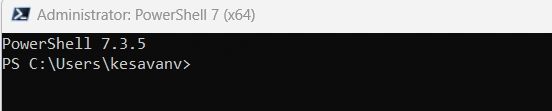
Step 1. Open PowerShell 7 with admin permission.
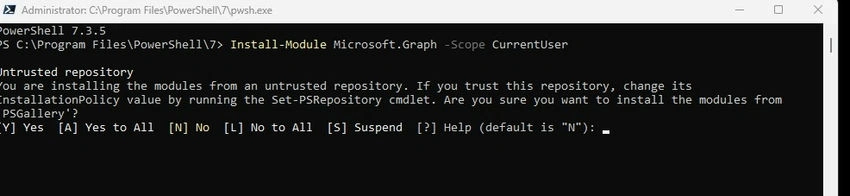
Step 2. To install Microsoft Graph, you can run Install-Module Microsoft. Graph either for the current user context or for all users by using the -Scope parameter. By doing this, you will install the latest generally available (stable) version of the Microsoft Graph PowerShell module.






Join the conversation! Your thoughts help the community grow.