
We can use regular expressions to find blank lines and replace them with white spaces.
Following steps are to find blank lines and replace:
In visual studio 2012.
1. Press “ Ctrl+ Shift + H “.
And window shown like:
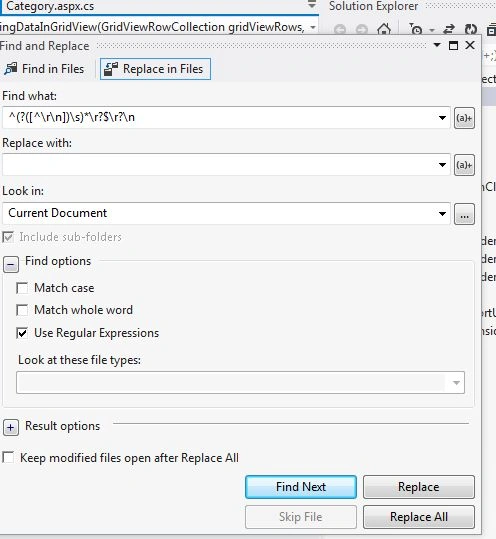
2. Write regular expression For (vs2012) "^(?([^\r\n])\s)*\r?$\r?\n" or for vs 2010 (^$\n or ^&\n)in find what box.
3. Leave Replace with box as empty.
4. In find check Use Regular Expressions.
Then Replace or Replace all as you want.
These steps will remove all blank spaces from current document or whole project as you choose Look in box.
Other regular expressions are predefined by visual studio as in below image.(or can see by (a)+ button on find what box).
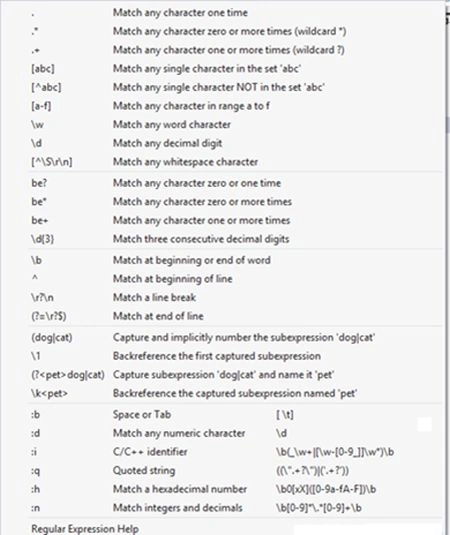

How to Remove Blank Lines in Visual Studio
Join the conversation! Your thoughts help the community grow.
Sign in to leave a comment
It is the same account you read, post and publish with — and you will come straight back to this page.
Prasunjeet SoniPosted Aug 7, 2019, 3:21 AM
This helps me alot .... earlier i have to find individually then delete extra spaces ... but now it s possible . in few clicks...
Manav PandyaPosted Dec 16, 2016, 2:59 AM
If you have then let me know sir
Manav PandyaPosted Dec 16, 2016, 2:59 AM
Do you have any shortest method ????