

In the rapidly evolving landscape of cloud services, where cost optimization is critical and important, Azure Cosmos DB stands out as a go-to solution for many. Microsoft's globally distributed, multi-model database service offers scalability and flexibility, making it a popular choice, especially among students and the Indian audience. For those eager to unlock the full potential of Cosmos DB while staying mindful of expenses, the Free Tier discount is a valuable asset. In this blog, we will learn how to apply the Azure Cosmos DB Cost-Free Tier Discount and maximize cost savings.
The free-tier discount can be used with the following two options:
- Azure Cosmos DB Free Tier (Paid or Corporate Subscription):
- Azure Free Account (Free Azure Account for Learners):
Azure Cosmos DB Free Tier (Paid or Corporate Subscription)
This option is available for corporate or paid subscriptions; the Azure Cosmos DB Free Tier offers a heavy discount, streamlining cost-effective access to the versatile features of Cosmos DB.
Azure Free Account (Free Azure Account for Learners)
In contrast, the Azure Free Account is a Microsoft initiative designed for learners, providing an opportunity to explore Azure Services with a free account for a limited time or throughout the subscription period. It's essential to distinguish between the Azure Cosmos DB Free Tier and the Azure Free Account, as they cater to different user demographics and subscription models.
When setting up a Cosmos DB account, the Cosmos DB free tier discount can be seamlessly applied. During the account creation process, you'll encounter the following options, as illustrated in the following image:
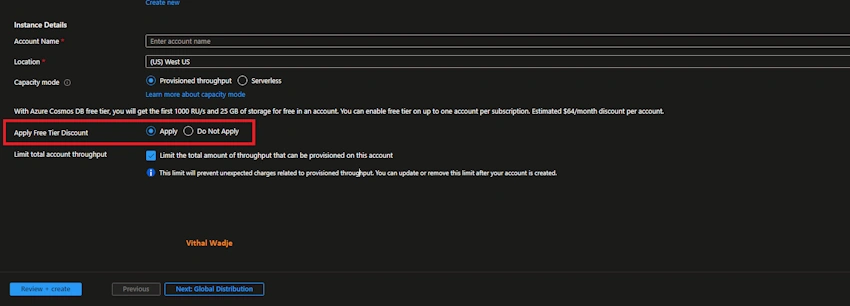
Azure Cosmos DB Free Tier Features and Limitations
- The Azure Cosmos DB free tier discount is applicable only in provisioned throughput capacity mode.
- Unfortunately, this free discount is not yet available in the serverless capacity mode.
- It's important to note that the discount can only be applied to a single Cosmos DB account per subscription; applying it to two accounts within the same subscription is not possible.
- Dedicated throughput is not supported because throughput is shared among all containers in the database.
- The database level throughput is capped at a maximum of 1000RU per second, which can be shared across containers.
- Each account is entitled to a maximum of 25GB of free storage along with the initial 1000 RU/s.
- While the standard maximum limit is 25 containers per database, in the case of the free discount, the throughput is shared among all containers.
- Beyond the limits of 1000 RU/s and 25GB of storage, regular charges will be applied.
- Creating a free Azure account brings combined benefits for the initial 12 months. This includes 400 RU/s for the Azure account and an additional 1000 RU/s for the Azure Cosmos DB free tier discount, totaling 1400 RU/s for the first year. Afterward, regular Azure free account limits come into effect.
- Similar combined benefits apply to storage, providing 25 GB from the Azure free account and an additional 25 GB from the Cosmos DB free tier discount, totaling 50 GB for the initial 12 months. After 12 months, standard limits apply for the duration of the free Azure account.
Summary
I hope, from the above explanation, you have learned how to apply the Azure Cosmost DB free tier discount and save money. If you have any queries, then please let me know in the comment box.
Related Articles
Arjun DhilodPosted Jan 18, 2024, 5:19 PM
Very informative information , Thank you