

Introduction
This article helps you to explain Namespace.
This article helps you to explain Namespace.
- How to use namespace in C#.
- Explain about alias namespace in C#.
- Explain about fully qualified namespace.
- How to remove ambiguty error when mutltiple namesapces are created.
How to use namespace In c#
First, we will discuss namespace. Namespace organizes your program. It makes code easily readable. It also provides assistance in avoiding name clashes.
First, we need to create C# console application. You can follow the steps to create a console application, using Visual Studio.
Open Visual studio ->File->New->Project after clicking project, a pop up Window will pop up , which is shown below.
First, we will discuss namespace. Namespace organizes your program. It makes code easily readable. It also provides assistance in avoiding name clashes.
First, we need to create C# console application. You can follow the steps to create a console application, using Visual Studio.
Open Visual studio ->File->New->Project after clicking project, a pop up Window will pop up , which is shown below.
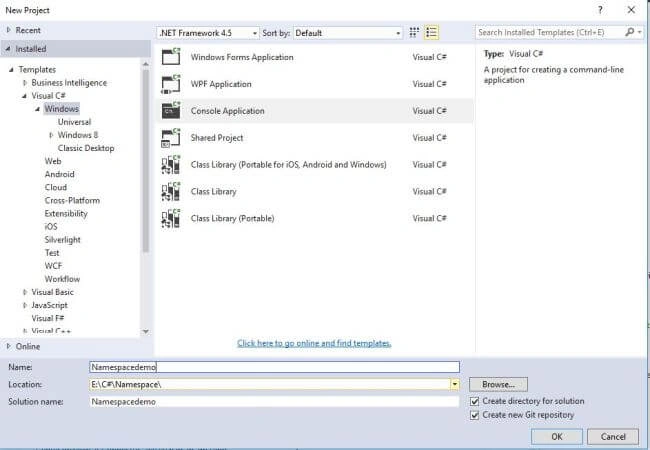
After opening a pop up under C# menu, I will discuss about sample code, using console Application. I chose console Application. Enter my Project name Namespacedemo after click OK. Solution Explorer will display.
- using System;
- using Group.SubGroupA; /*Namespace directive For subGroup*/
- namespace Namespacedemo
- {
- class Program
- {
- static void Main(string[] args)
- {
- classGroup.print();
- /*Fully Qualified namespace*/
- Group.SubGroupB.classGroup.print();
- Console.ReadKey();
- }
- }
- }
- namespace Group
- {
- namespace SubGroupA
- {
- class classGroup
- {
- public static void print()
- {
- Console.WriteLine("Hi All Group A print The value ");
- }
- }
- }
- }
- namespace Group
- {
- namespace SubGroupB
- {
- class classGroup
- {
- public static void print()
- {
- Console.WriteLine("Hi All Group B print The value ");
- }
- }
- }
- }
In My Code, I will explain that I have one main Namespace, which is called with the name Group. Group has two subgroup Names- SubGroupA and SubGroupB, where both have void return type. I enter method name Print. Both two submenus have two different output strings. Now, I need to invoke both two namespaces in the main class of the Program. Now, I should invoke both SubGroupA and SubgroupB to main class. There are different ways to invoke namespace's main class Program.
- Full Qualified namespace
- Alias Namespace
Proceed, as shown below and I have added namespace, using Directive namespace.
In Full Qualified namespace on needs to have namespace name, classname and method.
Write the code, as shown below.
- using Group.SubGroupA; /*Namespace directive For subGroup*/
- Group.SubGroupB.classGroup.print();
- using System;
- using GroupA = Group.SubGroupA; //Alias Name subgroupA
- using GroupB = Group.SubGroupB; //Alias Name subgroupB
- namespace Namespacedemo
- {
- class Program
- {
- static void Main(string[] args)
- {
- GroupA.classGroup.print();
- GroupB.classGroup.print();
- Console.ReadKey();
- }
- }
- }
- namespace Group
- {
- namespace SubGroupA
- {
- class classGroup
- {
- public static void print()
- {
- Console.WriteLine("Hi All Group A print The value ");
- }
- }
- }
- }
- namespace Group
- {
- namespace SubGroupB
- {
- class classGroup
- {
- public static void print()
- {
- Console.WriteLine("Hi All Group B print The value ");
- }
- }
- }
- }
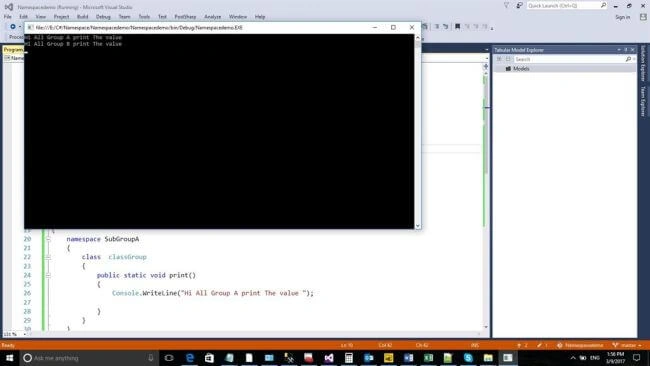
Output
Conclusion
I hope you understood how to use namespace in C# and how to use alias Directive and Fully Qualified namespace in C#. Please share your valuable feedback and comments to improve my future articles.
I hope you understood how to use namespace in C# and how to use alias Directive and Fully Qualified namespace in C#. Please share your valuable feedback and comments to improve my future articles.
Anu VPosted Mar 10, 2017, 6:08 AM
Thanks for sharing.. Nice article...
Vinodh NarayananPosted Mar 9, 2017, 7:16 AM
Good one sir thanks for sharing