

Step 1- First let create an UI
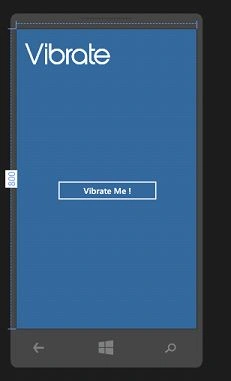
Code Snippet For UI(XAML)
- <phone:PhoneApplicationPage
- x:Class="Web_Service.MainPage"
- xmlns="http://schemas.microsoft.com/winfx/2006/xaml/presentation"
- xmlns:x="http://schemas.microsoft.com/winfx/2006/xaml"
- xmlns:phone="clr-namespace:Microsoft.Phone.Controls;assembly=Microsoft.Phone"
- xmlns:shell="clr-namespace:Microsoft.Phone.Shell;assembly=Microsoft.Phone"
- xmlns:d="http://schemas.microsoft.com/expression/blend/2008"
- xmlns:mc="http://schemas.openxmlformats.org/markup-compatibility/2006"
- xmlns:cxi="clr-namespace:Web_Service"
- mc:Ignorable="d"
- FontFamily="{StaticResource PhoneFontFamilyNormal}"
- FontSize="{StaticResource PhoneFontSizeNormal}"
- Foreground="{StaticResource PhoneForegroundBrush}"
- SupportedOrientations="Portrait" Orientation="Portrait"
- shell:SystemTray.IsVisible="False">
- <phone:PhoneApplicationPage.Resources>
- <Storyboard x:Name="FadeinTransistion">
- <DoubleAnimationUsingKeyFrames Storyboard.TargetProperty="(UIElement.Opacity)" Storyboard.TargetName="textBlock">
- <EasingDoubleKeyFrame KeyTime="0" Value="0"/>
- <EasingDoubleKeyFrame KeyTime="0:0:0.5" Value="0.2"/>
- <EasingDoubleKeyFrame KeyTime="0:0:1" Value="0.4"/>
- <EasingDoubleKeyFrame KeyTime="0:0:1.5" Value="0.6"/>
- <EasingDoubleKeyFrame KeyTime="0:0:2" Value="0.8"/>
- <EasingDoubleKeyFrame KeyTime="0:0:2.5" Value="1"/>
- </DoubleAnimationUsingKeyFrames>
- </Storyboard>
- </phone:PhoneApplicationPage.Resources>
- <!--LayoutRoot is the root grid where all page content is placed-->
- <Grid x:Name="LayoutRoot" Background=" #336699">
- <Grid.RowDefinitions>
- <RowDefinition Height="800"/>
- </Grid.RowDefinitions>
- <StackPanel x:Name="TitlePanel" Grid.Row="0" Margin="12,17,0,308">
- <TextBlock x:Name="textBlock" Text="Vibrate" Margin="9,20,0,0" Style="{StaticResource PhoneTextAccentStyle}" FontFamily="Fonts\abeatbyKai.ttf#abeatbyKai" Height="85" Foreground="White" FontSize="70" />
- </StackPanel>
- <!--ContentPanel - place additional content here-->
- <Grid x:Name="ContentPanel" Margin="0,520,0,0"/>
- <Button Content="Vibrate Me !" Click="Vibrater_Click" HorizontalAlignment="Left" Margin="100,395,0,0" VerticalAlignment="Top" Width="285"/>
- </Grid>
- </phone:PhoneApplicationPage>
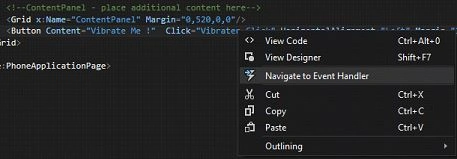
Right Click Vibrater_Click>Navigate To Event handler
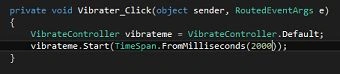
So now Press “F5” to Debug . Its Done
Note: You can change how many seconds you want to vibrate in the Timespan(1000=1sec).
Comment below for any further doubts.
Join the conversation! Your thoughts help the community grow.