Introduction
Usually, while using validation in Kendo Grid, you will find some design issues in the Grid when displaying the warning/error message. This blog will tell you how to fix this issue..
Kendo Grid with validation
I will implement the Kendo Grid by referring http://demos.telerik.com/kendo-ui/grid/editing
KendoGrid.html
- <!DOCTYPE html>
- <html>
- <head>
- <meta charset="utf-8">
- <title>Untitled</title>
-
- <link rel="stylesheet" href="http://kendo.cdn.telerik.com/2017.1.118/styles/kendo.common.min.css">
- <link rel="stylesheet" href="http://kendo.cdn.telerik.com/2017.1.118/styles/kendo.rtl.min.css">
- <link rel="stylesheet" href="http://kendo.cdn.telerik.com/2017.1.118/styles/kendo.default.min.css">
- <link rel="stylesheet" href="http://kendo.cdn.telerik.com/2017.1.118/styles/kendo.mobile.all.min.css">
-
- <script src="http://code.jquery.com/jquery-1.12.3.min.js"></script>
- <script src="http://kendo.cdn.telerik.com/2017.1.118/js/angular.min.js"></script>
- <script src="http://kendo.cdn.telerik.com/2017.1.118/js/jszip.min.js"></script>
- <script src="http://kendo.cdn.telerik.com/2017.1.118/js/kendo.all.min.js"></script></head>
- <body>
- <div id="example">
- <div id="grid"></div>
-
- <script>
- $(document).ready(function () {
-
-
- var crudServiceBaseUrl = "https://demos.telerik.com/kendo-ui/service",
- dataSource = new kendo.data.DataSource({
- transport: {
- read: {
- url: crudServiceBaseUrl + "/Products",
- dataType: "jsonp"
- },
- update: {
- url: crudServiceBaseUrl + "/Products/Update",
- dataType: "jsonp"
- },
- destroy: {
- url: crudServiceBaseUrl + "/Products/Destroy",
- dataType: "jsonp"
- },
- create: {
- url: crudServiceBaseUrl + "/Products/Create",
- dataType: "jsonp"
- },
- parameterMap: function(options, operation) {
- if (operation !== "read" && options.models) {
- return {models: kendo.stringify(options.models)};
- }
- }
- },
- batch: true,
- pageSize: 20,
- schema: {
- model: {
- id: "ProductID",
- fields: {
- ProductID: { editable: false, nullable: true },
- ProductName: { validation: { required: true } },
- UnitPrice: { type: "number", validation: { required: true, min: 1} },
- Discontinued: { type: "boolean" },
- UnitsInStock: { type: "number", validation: { min: 0, required: true } }
- }
- }
- }
- });
-
- $("#grid").kendoGrid({
- dataSource: dataSource,
- navigatable: true,
- pageable: true,
- height: 550,
- toolbar: ["create", "save", "cancel"],
- columns: [
- "ProductName",
- { field: "UnitPrice", title: "Unit Price", format: "{0:c}", width: 120 },
- { field: "UnitsInStock", title: "Units In Stock", width: 120 },
- { field: "Discontinued", width: 120 },
- { command: "destroy", title: " ", width: 150 }],
- editable: true
- });
- });
- </script>
- </div>
- </body>
- </html>
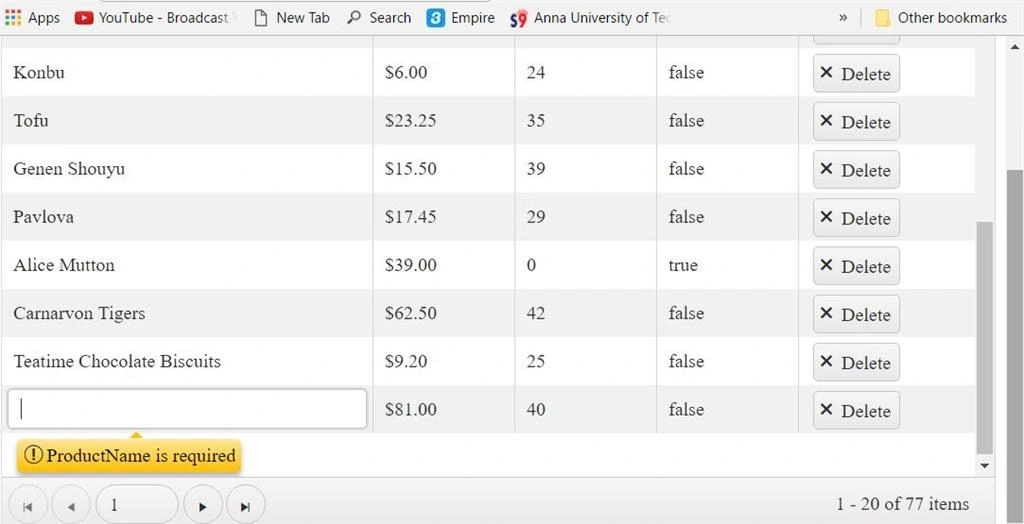
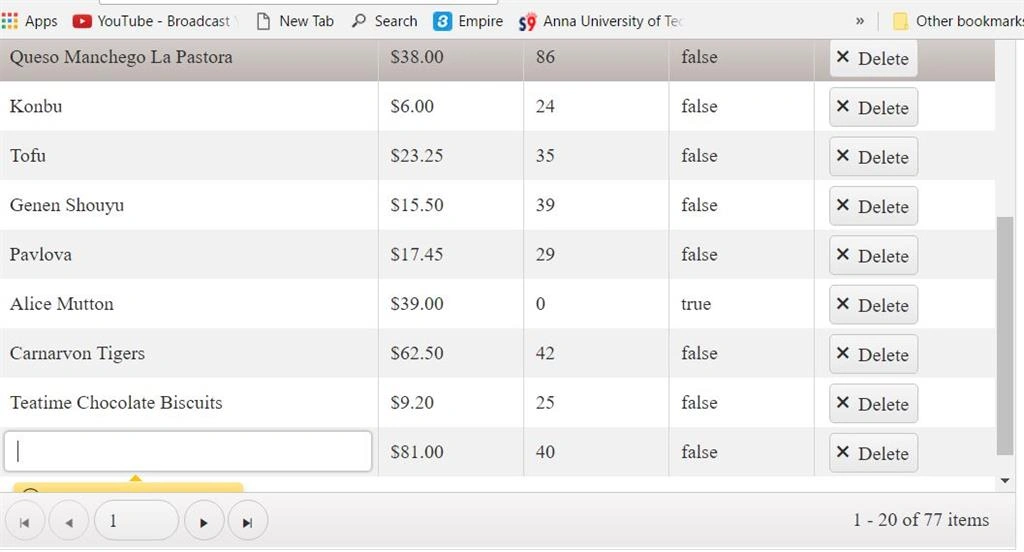
From the above figure, you can notice there is a break in error message. In the last row of Grid, the user needs to scroll down manually to check the error message. This is somewhat odd from a user's perspective. Let’s see how to fix it with simple logic which is written in the below function.
- $(function () {
- var grid = $("#grid").data("kendoGrid");
-
- grid.table.on("focusout", ".k-invalid", function () {
- var content = grid.content;
- var height = content.height();
- var cell = $(this).closest("td");
- var message = cell.find(".k-invalid-msg");
- var callout = message.find(".k-callout");
- var position = message.position();
- var top = position.top + callout.outerHeight() + message.outerHeight();
- if (top > height) {
- content.scrollTop(content.scrollTop() + top - height);
- }
- });
- });
Complete code
- <!DOCTYPE html>
- <html>
- <head>
- <meta charset="utf-8">
- <title>Untitled</title>
-
- <link rel="stylesheet" href="http://kendo.cdn.telerik.com/2017.1.118/styles/kendo.common.min.css">
- <link rel="stylesheet" href="http://kendo.cdn.telerik.com/2017.1.118/styles/kendo.rtl.min.css">
- <link rel="stylesheet" href="http://kendo.cdn.telerik.com/2017.1.118/styles/kendo.default.min.css">
- <link rel="stylesheet" href="http://kendo.cdn.telerik.com/2017.1.118/styles/kendo.mobile.all.min.css">
-
- <script src="http://code.jquery.com/jquery-1.12.3.min.js"></script>
- <script src="http://kendo.cdn.telerik.com/2017.1.118/js/angular.min.js"></script>
- <script src="http://kendo.cdn.telerik.com/2017.1.118/js/jszip.min.js"></script>
- <script src="http://kendo.cdn.telerik.com/2017.1.118/js/kendo.all.min.js"></script></head>
- <body>
- <div id="example">
- <div id="grid"></div>
-
- <script>
- $(document).ready(function () {
-
- $(function () {
- var grid = $("#grid").data("kendoGrid");
-
- grid.table.on("focusout", ".k-invalid", function () {
- var content = grid.content;
- var height = content.height();
- var cell = $(this).closest("td");
- var message = cell.find(".k-invalid-msg");
- var callout = message.find(".k-callout");
- var position = message.position();
- var top = position.top + callout.outerHeight() + message.outerHeight();
- if (top > height) {
- content.scrollTop(content.scrollTop() + top - height);
- }
- });
- });
-
- var crudServiceBaseUrl = "https://demos.telerik.com/kendo-ui/service",
- dataSource = new kendo.data.DataSource({
- transport: {
- read: {
- url: crudServiceBaseUrl + "/Products",
- dataType: "jsonp"
- },
- update: {
- url: crudServiceBaseUrl + "/Products/Update",
- dataType: "jsonp"
- },
- destroy: {
- url: crudServiceBaseUrl + "/Products/Destroy",
- dataType: "jsonp"
- },
- create: {
- url: crudServiceBaseUrl + "/Products/Create",
- dataType: "jsonp"
- },
- parameterMap: function(options, operation) {
- if (operation !== "read" && options.models) {
- return {models: kendo.stringify(options.models)};
- }
- }
- },
- batch: true,
- pageSize: 20,
- schema: {
- model: {
- id: "ProductID",
- fields: {
- ProductID: { editable: false, nullable: true },
- ProductName: { validation: { required: true } },
- UnitPrice: { type: "number", validation: { required: true, min: 1} },
- Discontinued: { type: "boolean" },
- UnitsInStock: { type: "number", validation: { min: 0, required: true } }
- }
- }
- }
- });
-
- $("#grid").kendoGrid({
- dataSource: dataSource,
- navigatable: true,
- pageable: true,
- height: 550,
- toolbar: ["create", "save", "cancel"],
- columns: [
- "ProductName",
- { field: "UnitPrice", title: "Unit Price", format: "{0:c}", width: 120 },
- { field: "UnitsInStock", title: "Units In Stock", width: 120 },
- { field: "Discontinued", width: 120 },
- { command: "destroy", title: " ", width: 150 }],
- editable: true
- });
- });
- </script>
- </div>
- </body>
- </html>
Result in Browser
I hope you have enjoyed this blog. Your valuable feedback, questions, and comments about this blog are always welcome.


Join the conversation! Your thoughts help the community grow.