

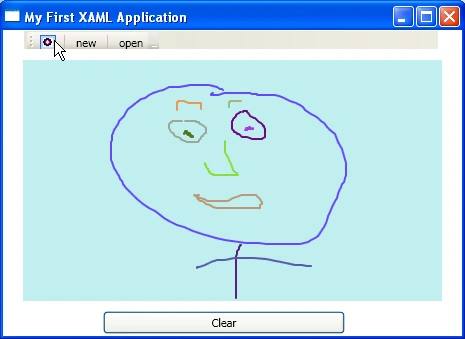
Figure 1 - First XAML App
Introduction
I finally got to playing around with XAML. I think Microsoft is on the right track here, but they have a way to go. The visual designer is lacking many of the features of the current .NET. There are missing properties in controls, inability to double click on buttons to insert events and other missing features. Also many of the property names changed in controls going from Window Controls in .NET 2.0 to XAML controls in .NET 3.0, so there is definitely a learning curve getting up to speed in XAML. I suspect with the release of "Orcas", many of these inadequacies will be remedied. In the meantime, hold on to your hats, its going to be a bumpy ride!
Installing XAML in Visual Studio 2005
In order to use XAML, in addition to Visual Studio 2005, you need to install the .NET Framework 3.0 redistributable and the Visual Studio 2005 extensions for .NET 3.0 (WPF and WCF). Once you have these installed, you are off and running. You do not need to have VISTA to run .NET 3.0 apps. .NET 3.0 will run on XP with SP2. VISTA just has the added advantage of already having the .NET 3.0 framework installed.
XAML Paradigm
XAML(Extensibility Application Markup Language) allows you to code your controls up in a well formed XML document. (Kinda reminds me of the old rc files in VC++, except with XML tags). Not only can you define properties of your controls in attributes, but you can hookup events into the controls as well using attributes. Below is the XAML text representation for an about box button:
<Button Click="btnAbout_Click" Name="btnAbout" Foreground="#FF0000FF" ToolTip="About Box">About</Button>
The nice thing about XAML is that it is fairly clear from the tags that the element is a button and the attributes Name, Foreground, and ToolTip are easily defined with strings. The Click event is wired to C# using an attribute (note: you still have the option to wire the Click event using the += operator.)
If you want to add an Image to your button, you can embed an child image tag inside your button:
Xaml Windows Project Structure
When you create a new .NET 3.0 Windows Application, the project consists of four files and about a dozen .NET references.
The files are:
App.xaml
App.xaml.cs
Window1.xaml
Window1.xaml.cs
The references include the following .NET 3.0 Assembly references:
System
System.Data
System.Xml
WindowsBase
PresentationCore
PresentationFramework
UIAutomationProvider
UIAutomationTypes
ReachFramework
System.Printing
System.ServiceModel
System.Runtime.Serialization
System.IdentityModel
App.xaml is the xaml application file containing the following markup structure
Listing 1 - Application XAML definition
|
<Application x:Class="WindowsApplication1.App" xmlns="http://schemas.microsoft.com/winfx/2006/xaml/presentation" xmlns:x="http://schemas.microsoft.com/winfx/2006/xaml" StartupUri="Window1.xaml"> </Application.Resources> |
This structure defines the name of the application class as well as the starting window for this application (Window1.xaml). Note that everything that was done in code and C# attributes for the Windows application in .NET 2.0 are now done in XML.
Any code that needs to execute is done inside a code-behind partial class under App.xaml.cs. For example, if you wanted to read a database as soon as the app started up, you could do this in the Activation event of the application:
Listing 2 - App.xml to wire up Activation event to event handler App_Activated:
|
<Application x:Class="WindowsApplication1.App" |
Listing 3 - App.xml.cs code-behind:
Ibrahim ErsoyPosted Aug 14, 2007, 4:01 AM
hey Mike, the picture u drew looks like my old mathematic teacher :))
Mahesh ChandPosted Mar 23, 2007, 2:48 PM
Finally you started it :)