
This blog give the information like how generate popup window on button click using the jquery.
Look
For that create the new project and take a one webform:
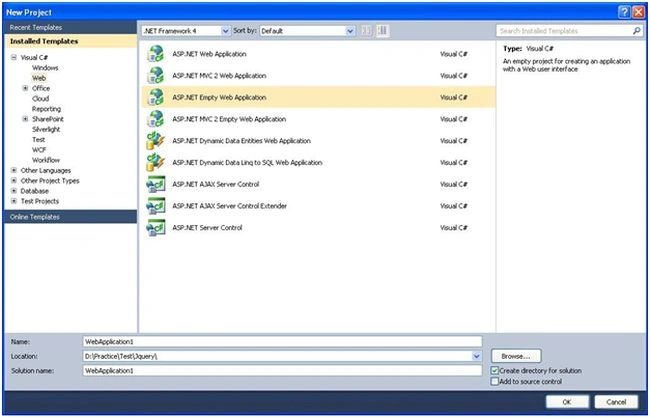
After that go to:
Select project--->Right Click->Add New Item->and Select Webform
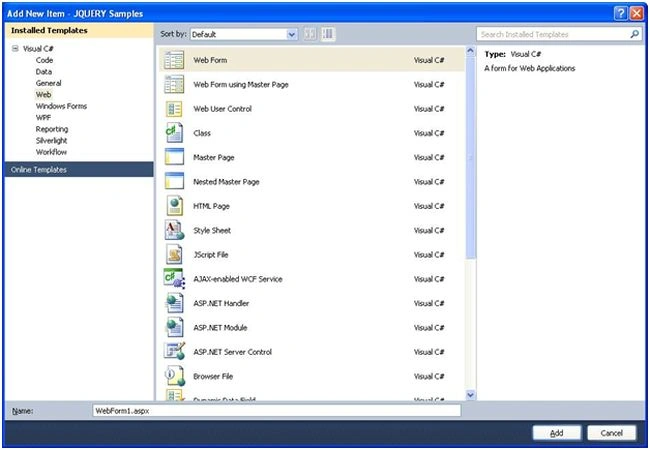
Output

And after click on button:

If you do not select any radio button and click onsubmit button the it gives alert message

Sample.aspx
Design
- <html>
- <body>
- <form id="form1" runat="server">
- <asp:Button Text="Modal Dialog" runat="server" ID="btnShowModal" />
- <asp:Button Text="Sample Dialog" runat="server" ID="btnShowSimple" Visible="false"/>
- <br />
- <br />
- <div id="output"></div>
- <div id="overlay" class="web_dialog_overlay"></div>
- <div id="dialog" class="web_dialog">
- <table style="width: 100%; border: 0px;" cellpadding="3" cellspacing="0">
- <tr>
- <td class="web_dialog_title">Online Survey</td>
- <td class="web_dialog_title align_right"><a href="#" id="btnClose">Close</a></td>
- </tr>
- <tr>
- <td> </td>
- <td> </td>
- </tr>
- <tr>
- <td colspan="2" style="padding-left: 15px;"><b>In Wchich Country You Belongs? </b></td>
- </tr>
- <tr>
- <td colspan="2" style="padding-left: 15px;">
- <asp:RadioButtonList runat="server" ID="brands">
- <asp:ListItem Text="India" Value="India" />
- <asp:ListItem Text="America" Value="America" />
- <asp:ListItem Text="Canada" Value="Canada" />
- <asp:ListItem Text="Chaina" Value="Chaina" />
- </asp:RadioButtonList>
- </td>
- </tr>
- <tr>
- <td style="text-align: center;"><asp:Button Text="Submit" runat="server" ID="btnSubmit" /></td>
- <td style="text-align: center;"><asp:Button Text="Cancel" runat="server" ID="btnClose" /></td>
- </tr>
- </table>
- </div>
- </form>
- </body>
- </html>
Join the conversation! Your thoughts help the community grow.