

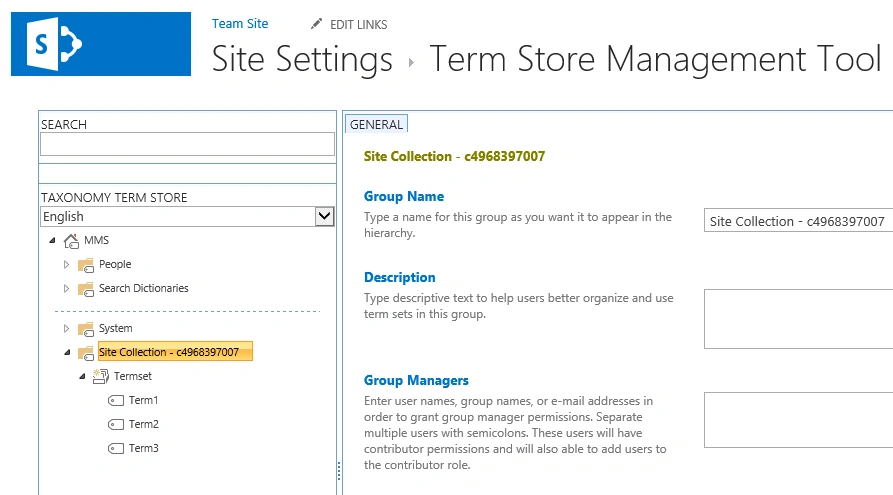
I have a site collection http://c4968397007/ in which I have created a taxonomy group. Navigate to the site collection http://c4968397007/. Click on Settings, then click on Site Settings.
Click on Term store management which is
available under Site Administration section. You could be able to see the
site collection taxonomy group in the Taxonomy Term Store. In this blog
you will see how to get that site collection taxonomy groupusing server object
model.
Steps Involved:
- Open Visual Studio 2012 (Run as administrator).
- Go to File=> New => Project.
- Select Console Application in the Visual C# node from the installed templates.
- Enter the Name and click on OK.
- In the solution explorer, right click on References folder and then click on Add Reference.
-
Add the following assemblies from 15 hive (C:\Program
Files\Common Files\microsoft shared\Web Server Extensions\15\ISAPI).
- Microsoft.SharePoint.dll
- Microsoft.SharePoint.Taxonomy.dll
- Open Program.cs file and replace the code with the following
using System;
using System.Collections.Generic;
using System.Linq;
using System.Text;
using System.Threading.Tasks;
using Microsoft.SharePoint;
using Microsoft.SharePoint.Taxonomy;
Join the conversation! Your thoughts help the community grow.