Introduction
Imagine you've developed an ASP.NET Core Web API for an e-commerce application.
Every time a customer visits your website, your API fetches product information from the database.
Now imagine 10,000 customers requesting the same product details.
Should your application execute the same database query 10,000 times?
Not necessarily!
This is where Redis caching comes into the picture.
Redis allows us to temporarily store frequently accessed data so that subsequent requests can retrieve it quickly without repeatedly querying the database.
In this blog, we'll understand what Redis is, why we need it, how caching works, and how to implement Redis in an ASP.NET Core Web API.
1. What Is Redis?
Redis (Remote Dictionary Server) is a high-performance data store commonly used as a cache, message broker, and database.
Unlike traditional relational databases such as SQL Server, Redis primarily works with data stored in memory, making it suitable for applications requiring fast data access.
Redis supports multiple data structures, including:
Strings: Store text, numbers, or serialized JSON.
Hashes: Store field-value pairs.
Lists: Store ordered collections.
Sets: Store unique values.
Sorted Sets: Store values ordered by scores.
For beginners, think of Redis as a shared, fast-access storage layer between your application and database.
2. Why Do We Need Redis?
Consider an e-commerce application where thousands of users request the same product details.
Without Redis:
A user sends a request to the API.
The API queries SQL Server.
SQL Server returns the product details.
The API returns the response.
The same process repeats for subsequent requests.
Even when the product information hasn't changed, the application may execute the same database query repeatedly.
With Redis:
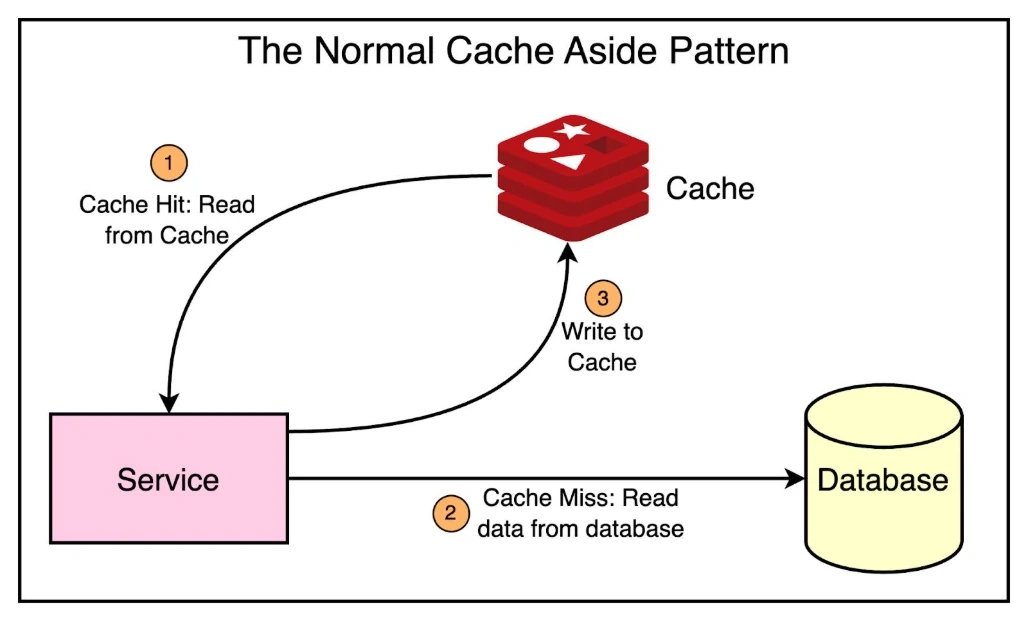
A user sends a request to the API.
The API checks whether the product exists in Redis.
If it exists, Redis returns the cached information.
If it doesn't exist, the API fetches the product from SQL Server.
The result is stored in Redis for future requests.
This approach can reduce unnecessary database operations and improve response times.
3. Understanding Cache Hit and Cache Miss
Two important caching terms are Cache Hit and Cache Miss.
Cache Hit
A cache hit occurs when the requested data is already available in Redis.
Example:
A customer requests product ID 101, and Redis already contains its details.
The API retrieves the product directly from Redis without querying SQL Server.
Cache Miss
A cache miss occurs when the requested data is not available in Redis.
Example:
A customer requests product ID 102, but Redis doesn't contain its details.
The API fetches the product from SQL Server, stores it in Redis, and returns the response.
This is the foundation of a common caching strategy called Cache-Aside.
4. Redis Caching Strategies
There are several caching strategies, each suitable for different application requirements.
Strategy | How it works | Common use case |
|---|
Cache-Aside | Application checks the cache and loads missing data from the database | Product details |
Write-Through | Writes update the database and cache as part of the write process | Frequently read records |
Write-Behind | Writes are buffered in the cache and persisted asynchronously | Write-heavy workloads |
Read-Through | Cache layer loads missing data from the backing store | Cache-provider-managed reads |
For most beginner ASP.NET Core projects, Cache-Aside is a practical starting point because it is simple to implement and gives the application control over caching.
5. Implementing Redis in ASP.NET Core Web API
Let's implement a basic product caching example using ASP.NET Core, SQL Server, Entity Framework Core, and Redis.
Step 1: Install the required NuGet package
dotnet add package Microsoft.Extensions.Caching.StackExchangeRedis
Step 2: Configure Redis in appsettings.json
{
  "ConnectionStrings": {
    "Redis": "localhost:6379"
  }
}
This example assumes Redis is running locally. For production, configure authentication, encryption, and secure secret management.
Step 3: Register Redis in Program.cs
builder.Services.AddStackExchangeRedisCache(options =>
{
    options.Configuration =
        builder.Configuration.GetConnectionString("Redis");

    options.InstanceName = "ProductAPI_";
});
ASP.NET Core provides the IDistributedCache abstraction, allowing our application to work with distributed caching without directly depending on Redis-specific commands.
Step 4: Implement Redis caching in a product service
using Microsoft.Extensions.Caching.Distributed;
using Microsoft.EntityFrameworkCore;
using System.Text.Json;

public class ProductService
{
    private readonly AppDbContext _context;
    private readonly IDistributedCache _cache;

    public ProductService(
        AppDbContext context,
        IDistributedCache cache)
    {
        _context = context;
        _cache = cache;
    }

    public async Task<Product?> GetProductAsync(
        int productId,
        CancellationToken cancellationToken = default)
    {
        string cacheKey = $"product:{productId}";

        // Step 1: Check Redis
        var cachedProduct = await _cache.GetStringAsync(
            cacheKey, cancellationToken);

        if (cachedProduct != null)
        {
            // Cache Hit
            return JsonSerializer.Deserialize<Product>(
                cachedProduct);
        }

        // Step 2: Cache Miss - Query SQL Server
        var product = await _context.Products
            .AsNoTracking()
            .FirstOrDefaultAsync(
                p => p.Id == productId,
                cancellationToken);

        if (product == null)
            return null;

        // Step 3: Store the result in Redis
        var options = new DistributedCacheEntryOptions
        {
            AbsoluteExpirationRelativeToNow =
                TimeSpan.FromMinutes(10)
        };

        await _cache.SetStringAsync(
            cacheKey,
            JsonSerializer.Serialize(product),
            options,
            cancellationToken);

        return product;
    }
}
Step 5: Create the API endpoint
[ApiController]
[Route("api/products")]
public class ProductsController : ControllerBase
{
    private readonly ProductService _productService;

    public ProductsController(ProductService productService)
    {
        _productService = productService;
    }

    [HttpGet("{id:int}")]
    public async Task<IActionResult> GetProduct(
        int id,
        CancellationToken cancellationToken)
    {
        var product = await _productService
            .GetProductAsync(id, cancellationToken);

        if (product == null)
            return NotFound();

        return Ok(product);
    }
}
Remember to register ProductService and your EF Core AppDbContext in dependency injection. The example assumes those dependencies and the Product entity already exist.
What Happens Internally?
First API request:
GET /api/products/101

Redis: Cache Miss
        |
        v
SQL Server: Fetch Product 101
        |
        v
Redis: Store Product for 10 minutes
        |
        v
API: Return Product
Second API request:
GET /api/products/101

Redis: Cache Hit
        |
        v
API: Return Cached Product

SQL Server is not queried.
Notice that the second request can avoid a database query entirely.
6. What Happens When Product Data Changes?
This is one of the most important questions in caching.
Suppose the price of product 101 changes from ₹1,000 to ₹1,200 in SQL Server.
However, Redis still contains the old price.
The API might return outdated information until the cache expires.
This problem is called stale data.
One common solution is cache invalidation.
After successfully updating the product in the database, remove its cached entry:
await _cache.RemoveAsync(
    $"product:{productId}",
    cancellationToken);
The next request will fetch the updated product from SQL Server and populate Redis again.
In production, consider what happens if database updates succeed but cache invalidation fails. Sensitive or consistency-critical operations may require stronger coordination.
7. Advantages of Redis Caching
Improved API performance: Frequently requested data can be served without executing repeated database queries.
Reduced database load: Fewer repetitive queries can free database resources for other operations.
Better scalability: Multiple application instances can share a centralized Redis cache.
Expiration support: Cached data can automatically expire after a configured duration.
Flexible data structures: Redis can support additional use cases beyond simple key-value caching.
8. Challenges and Best Practices
Redis is powerful, but caching introduces additional complexity.
Cache invalidation: Remove or refresh entries when underlying data changes.
Expiration: Choose TTL values based on how frequently the data changes.
Cache stampede: Prevent many concurrent requests from overwhelming the database when a popular cache entry expires.
Memory management: Configure Redis memory limits and eviction policies according to workload requirements.
Security: Never expose Redis publicly without appropriate access controls.
Failure handling: Decide how the application should behave if Redis becomes temporarily unavailable.
Also, avoid caching sensitive, user-specific information under shared keys.
9. When Should You Use Redis?
Redis caching is particularly useful for:
Product catalogs and product details
Frequently accessed reference data
Public configuration and lookup data
Expensive database query results
Shared session data where appropriate
Rate-limiting counters and other short-lived state
However, Redis isn't necessary for every application. If your application has low traffic, inexpensive queries, or strict real-time consistency requirements, caching may introduce more complexity than value.
Conclusion
Redis caching is an effective technique for improving ASP.NET Core API performance when the application repeatedly reads the same data.
By implementing the Cache-Aside pattern, we can reduce unnecessary database queries and serve frequently requested information more efficiently.
However, successful caching isn't just about storing data in Redis. It also requires thoughtful decisions about expiration, invalidation, consistency, security, and failure handling.
The key takeaway:
Don't query the database repeatedly for unchanged data when an appropriately managed cache can serve it efficiently.
Start with simple caching, measure the performance improvements, and gradually introduce more advanced strategies as your application grows.
References
#Redis #DotNet #ASPNETCore #WebAPI #Caching #BackendDevelopment #CSharp #SoftwareEngineering #PerformanceOptimization #CleanArchitecture


Join the conversation! Your thoughts help the community grow.