

In this blog i am going to explain how to remove duplicate records from a table in SQL Server. Sometimes while you working with any database like My SQL, MS SQL, Oracal and many others it is required to remove duplicate records from a table. So in this blog i'll show a best way to delete duplicate records from table in Sql Server.
Now, Consider you have a table with following columns.
- CREATE TABLE #Employee
- (
- EmpID int IDENTITY(1,1) NOT NULL,
- Name varchar(55) NULL,
- Salary decimal(10, 2) NULL,
- Designation varchar(20) NULL
- )
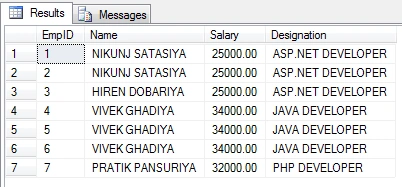
You can see there is some duplicate records so we will delete all the duplicate records from table by using ROW_NUMBER() in Sql Server. So Write following SQl Query.
- WITH TempEmp (Name,duplicateRecCount)
- AS
- (
- SELECT Name,ROW_NUMBER() OVER(PARTITION by Name, Salary ORDER BY Name)
- AS duplicateRecCount
- FROM dbo.#Employee
- )
- --Now Delete Duplicate Records
- DELETE FROM TempEmp
- WHERE duplicateRecCount > 1
- SELECT * FROM #Employee
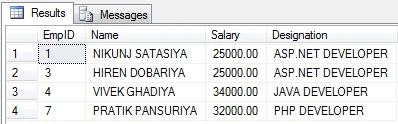
Summary
In this article, I expose how to remove duplicate records from a table in SQL Server. I hope this blog will helpful to you. Please post your questions or comments about this blog.
Hadshana KamalanathanPosted Jul 16, 2018, 10:28 AM
Thank you for sharing.