
Please follow the below steps:
Steps:
- Create a list in the main site (Host web) as below:
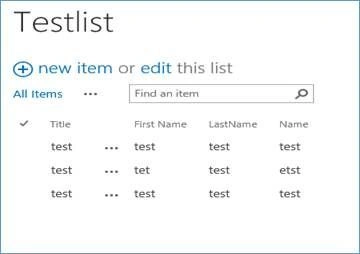
- Open Visual Studio à Create a new SharePoint App Project.

- Select the Host for the app as “SharePoint-Hosted”.
- Once the project is created, you will find the below structure.
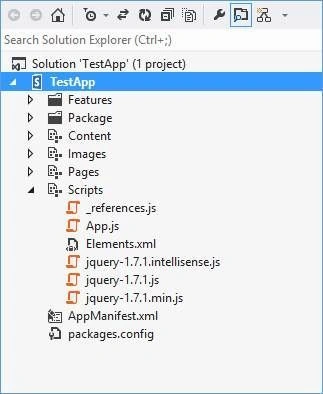
- Add a drop down and a save button to the default.aspx page as below:
- <select id="drpdwnType">
- <option value="volvo">volvo</option>
- <option value="saab">saab</option>
- <option value="mercedes">mercedes</option>
- <option value="audi">audi</option>
- </select>
- <asp:Button runat="server" ID="btnSave" OnClientClick="btnSaveClick()" Text="Save" />
- Add the below code to App.js file.
- 'use strict';
- var appWebContext;
- var listResult;
- var hostweburl;
- function btnSaveClick() {
- appWebContext = new SP.ClientContext.get_current();
- hostweburl = decodeURIComponent($.getUrlVar("SPHostUrl"));
- var hostwebContext = new SP.AppContextSite(appWebContext, hostweburl);
- var list = hostwebContext.get_web().get_lists().getByTitle("TestList");
- var createItemInfo = new SP.ListItemCreationInformation();
- var item = list.addItem(createItemInfo);
- var e= document.getElementById("drpdwnType");
- item.set_item('Title', e.options[e.selectedIndex].text);
- item.update();
- appWebContext.load(item);
- appWebContext.executeQueryAsync(onQuerySucceeded,onQueryFailed);
- }
- function onQuerySucceeded() {
- alert('item creataed');
- }
- function onQueryFailed(sender, args) {
- alert('Request failed. ' + args.get_message() +
- '\n' + args.get_stackTrace());
- }
- // jQuery plugin for fetching querystring parameters..
- jQuery.extend({
- getUrlVars: function () {
- var vars = [], hash;
- var hashes = window.location.href.slice(window.location.href.indexOf('?') + 1).split('&');
- for (var i = 0; i < hashes.length; i++) {
- hash = hashes[i].split('=');
- vars.push(hash[0]);
- vars[hash[0]] = hash[1];
- }
- return vars;
- },
- getUrlVar: function (name) {
- return jQuery.getUrlVars()[name];
- }
- });
- Go to AppManifest.xml à Permissions tab. We need to give permission to the app to access the host web. Select “SiteCollection” Permission Level ”Manage”.
- Deploy the solution, Trust the app.
- Once the page opens, select some value and click on “Save” button, test the host web list, value will be getting saved in the list.

Join the conversation! Your thoughts help the community grow.