

As I saw So many new developers are asking similar question so thought of writing this blog.
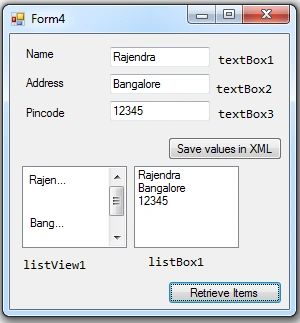
So to made it bit user friendly, I put 3 text box, where you can enter the values and by clicking "Save value in XML" button, you can save the values in XML format. Currently I am using @"C:\xmlfile.xml" for file path, so you can modify this as per your requirement. I have also added 1 list view and 1 list box, where you can get the values from XML by clicking "RetrieveItems" button.
- using System;
- using System.Collections.Generic;
- using System.Linq;
- using System.Windows.Forms;
- using System.Xml;
- namespace WindowsFormsApplication1
- {
- public partial class Form1 : Form
- {
- private const string FilePath = @"C:\xmlfile.xml";
- public Form1()
- {
- InitializeComponent();
- }
- /// <summary>
- /// Save Values in XML
- /// </summary>
- /// <param name="sender"></param>
- /// <param name="e"></param>
- private void btnSaveValuesInXML_Click(object sender, EventArgs e)
- {
- // Creates an instance of the System.Xml.XmlTextWriter class using the specified file.
- var textWriter = new XmlTextWriter(FilePath, null);
- // Writes the XML declaration with the version "1.0".
- textWriter.WriteStartDocument();
- // Write comments
- textWriter.WriteComment("First Comment for XmlTextWriter Sample Example");
- // Write first element
- textWriter.WriteStartElement("Student");
- // textWriter.WriteStartElement("Document", "Test", "RECORD");
- // Write next element Name
- textWriter.WriteStartElement("Name");
- textWriter.WriteString(textBox1.Text);
- textWriter.WriteEndElement();
- // Write element Address
- textWriter.WriteStartElement("Address");
- textWriter.WriteString(textBox2.Text);
- textWriter.WriteEndElement();
- // Write element Pincode
- textWriter.WriteStartElement("Pincode");
- textWriter.WriteString(textBox3.Text);
- textWriter.WriteEndElement();
- // Ends the document.
- textWriter.WriteEndDocument();
- // close writer
- textWriter.Close();
- MessageBox.Show(@"Values got stored in XML");
- }
- /// <summary>
- /// Retrieve Items
- /// </summary>
- /// <param name="sender"></param>
- /// <param name="e"></param>
- private void btnRetrieveItems_Click(object sender, EventArgs e)
- {
- var doc = new XmlDocument();
- doc.Load(FilePath);
- var nodeNames = new List<string>();
- var xmlNodeList = doc.SelectNodes("/Student");
- // Normal Foreach Statement.
- //if (xmlNodeList != null)
- // foreach (System.Xml.XmlNode node in xmlNodeList)
- // {
- // foreach (System.Xml.XmlNode child in node.ChildNodes)
- // {
- // nodeNames.Add(child.InnerText);
- // }
- // }
- // Linq Statement
- if (xmlNodeList != null)
- nodeNames.AddRange(from XmlNode node in xmlNodeList
- from XmlNode child in node.ChildNodes
- select child.InnerText);
- foreach (var node in nodeNames)
- {
- listView1.Items.Add(node); // You can add SubItems for this also.
- listBox1.Items.Add(node);
- }
- }
- }
- }
Join the conversation! Your thoughts help the community grow.